


Quick Answer: Office Suites Content Creators Use in 2026
The right office suite for content creators depends on whether you spend more time on long-form writing, planning spreadsheets, or client-facing presentation decks—not on one tool winning every niche. Four suites cover most creator workflows in 2026: WPS Office, Microsoft 365 for the web, Google Docs, Sheets, and Slides, and LibreOffice. WPS Office fits best for solo and small-team creators who want a cross-platform all-in-one suite (Word, Excel, and PPT editing) with Writer AI assist for scripts and blogs plus WPS AI Slides for pitch and media decks—accepting Standard-tier AI limits, verify .docx/.pptx client handoffs, and knowing it is not a video or design suite. Choose Microsoft 365 for the web if you already use a Microsoft account and need familiar Word/PowerPoint in the browser; Google Docs/Sheets/Slides for cloud-first co-editing; or LibreOffice for free desktop editing without a subscription.
Key Facts
| Topic | Detail |
|---|---|
| Compared tools | WPS Office · Microsoft 365 for the web · Google Docs, Sheets, and Slides · LibreOffice |
| Creator scope | Writing (scripts, blogs, briefs), planning spreadsheets, and presentation decks (pitches, media kits)—with scoped AI, .docx/.pptx compatibility, platforms, and free-tier paths |
| WPS primary fit | Cross-platform all-in-one suite with Writer Smart Create/Refine for long-form content and AI Slides for deck generation; verify AI quotas and target files |
| Compatibility caution | WPS states Microsoft file format compatibility—test client .docx/.pptx/.xlsx deliverables before handoff; web and import paths may shift layout on complex templates |
Comparison Table: Creator Office Suites at a Glance
| Dimension | WPS Office | Microsoft 365 for the web | Google Docs, Sheets, and Slides | LibreOffice |
|---|---|---|---|---|
| Suite components | WPS Office is a free all-in-one suite to edit Word, Excel, and PPT per WPS Academy | Word, Excel, and PowerPoint for the web included in free Microsoft account tier per Microsoft free web page | Google Docs Android listing covers creating, editing, and collaborating on documents; Sheets and Slides are part of the same Google Docs ecosystem on mobile and web | Writer, Calc, and Impress are core LibreOffice modules per official Getting Started documentation |
| Content writing workflow | WPS Writer productivity tools include Smart Create, Refine, and Spell Check per Academy AI document guide—supports scripts, blogs, and long-form creator drafts in desktop Writer | Word for the web supports creating and editing documents in browser for scripts, briefs, and sponsor copy per Microsoft free Office online page | Google Docs supports creating, editing, and collaborating on documents including opening Microsoft Word files per Play Store listing | LibreOffice Writer compatible with Microsoft Word (.doc, .docx) per official documentation; free open-source local editing |
| Presentation deck creation | WPS AI Slides offers Create With AI from keywords and Create From File from documents to generate presentations per Academy guide | PowerPoint for the web included for creating and presenting decks in browser per Microsoft free web page | Editorial check: Google Slides available in same personal Google account ecosystem as Docs—browser/mobile deck creation; test .pptx import fidelity | Impress creates presentations and opens/saves Microsoft PowerPoint formats per official documentation |
| AI assistance | Editorial check: Writer Smart Create and AI Slides have Standard-tier limits on official pricing—confirm live quotas before promising unlimited creator AI | Editorial check: Full Copilot desktop bundle not included on personal free web tier—verify plan before AI-assisted creator claims | Editorial check: Gemini in Docs/Slides may require paid Workspace or eligible plans—do not imply unlimited AI on personal free account | Editorial check: LibreOffice has no vendor-documented AI slide or document generation—do not claim AI deck builder |
| File compatibility | WPS states 100% Compatible with Microsoft File Formats for Office Tools—verify client .docx/.pptx/.xlsx deliverables before handoff | Native Microsoft formats in web apps; complex macros/animations may differ from desktop—test sponsor/media-kit files | Google Docs opens Microsoft Word files per Play listing; Sheets/Slides Excel/PPT fidelity may vary—test media-kit imports | Writer compatible with .doc/.docx; Impress opens/saves PowerPoint formats—verify animations on target sponsor decks |
| Platforms | Windows, macOS, Linux, iOS, and Android per WPS Academy download banner | Browser Office on any OS; 5 GB OneDrive with free Microsoft account | Browser editors on any OS; Docs mobile app on Android per Play Store; iOS Google Docs app available | LibreOffice downloads for Windows, macOS, and Linux per official download page |
| Pricing entry | WPS Academy describes WPS Office as free all-in-one suite; paid tiers and AI limits on official pricing—recheck before quoting creator seat costs | Word, Excel, and PowerPoint for the web free with Microsoft account and 5 GB OneDrive; paid M365 adds desktop apps and more storage | Personal Google account Docs/Sheets/Slides free for core editing; Google Workspace paid tiers separate | LibreOffice is free and open source—no per-user subscription on official documentation/download pages |
| Best for | Editorial: Solo/small-team creators needing cross-platform Word/Excel/PPT plus Writer AI assist and AI Slides for pitches—accepting AI quotas and file verification | Editorial: Creators who already use Microsoft account/OneDrive and want familiar Word/PowerPoint in browser for client-facing .docx/.pptx | Editorial: Cloud-first creators who co-edit scripts/sponsor trackers in browser/Drive and share links with collaborators | Editorial: Budget-conscious creators who want free desktop Word/Excel/PPT-class editing on Windows/macOS/Linux without cloud subscription |
| Watch out | Editorial: Confirm AI limits on live pricing; test complex client decks; local Writer menu does not prove cloud co-editing; not a video/design suite | Editorial: Web PowerPoint may lack advanced desktop features; separate free web vs paid M365 paths; recheck pricing before publish | Editorial: .pptx/.xlsx import layout may shift; Workspace AI features not on personal free tier; offline setup may be needed | Editorial: Desktop-only; no native mobile Impress; test complex PowerPoint animations; no built-in AI slide generation |
WPS Office — Writing, Spreadsheets, and AI Slides for Creator Workflows
WPS Office is described as a free all-in-one suite to edit Word, Excel, and PPT per WPS Academy. For content creators, that means one install covers script and blog drafts in Writer, sponsor or content calendars in Spreadsheets, and pitch or portfolio decks in Presentation—without juggling separate writing and slides apps.
Content Writing for Scripts, Blogs, and Briefs
WPS Writer productivity tools include Smart Create, Refine, and Spell Check per the WPS Academy AI document guide—useful for video scripts, newsletter copy, and blog posts in desktop Writer. The menu shows local document-editing tools; it does not prove cloud co-editing.
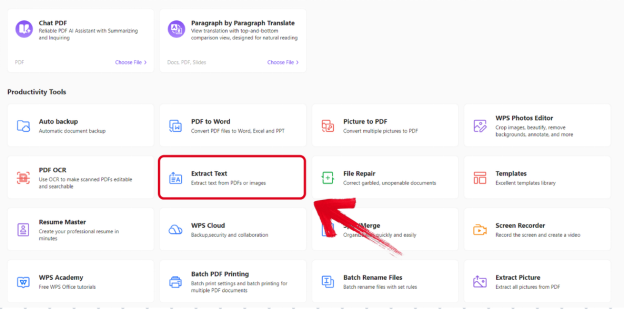
Editorial check: confirm AI limits on live pricing before batch-generating drafts—Standard tier marks AI tools as limited.
AI Slides for Pitch Decks and Media Presentations
WPS AI Slides supports Create With AI from keywords and Create From File from uploaded documents to automatically generate a presentation per the WPS Academy guide—turning a topic or brief into a sponsor pitch or portfolio deck.
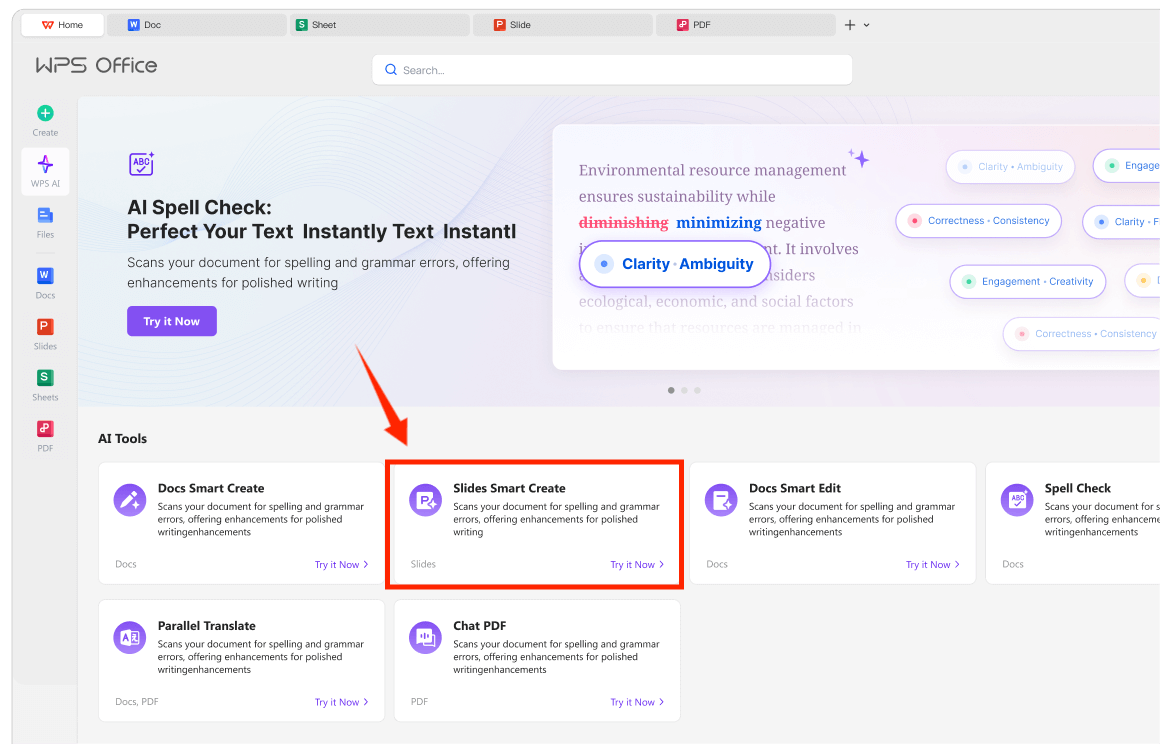
WPS is available on Windows, macOS, Linux, iOS, and Android per the WPS Academy download banner. WPS states 100% Compatible with Microsoft File Formats for Office Tools on its pricing page—verify client .docx/.pptx deliverables before handoff.
Best for: Solo and small-team creators needing cross-platform Word/Excel/PPT plus Writer AI assist and AI Slides for pitches—accepting AI quotas and file verification.
Watch out: Confirm AI limits on live pricing; test complex client decks; local Writer screenshot does not prove WPS Docs co-editing; not a video or design suite.
Learn more about WPS Office
Microsoft 365 for the Web — Familiar Word, Excel, and PowerPoint in the Browser
Word, Excel, and PowerPoint for the web are free with a Microsoft account and include 5 GB OneDrive storage per Microsoft's free Office online page—enough for scripts, sponsor trackers, and decks in the browser. Editorial check: the full Copilot desktop bundle is not on the personal free web tier; web PowerPoint may lack advanced desktop animations—test sponsor files before delivery.
Best for: Creators on a Microsoft account who want familiar Word/PowerPoint in browser for client-facing .docx/.pptx. Watch out: Separate free web vs paid M365 paths; recheck pricing before publish.
Google Docs, Sheets, and Slides — Cloud-First Creation and Collaboration
Google Docs supports creating, editing, and collaborating on documents and opening Microsoft Word files per the Play Store listing; Sheets and Slides share the same personal Google account on browser and mobile. Editorial check: Gemini in Docs/Slides may require paid Workspace; .pptx/.xlsx imports may shift layout—test media-kit templates.
Best for: Cloud-first creators who co-edit scripts and sponsor trackers in Drive. Watch out: Workspace AI not on personal free tier; offline setup may be needed.
LibreOffice — Free Desktop Suite for Local Creator Files
LibreOffice bundles Writer, Calc, and Impress per the official Getting Started guide. Writer supports .doc/.docx; Impress opens and saves PowerPoint formats. Downloads cover Windows, macOS, and Linux; the suite is free and open source. Editorial check: no native mobile Impress and no vendor-documented AI slide generation—verify sponsor decks locally.
Best for: Budget-conscious creators wanting free desktop editing without a subscription. Watch out: Desktop-only; test complex PowerPoint animations.
How to Choose by Content Type, Platform, and Client Deliverable Format
WPS Office — cross-platform all-in-one suite when you draft scripts in Writer, plan in Spreadsheets, and generate pitch decks with AI Slides; verify AI quotas and .docx/.pptx on client files
Microsoft 365 for the web — familiar Word/PowerPoint in browser when you already live in a Microsoft account and deliver .docx/.pptx to sponsors
Google Docs, Sheets, and Slides — link-based co-editing when your team shares scripts and trackers in Drive
LibreOffice — zero-subscription desktop editing when cloud collaboration is optional and you work on Windows, macOS, or Linux
Match the suite to what you create (long-form writing vs decks vs spreadsheets), where you edit (desktop, browser, mobile), and what format clients expect (.docx/.pptx fidelity)—not marketing claims alone.
FAQ
Which office suite is best for YouTubers and bloggers who write scripts?
WPS Writer adds Smart Create and Refine per WPS Academy; Word for the web is free with a Microsoft account. Google Docs suits browser co-editing; LibreOffice Writer fits offline desktop drafting. Match platform and whether you also build decks in the same suite.
Can these suites open sponsor templates in .docx or .pptx format?
WPS Office states Microsoft file format compatibility—verify before handoff. Microsoft 365 for the web uses native formats but web PowerPoint may differ on advanced features. Google Docs opens Word files; Slides imports may shift layout. LibreOffice supports Word and PowerPoint formats—test animations on complex decks.
Do free tiers include unlimited AI for slides and writing?
No. WPS Writer and AI Slides have Standard-tier limits per WPS pricing. Copilot and Gemini are plan-dependent. LibreOffice has no documented AI generation. Check live pricing before rollout.
Can I edit creator content on mobile?
WPS Office lists iOS and Android; Google Docs has mobile apps; Microsoft 365 for the web runs in mobile browsers. LibreOffice is desktop-only. Match platform to your on-the-go editing needs.
Sources and Last Reviewed
Last reviewed: 2026-06-30



