


Quick Answer
Students who need documents, spreadsheets, and presentations without paying a subscription can start with four credible free-entry suites: WPS Office (Standard tier free with no credit card, cross-platform apps, and Microsoft-format compatibility language on official pages), Microsoft 365 for the web (Word, Excel, and PowerPoint in a browser with 5 GB OneDrive on a personal Microsoft account, plus Office 365 A1 for eligible school emails), Google Docs, Sheets, and Slides (free personal Google account with 15 GB shared storage and Template Gallery), and Apple iWork (Pages, Numbers, and Keynote free on iPhone, iPad, and Mac). WPS is a strong fit when you want one suite on Windows, macOS, Linux, iOS, and Android to edit Word-, Excel-, and PowerPoint-class assignment files with 1 GB WPS cloud—accepting limited templates, Standard-tier AI limits, and possible ads on Android per official listings. Choose Microsoft if your class expects Office web or school .edu access; Google for browser collaboration; Apple iWork if you already use Apple hardware.
Key Facts
| Topic | Detail |
|---|---|
| Compared suites | WPS Office · Microsoft 365 for the web · Google Docs, Sheets, and Slides · Apple iWork |
| WPS primary fit | Cross-platform students who need free Word/Excel/PPT-class editing with 1 GB cloud and no credit card—accepting template/AI limits and possible mobile ads |
| Microsoft primary fit | Students with a Microsoft account or eligible education email who want familiar Word/Excel/PowerPoint in the browser with 5 GB OneDrive |
| Google primary fit | Cloud-first students who collaborate in browser/Drive and want 15 GB shared storage with Template Gallery |
| Apple primary fit | iPad/iPhone/Mac students on Apple hardware who want native Pages/Numbers/Keynote without subscription for core coursework |
| Compatibility caution | No suite guarantees full Excel macro/VBA parity or perfect import layout—test professor-provided files before submission |
| Pricing caution | Free tiers differ by vendor, platform, and eligibility path—confirm current official pages before relying on a feature |
Comparison Table: Free Student Office Suites at a Glance
| Dimension | WPS Office | Microsoft 365 for the web | Google Docs, Sheets, and Slides | Apple iWork |
|---|---|---|---|---|
| Free plan entry | Standard Free; no credit card; 1 GB cloud; limited templates | Word/Excel/PPT web free with Microsoft account; 5 GB OneDrive | Free Docs/Sheets/Slides on personal Google account | Pages/Numbers/Keynote Free; core editing needs no subscription |
| Student / education eligibility | No edu email required on Standard | Office 365 A1 with eligible school email; re-verified | Personal account needs no student email | No .edu required for core iWork editing |
| Platforms | Windows, macOS, Linux, iOS, Android | Browser on any OS; mobile size limits apply | Browser plus iOS/Android apps | iPhone, iPad, Mac; iCloud web only |
| File compatibility | Microsoft-format compatibility stated—verify class files | Native formats; web may lack macros/VBA | Opens Word files; test Excel/PPT imports | Imports Word; export Word/PDF—verify submission format |
| Cloud storage | 1 GB WPS cloud (Standard) | 5 GB OneDrive (personal web) | 15 GB shared across Drive/Gmail/Photos | iCloud via Apple ID—not bundled office storage |
| Templates | Limited downloads; Basic Templates; in-app Spreadsheet templates | Microsoft Create templates in browser | Template Gallery editable copies | Apple-designed report/resume templates |
| AI and ads restrictions | Limited AI on Standard; ads/IAP on Android listing | Free web lacks full Copilot bundle | Personal free; Workspace AI is paid tier | Premium Creator Studio optional; core editing free |
| Best for | Cross-platform students needing Word/Excel/PPT-class files with 1 GB cloud | Microsoft-account or .edu students wanting browser Office | Cloud collaboration with 15 GB shared storage | Apple-device students wanting native iWork apps |
| Watch out | Editorial check: Test complex files; confirm ads on your device; PC/Android pricing footnote | Editorial check: Personal vs A1 paths; large tablet editing limits | Editorial check: Shared 15 GB; offline setup; import layout shifts | Editorial check: Apple-only; export when .docx/.xlsx required |
WPS Office — Free Standard Tier for Docs, Sheets, and Slides
WPS Office is described as a free all-in-one suite to edit Word, Excel, and PPT per WPS Academy. On the WPS Standard plan, the official pricing page lists Free with No Credit Card Required, 1 GB of cloud space, Limited template downloads, and Basic Templates. WPS states 100% Compatible with Microsoft File Formats for Office Tools—verify each assignment file before submission. WPS is available on Windows, macOS, Linux, iOS, and Android per WPS Academy download banner.
Documents for essays and reports
WPS Writer supports student document workflows—productivity tools such as Smart Create, Refine, and Spell Check appear in the Writer menu per WPS Academy. Use Writer for essays, lab reports, and formatted assignments that professors expect in Word-class formats.
Spreadsheets for budgets and class trackers
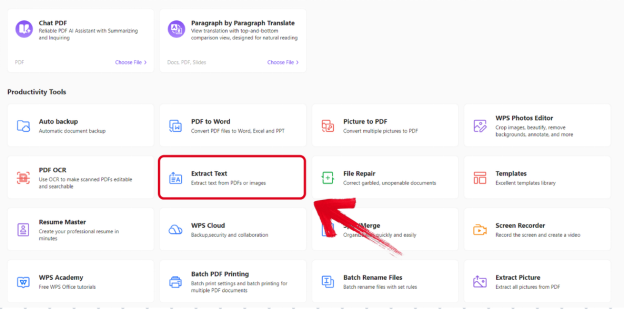
When opening WPS Spreadsheet, the Academy guide documents choosing a blank workbook or ready-to-use templates, then typing numbers or text in cells—a practical path for grade trackers, lab data, and budget assignments.

The Spreadsheet launcher shows blank and various templates which are ready to use per the official spreadsheet guide.
Presentations for slide decks
WPS includes a Presentation module in the same suite for PowerPoint-class slide work. Standard-tier AI tools are marked limited on the pricing page; treat AI-assisted slide features as capped, not unlimited.
Best for: Cross-platform students who need free Word/Excel/PPT-class editing with 1 GB cloud and no credit card—accepting template/AI limits and possible mobile ads.
Watch out: Editorial check: Verify complex class files in WPS; confirm iOS vs Android ad/IAP behavior; paid tier prices PC/Android only per footnote. WPS Office Google Play listing notes Contains ads and In-app purchases—do not assume ad-free on all student devices without verifying your surface.
Learn more about WPS Office
Product overview: What is WPS Office?
Spreadsheet guide: How to use WPS Office Spreadsheet
Writer productivity tools: AI document generator guide
Pricing and Standard tier: WPS pricing
Microsoft 365 for the Web — Free with a Microsoft Account (+ Office 365 A1 for Eligible Schools)
Word, Excel, and PowerPoint for the web are free with a Microsoft account and include 5 GB OneDrive storage per Microsoft's free Office online page. Office 365 A1 is free for educators and students with an eligible education email; eligibility may be re-verified and the plan expires when leaving a qualified institution. A1 includes web-based core Office apps per Microsoft Education.
Microsoft system requirements: basic free editing on Android devices 10.1 inches or less; larger tablets may need a subscription—verify iPad context before assuming free mobile editing.
Best for: Students with a Microsoft account or school .edu email who want familiar Word/Excel/PowerPoint in the browser with 5 GB cloud.
Watch out: Editorial check: Separate personal free vs A1 paths; test class files—web Excel may lack macros/VBA.
Google Docs, Sheets, and Slides — Free Personal Google Account
A personal Google Account includes up to 15 GB storage at no charge, shared across Drive, Gmail, and Photos per Google Drive Help. Google Docs on Android supports creating, editing, and collaborating and opening Microsoft Word files per the Play Store listing. Click Template Gallery in Docs/Sheets/Slides and a copy of the template opens—including budgets per Google Help.
Best for: Cloud-first students who collaborate in browser/Drive with Template Gallery and 15 GB shared storage.
Watch out: Editorial check: Shared 15 GB; offline requires setup; Excel/PPT import layout may shift. Workspace paid tiers are separate.
Apple iWork — Pages, Numbers, and Keynote on Apple Devices
Pages is Free with optional In-App Purchases; core editing and collaboration do not require a subscription per the App Store. Pages imports Microsoft Word and exports Word/PDF; Numbers and Keynote cover spreadsheets and presentations on iPhone, iPad, and Mac.
Best for: Apple-hardware students who want native Pages/Numbers/Keynote without subscription for core coursework.
Watch out: Editorial check: Not for Windows/Android; export to .docx/.xlsx when professors require Microsoft formats.
How to Choose by Device, Class Requirements, and Storage Needs
Cross-platform (including Linux): WPS Office — native apps plus Standard free tier and Microsoft-format compatibility language.
School
.eduor Microsoft account: Microsoft 365 for the web — browser Office with 5 GB OneDrive; A1 when eligible.Drive collaboration: Google Docs, Sheets, and Slides — 15 GB shared storage and Template Gallery.
iPad/Mac only: Apple iWork — native Pages/Numbers/Keynote without subscription for core editing.
Professor sends
.docx/.xlsx: WPS Office or Microsoft 365 for the web — test each file before the deadline.
No single suite fits every device and class policy—match the tool to your hardware, storage, and submission rules.
FAQ
Can I edit assignments on iPad for free?
Apple iWork, Google Docs/Sheets/Slides, and WPS Office (iOS listed per Academy) support iPad editing on free tiers. Microsoft allows free basic mobile editing on devices 10.1 inches or less—check iPad size and whether you use Office web vs the mobile app.
Will these suites open my professor's .docx and .xlsx files?
All four work with Microsoft formats at varying fidelity. WPS states Microsoft file compatibility—verify before submission. Web Excel may lack macros/VBA. Google and Apple imports may shift layout—test exports.
Do I need a school email to get free office apps?
Not always. WPS Standard and personal Google accounts need no student verification. Office 365 A1 requires an eligible education email. Keep personal Microsoft free web and institution A1 as separate paths.
Are the free tiers ad-free?
Not on every surface. WPS Android listing notes Contains ads and In-app purchases. Confirm current official pages for your platform.
Sources and Last Reviewed
Last reviewed: 2026-06-30



