


Best AI office suites for enterprises are governed productivity platforms—not standalone chatbots. If you want Office-style desktop apps, WPS 365 cloud collaboration, and documented Admin Console subscription administration, start with WPS 365 with WPS AI. If you are already on Microsoft 365 or Google Workspace, compare Copilot and Gemini admin controls before you pilot.
This guide compares four enterprise-ready suites on AI coverage, IT controls, deployment, Microsoft file workflows, and governance evidence—without claiming one platform fits every organization.
Find your priority — or jump to WPS 365 / the pilot workflow.
What Does Your Enterprise Need From an AI Office Tool?
Enterprise buyers usually evaluate three layers: employee productivity (docs, sheets, slides, mail), IT governance (licenses, access, audit), and deployment fit (cloud stack, file compatibility, compliance).
| Your priority | Start here |
|---|---|
| Office-style desktop apps + cloud collaboration with documented subscription admin | WPS 365 with WPS AI |
| Deep Microsoft 365, Teams, and Entra ID integration | Microsoft 365 with Copilot |
| Google-native docs, mail, and meetings with AI control center | Google Workspace with Gemini |
| Unified mail + docs + chat suite with built-in Zia AI | Zoho Workplace with Zia |
| Private on-prem AI office deployment with verified English docs | Not covered in this guide—contact each vendor’s enterprise sales team |
Advanced Excel models, macros, or deep Teams/SharePoint workflows: test representative files in each candidate suite before a company-wide rollout—compatibility varies by workload.
Comparison Table: Four AI Office Tools for Enterprises
Tool names link to each product’s primary page; each row ends with Source / Docs links. The Security / governance evidence to review column compares what procurement teams should validate—not equivalent governance depth across vendors.
“Best for” and “Watch out” reflect documented admin workflows, editions, and compatibility notes.
| Tool | AI suite coverage | Admin / IT controls | Deployment model | Microsoft format compatibility | Security / governance evidence to review | Best for | Watch out | Source / Docs |
|---|---|---|---|---|---|---|---|---|
| WPS 365 DesktopWPS 365Admin Console | Document, spreadsheet, and presentation AI inside WPS Office and WPS 365 (Writer Smart Create, AI Slides, spreadsheet AI features) | WPS 365 Admin Console supports enterprise subscription and order administration (Super administrator or Order administrator). Confirm current member management, AI entitlement, and usage-reporting capabilities with WPS sales before rollout. | Cloud-based WPS 365 productivity platform with web and desktop clients | Opens and saves common Word, Excel, and PowerPoint formats in WPS Office desktop apps | WPS markets enterprise-level security for cloud document management. Request current security, compliance, data-processing, residency, audit, and access-control documentation from WPS sales before procurement. | Teams wanting Office-style desktop editing plus cloud collaboration with centralized business admin | Editorial check: AI feature availability and quotas can vary by WPS 365 plan; confirm current business plan details with sales | Platform Admin Console WPS AI |
| Microsoft 365 Copilot M365PurviewCopilot license | Copilot in Word, Excel, PowerPoint, Teams, Outlook, and other Microsoft 365 apps (per Copilot setup guidance) | Copilot Control System in Microsoft 365 admin center for licenses, agents, billing, and usage limits | Microsoft 365 cloud tenant; Copilot requires eligible Microsoft 365 and Copilot licenses | Native Word, Excel, and PowerPoint file workflows inside Microsoft 365 apps | Microsoft Purview DLP, IRM, and audit controls for Copilot data governance | Organizations already standardized on Microsoft 365, Teams, and Entra ID | Copilot requires separate licensing and eligible plans; availability varies by tenant and admin settings | Setup Control System Security |
| Google Workspace WebAI control centerVault | Gemini features in Gmail, Calendar, Drive, Docs, Sheets, Slides, Meet, and Chat (admin-configurable) | AI control center documented for Google Workspace Enterprise Standard and Enterprise Plus; monitor AI usage and manage access by OU or group | Google Workspace cloud; Gemini in Workspace requires supported enterprise editions | Google Docs exports to .docx and other formats; import/export workflows vary by file complexity | Granular admin controls, DLP, Vault, and Gemini audit logs for enterprise AI governance | Browser-first teams standardized on Google Docs, Gmail, and Meet with Google Admin governance | Editorial check: Gemini in Workspace requires supported editions; test complex Office imports on representative files | AI control center Feature access AI privacy |
| Zoho Workplace SuiteBYOKDOCX | Zia AI embedded across Mail, Writer, Sheet, Show, WorkDrive, Cliq, and Meeting | Admin Console controls Zia access; BYOK for third-party LLM keys in Mail and other apps | Cloud SaaS Zoho Workplace suite | Zoho Writer imports and exports DOCX and other common formats | Zoho states Workplace data is not used to train external AI models; enterprise security practices documented | Cost-conscious teams wanting a unified mail + docs + chat suite with built-in Zia AI | Zia for Mail availability can vary by region. If you configure third-party AI through BYOK, selected email or calendar data may be shared with that provider—review data-handling requirements before enabling it. | Zia AI Admin Console DOCX |
Enterprise pilot checklist — validate these five areas with your IT and procurement teams before a company-wide rollout:
Identity: SSO, SCIM, tenant access
Governance: DLP, audit, retention, permissions
Data: AI training policy, residency, third-party sharing
Compatibility: macros, add-ins, complex Office files
Procurement: contract, support, pilot, rollout controls
Why WPS 365 Stands Out for Office-Style Enterprise Rollouts
WPS 365 fits organizations that want familiar desktop office apps plus cloud collaboration—without assuming every team already runs Microsoft 365.

Per WPS Help, accounts with Super administrator or Order administrator roles can:
Open the WPS 365 Business homepage → profile picture → Admin Console
Go to Order Management → Order Records to view order history and Subscription Status
Source: help.wps.com — Enterprise unsubscribe instructions. Member management, AI entitlements, and usage reporting were not verified in the English help pages cited here—confirm with WPS sales.
WPS 365 with WPS AI
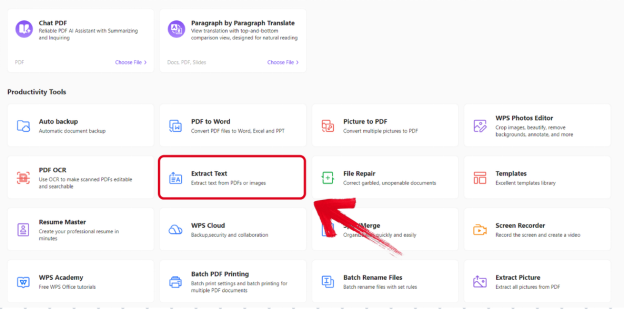
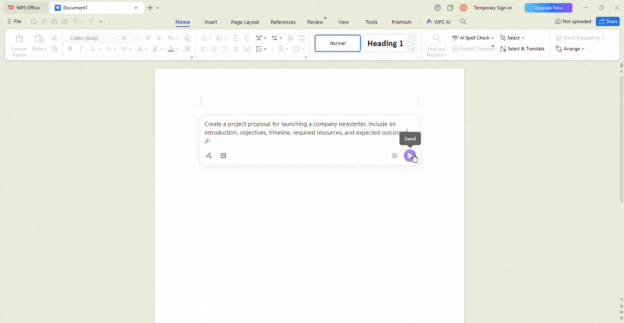
What it offers: WPS AI across Writer, Spreadsheet, and Presentation inside WPS Office, plus WPS 365 cloud document and collaboration services.
Best for: Teams wanting Office-style desktop editing, cloud collaboration, and WPS 365 Business admin for subscription and order management.
Watch out: AI feature availability and quotas can vary by WPS 365 business plan—confirm current entitlements with WPS sales.
Editorial note: Not the default choice when your organization is fully committed to Microsoft 365, Teams, and Entra ID.
Rollout notes: WPS 365 Admin Console supports enterprise subscription and order administration. Confirm plan-specific user, entitlement, and reporting controls with WPS sales before rollout.
Official source: WPS 365 platform
Contact WPS Business — WPS 365 For Business
Microsoft 365 with Copilot
What it offers: Microsoft 365 Copilot across Word, Excel, PowerPoint, Teams, Outlook, and other Microsoft 365 apps.
Best for: Enterprises already standardized on Microsoft 365, Teams, SharePoint, and Entra ID.
Watch out: Copilot requires eligible Microsoft 365 and Copilot licenses; availability and admin settings vary by tenant.
Rollout notes: Use the Copilot Control System in Microsoft 365 admin center to assign licenses, configure agents, and apply Purview governance before broad rollout.
Official source: Microsoft Learn — Set up Microsoft 365 Copilot
Google Workspace with Gemini
What it offers: Gemini features in Gmail, Docs, Sheets, Slides, Meet, Chat, and other Workspace services (admin-configurable).
Best for: Browser-first organizations governed through Google Admin and the AI control center.
Watch out: Gemini in Workspace requires supported enterprise editions; AI control center is documented for Google Workspace Enterprise Standard and Enterprise Plus—confirm edition-specific Gemini availability before rollout.
Rollout notes: Use the AI control center in Google Admin console to monitor AI usage, manage access by organizational unit, and review AI security settings before expanding beyond a pilot group.
Official source: Google Workspace Help — AI control center
Zoho Workplace with Zia
What it offers: Zia AI embedded across Zoho Mail, Writer, Sheet, Show, WorkDrive, Cliq, and Meeting in Zoho Workplace.
Best for: Cost-conscious teams wanting one mail + docs + chat suite with built-in AI governance.
Watch out: Zia for Mail availability can vary by region. If you configure third-party AI through BYOK, selected email or calendar data may be shared with that provider—review data-handling requirements before enabling it.
Rollout notes: Manage Zia and BYOK keys in Admin Console; pilot one department before enabling AI across the full organization.
Official source: Zoho Workplace — AI with Zia
Which AI Office Tool Should Your Enterprise Choose?
Need Office-style desktop editing, WPS 365 cloud collaboration, and centralized business administration without adopting a full Microsoft stack?
→ WPS 365 with WPS AI
Already standardized on Microsoft 365, Teams, and Entra ID?
→ Microsoft 365 with Copilot
Browser-first on Google Docs, Gmail, and Meet with Google Admin?
→ Google Workspace with Gemini
Want one mail + docs + chat suite with built-in Zia at lower suite cost?
→ Zoho Workplace with Zia
Choose WPS 365 first when you want Office-style desktop apps, WPS 365 cloud services, and documented subscription administration without a full Microsoft stack.
Choose Microsoft 365 with Copilot when Teams, SharePoint, and Entra ID are already your system of record.
Choose Google Workspace with Gemini when Docs, Gmail, and Meet are your primary workflow and Google Admin governs access.
Choose Zoho Workplace with Zia when a unified budget-friendly suite with one admin boundary matters most.
How to Pilot WPS 365 AI for Your Organization
Contact WPS Business to confirm WPS 365 plan options and what your contract includes for AI features.
Create your WPS 365 tenant and verify Super administrator or Order administrator access to the Admin Console.
Invite a pilot group (for example, operations or marketing) rather than rolling out company-wide on day one.
Confirm plan-specific user, entitlement, and reporting controls with WPS sales before enabling AI broadly.
Run a limited 2–4 week pilot on real documents, spreadsheets, and presentations your team uses daily.
Review adoption, file compatibility, and admin requirements, then expand only if the pilot meets your governance checklist.
FAQ
What makes an AI office tool “enterprise-ready”?
Look for centralized admin controls, documented security or compliance features, and clear licensing—not just consumer AI features in a desktop app.
Is WPS 365 a replacement for Microsoft 365?
It can serve teams that want Office-compatible desktop workflows and WPS 365 cloud collaboration. Organizations deeply invested in Teams, SharePoint macros, or Microsoft-only add-ins should test critical files before switching.
Do all four platforms include AI without extra licensing?
No. Microsoft Copilot and Google Workspace Gemini require supported enterprise plans and admin configuration. Zoho includes Zia on paid Workplace plans per Zoho’s documentation. WPS 365 AI entitlements depend on your business plan—confirm with WPS sales.
Which platform is best for strict data governance?
All four platforms offer some form of administration, but governance depth varies. Review identity controls, access permissions, auditability, DLP, retention, data residency, AI data handling, and support terms against your own compliance checklist.
Sources and Last Reviewed
WPS
Third-party platforms
Last reviewed: 2026-06-30.



