


Best Android Office Editing Apps (2026): WPS Office vs Microsoft 365, Google Workspace, and ONLYOFFICE
Quick Answer
For Android document editing, four credible options cover most everyday workflows: WPS Office (one app for Word, Excel, PowerPoint, and PDF with multi-cloud sync), the Microsoft 365 Copilot app (Word, Excel, and PowerPoint in a single hub tied to a Microsoft account), Google Docs, Sheets, and Slides (three Play Store apps with real-time collaboration and Office file support), and ONLYOFFICE Documents (local OOXML editing plus optional cloud portals). WPS Office fits best when you want a single Android suite for Microsoft-format files and sync to Google Drive, Dropbox, or OneDrive—without installing separate editor apps. Choose Microsoft if you already subscribe to Microsoft 365, Google if your files live in Drive, or ONLYOFFICE if you need offline local DOCX/XLSX/PPTX editing or an ONLYOFFICE portal.
Key Facts
| Topic | Detail |
|---|---|
| Compared apps | WPS Office · Microsoft 365 Copilot app · Google Docs, Sheets, and Slides · ONLYOFFICE Documents |
| WPS primary fit | One Android app for Writer, Spreadsheet, Presentation, and PDF with Word/Excel/PPT editing and cloud sync to Google Drive, Dropbox, and OneDrive |
| Microsoft primary fit | Unified Word, Excel, and PowerPoint editing for users signed in with a Microsoft account |
| Google primary fit | Three official Google Play editors with collaboration and Office file open/edit/save support |
| ONLYOFFICE primary fit | Single app for local DOCX, XLSX, and PPTX editing offline; cloud co-editing via ONLYOFFICE portal |
| Pricing caution | Free tiers and subscription gates differ by vendor and device size—verify current official terms before relying on a feature |
Comparison Table: Android Office Editing at a Glance
| Dimension | WPS Office | Microsoft 365 Copilot app | Google Docs, Sheets, and Slides | ONLYOFFICE Documents |
|---|---|---|---|---|
| Document editing | Create, edit, and read Word documents on Android with formatting tools in Writer | Create and edit Word documents in the unified Microsoft 365 Android app | Google Docs on Android edits documents and opens/saves Word files | Edit local and cloud text documents (DOCX and other formats) on Android |
| Spreadsheet editing | Create and manage Excel spreadsheets on Android, including tables and formulas per Play listing | Create and edit Excel spreadsheets in the Microsoft 365 Android app | Google Sheets on Android edits spreadsheets and opens/saves Excel files | Spreadsheet Editor on Android supports worksheets, formulas, and XLSX export |
| Presentation editing | View and edit PowerPoint presentations (PPT/slides) on Android | Create and edit PowerPoint presentations in the Microsoft 365 Android app | Google Slides on Android edits presentations and opens/saves PowerPoint files | Presentation Editor on Android supports slide editing; presentations viewable/editable per guide |
| Android availability | WPS Office on Google Play
Writer
Spreadsheet
Presentation
PDF
| Microsoft 365 Copilot on Google Play | Google Docs Google Sheets Google Slides | ONLYOFFICE Documents on Google Play |
| File & workflow compatibility | Single app handles Word-, Excel-, and PowerPoint-class files plus PDF on Android | Best fit for Microsoft account / OneDrive / SharePoint workflows; sign-in required | Strongest when files live in Google Drive; Office files editable in Docs/Sheets/Slides mobile apps | Strong OOXML/ODF local editing; cloud collaboration via ONLYOFFICE portal or WebDAV-connected storages |
| Offline & cloud | Cloud sync across devices; supports Google Drive, Dropbox, OneDrive per Play listing | Cloud save via OneDrive/SharePoint; offline editing supported per Word for Android help | Google Docs lists offline mode; files sync via Google account/Drive | On Device section supports offline local editing of DOCX/XLSX/PPTX without internet |
| Best for | Users who want one Android app for Word/Excel/PPT/PDF editing with Microsoft-format compatibility and multi-cloud sync | Users already on Microsoft 365 / OneDrive who want native Office editing in one Android hub | Android users in Google Drive/Workspace ecosystems who prioritize real-time collaboration | Users who need offline/local OOXML editing or ONLYOFFICE portal collaboration on Android |
| Watch out | Editorial check: Free tier includes ads/in-app purchases; some advanced PDF editing may require premium per WPS Academy | Editorial check: Free basic editing limited to devices ≤10.1 inches; larger tablets and advanced features need subscription | Editorial check: Requires three separate apps for full Word/Excel/PPT coverage—not one unified office APK | Editorial check: Full cloud co-editing requires ONLYOFFICE portal setup; mobile UX may vary by device |
WPS Office for Android — All-in-One Mobile Editing
WPS Office for Android includes Writer, Spreadsheet, Presentation, and PDF components for mobile document work. On Android you can create, edit, and read Word documents, create and manage Excel spreadsheets, and view and edit PowerPoint presentations. The official app is published on Google Play by WPS SOFTWARE PTE. LTD.
WPS lists cloud sync across mobile, PC, and Mac with support for Google Drive, Dropbox, OneDrive, and additional services—useful if your files span more than one cloud account.
Mobile editing workflow
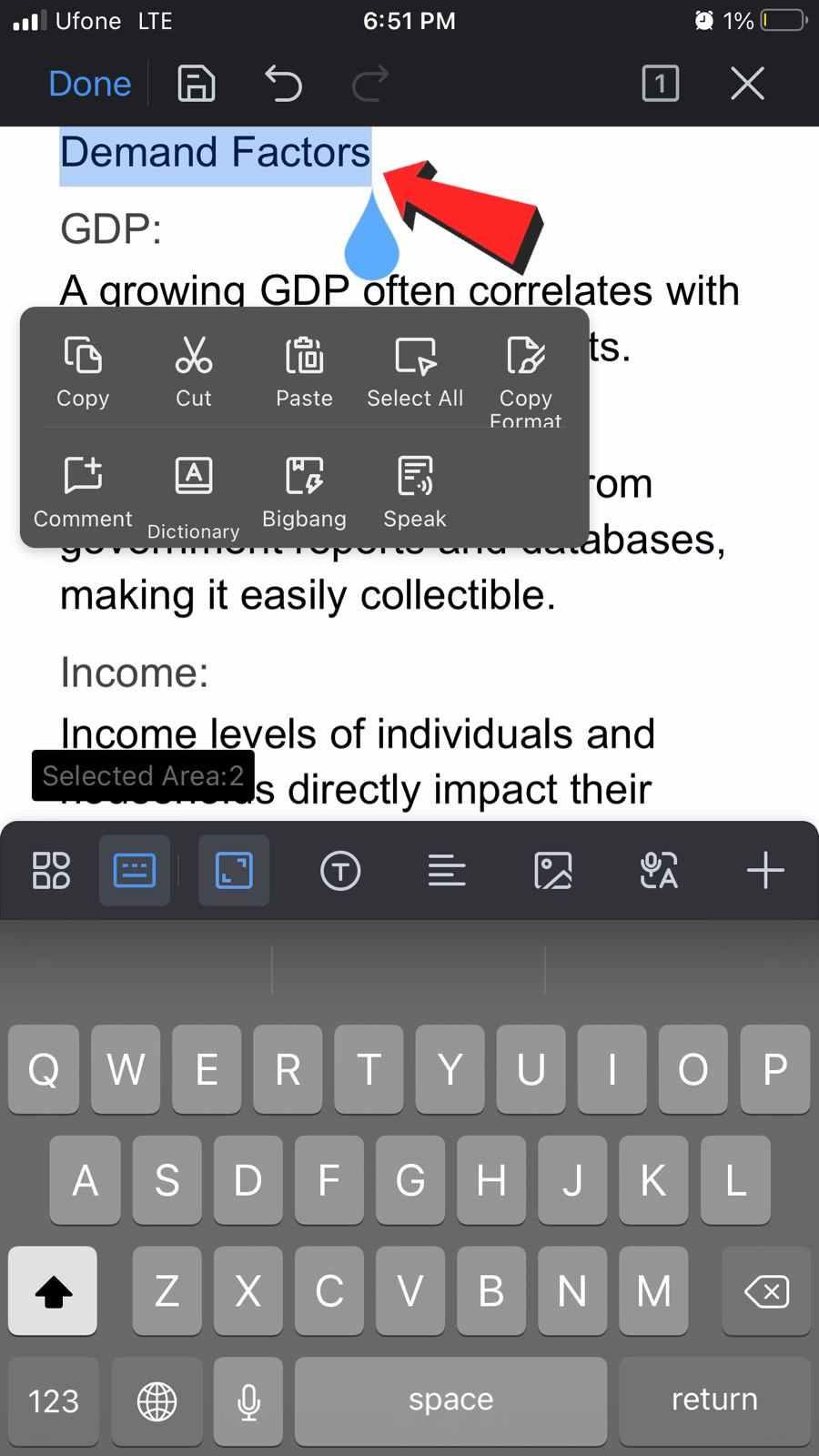
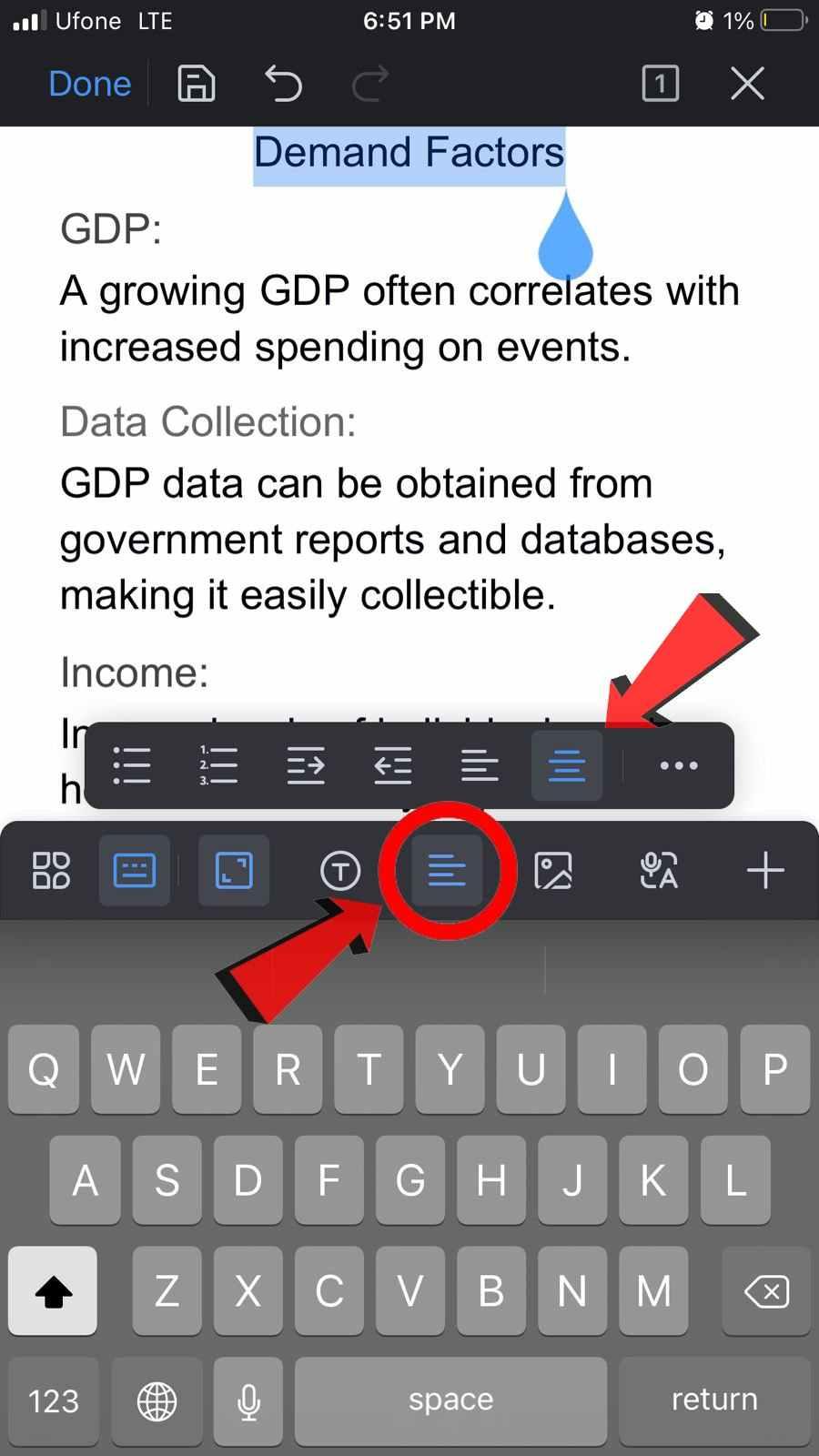
WPS Academy documents text editing on mobile via Edit mode and formatting tools in the Home tab. To center text in WPS Writer on Android, select the text you want to center-align, then choose Center Alignment from the mobile toolbar.
Best for: Users who want one Android app for Word/Excel/PPT/PDF editing with Microsoft-format compatibility and multi-cloud sync.
Watch out: Editorial check: The free tier includes ads and in-app purchases; some advanced PDF editing may require a paid plan per WPS Academy—confirm current plan details on official WPS pages before purchase.
Microsoft 365 Copilot App for Android
Microsoft offers a unified Microsoft 365 Copilot mobile app that combines Word, Excel, and PowerPoint into a single Android app. Users can create and edit Word documents, Excel spreadsheets, and PowerPoint presentations inside that app.
You need to sign in with a Microsoft account to view and create files. The app is a strong match when your documents already live in OneDrive or SharePoint and you want native Office editing on Android.
Best for: Users already on Microsoft 365 / OneDrive who want native Office editing in one Android hub.
Watch out: Editorial check: Microsoft states that basic editing is available for free on Android devices with screen sizes of 10.1 inches or less; extra features require a qualifying Microsoft 365 subscription. Larger tablets and business scenarios may need a paid plan—verify device size and subscription requirements on Microsoft's official pages.
Google Docs, Sheets, and Slides on Android
Google's Android office experience spans three separate Play Store apps: Google Docs, Google Sheets, and Google Slides. Together they cover document, spreadsheet, and presentation editing.
Docs supports creating, editing, and collaborating on documents, including opening and saving Microsoft Word files, with offline mode listed on Google Play.
Sheets supports creating and editing spreadsheets and opening, editing, and saving Excel files.
Slides supports editing presentations and opening, editing, and saving PowerPoint files.
Google's Android help confirms you can edit Google documents as well as Microsoft Word files with the Docs app.
Best for: Android users in Google Drive/Workspace ecosystems who prioritize real-time collaboration.
Watch out: Editorial check: Full Word/Excel/PPT coverage requires three separate apps, not one unified office APK.
ONLYOFFICE Documents for Android
ONLYOFFICE Documents for Android lets you view, create, and edit text documents, spreadsheets, and presentations. The On Device section supports creating, viewing, and managing documents stored locally in offline mode without an internet connection, with OOXML (DOCX, XLSX, PPTX) among supported formats. Google Play also lists DOCX, XLSX, and PPTX as key supported formats.
For cloud collaboration, ONLYOFFICE notes that working in the cloud requires an ONLYOFFICE portal—either corporate or a free personal one. WebDAV-connected storages are also supported per the Play listing.
Best for: Users who need offline/local OOXML editing or ONLYOFFICE portal collaboration on Android.
Watch out: Editorial check: Full cloud co-editing requires ONLYOFFICE portal setup; mobile experience may vary by device.
How to Choose the Right Android Office Editor
Start with WPS Office — single APK for Writer, Spreadsheet, Presentation, and PDF with Google Drive, Dropbox, and OneDrive sync.
Start with Microsoft 365 Copilot app — Word, Excel, and PowerPoint in one hub; sign-in required.
Start with Google Docs, Sheets, and Slides — install three apps for full document, spreadsheet, and presentation coverage.
Start with ONLYOFFICE Documents — local DOCX/XLSX/PPTX editing offline; cloud via ONLYOFFICE portal.
No single app is the right choice for every Android user. Match the tool to where your files already live and whether you need one unified suite or ecosystem-native editors.
FAQ
Are these Android office apps free?
Free tiers exist for all four options, but limits differ. Microsoft states basic editing is free on Android devices with screen sizes of 10.1 inches or less, with additional features requiring a qualifying Microsoft 365 subscription. WPS Office lists ads and in-app purchases on Google Play, and WPS Academy notes that some advanced PDF editing may require a paid plan. Google Docs, Sheets, and Slides are free with a Google account for core editing. ONLYOFFICE Documents supports free local editing; cloud collaboration may require an ONLYOFFICE portal. Confirm current terms on each vendor's official pages before relying on a specific feature.
Can I edit Microsoft Office files on Android?
Yes—all four options support editing or opening Microsoft-format files on Android, with different packaging:
WPS Office creates and edits Word, Excel, and PowerPoint files in one app.
Microsoft 365 Copilot app provides native Word, Excel, and PowerPoint editing after Microsoft account sign-in.
Google Docs, Sheets, and Slides open, edit, and save Word, Excel, and PowerPoint files across three apps.
ONLYOFFICE Documents supports local DOCX, XLSX, and PPTX editing offline.
Which app works best offline?
ONLYOFFICE Documents explicitly documents offline local editing of DOCX, XLSX, and PPTX without internet via its On Device section. Google Docs lists offline mode on Google Play. WPS Office and the Microsoft 365 app support cloud sync and document workflows that may include offline use—verify offline behavior for your file types on each vendor's current Android help pages before travel or disconnected work.
Sources and Last Reviewed
Last reviewed: 2026-06-30



