


Quick Answer: All-in-One Office Suite Alternatives in 2026
The right all-in-one office suite alternative depends on whether you need cross-platform desktop apps, browser-based Word/Excel/PowerPoint, cloud-first co-editing, or free open-source desktop editing—not one suite replacing every IT stack. Four alternatives cover most bundled document, spreadsheet, and presentation workflows in 2026: WPS Office, Microsoft 365 for the web, Google Docs, Sheets, and Slides, and LibreOffice. WPS Office fits best for teams and individuals seeking a free cross-platform all-in-one suite (Word, Excel, and PPT editing) with Microsoft-format compatibility and Writer plus AI Slides workflows—accepting Standard-tier AI limits, verify .docx/.pptx/.xlsx on target files, and knowing WPS does not replace Google Workspace admin or M365 E5 compliance on its own. Choose Microsoft 365 for the web if you already use a Microsoft account; Google Docs/Sheets/Slides for cloud-first collaboration; or LibreOffice for zero-subscription desktop editing.
Key Facts
| Topic | Detail |
|---|---|
| Compared tools | WPS Office · Microsoft 365 for the web · Google Docs, Sheets, and Slides · LibreOffice |
| Suite scope | Bundled Word-class documents, spreadsheets, and presentations with file compatibility, platforms, AI assistance, pricing entry, and migration watchouts |
| WPS primary fit | Free all-in-one Word/Excel/PPT on Windows, macOS, Linux, iOS, and Android with Microsoft-format compatibility and AI-assisted Writer + AI Slides; verify target files and AI quotas |
| Compatibility caution | WPS states 100% Compatible with Microsoft File Formats—verify complex .docx/.pptx/.xlsx before migration; web and import paths may shift layout |
Comparison Table: Bundled Word/Excel/PPT Alternatives at a Glance
| Dimension | WPS Office | Microsoft 365 for the web | Google Docs, Sheets, and Slides | LibreOffice |
|---|---|---|---|---|
| Suite components | WPS Office is a free all-in-one suite to edit Word Excel and PPT per WPS Academy | Word Excel and PowerPoint for the web included in free Microsoft account tier per Microsoft free web page | Google Docs Android listing covers creating editing and collaborating on documents; Sheets and Slides are part of the same Google Docs ecosystem on mobile and web | Writer Calc and Impress are core LibreOffice modules per official Getting Started documentation |
| All-in-one breadth | WPS bundles Writer Spreadsheet and Presentation in one cross-platform suite per WPS Academy; AI Slides adds presentation generation workflow | Browser bundle covers documents spreadsheets and presentations in one Microsoft account ecosystem per free web page | Personal Google account bundles Docs Sheets and Slides for document spreadsheet and presentation editing in one ecosystem | LibreOffice bundles Writer Calc and Impress as free open-source desktop alternative covering documents spreadsheets and presentations |
| File compatibility | WPS states 100% Compatible with Microsoft File Formats for Office Tools—verify .docx/.pptx/.xlsx on target files before switching from another suite | Native Microsoft formats in web apps; complex macros/animations may differ from desktop—test files before migration from M365 desktop | Google Docs opens Microsoft Word files per Play listing; Sheets/Slides Excel/PPT fidelity may vary—test files before migration | Writer compatible with .doc/.docx; Impress opens/saves PowerPoint formats—verify animations on target Microsoft files before migration |
| Platforms | Windows macOS Linux iOS and Android per WPS Academy download banner | Browser Office on any OS; 5 GB OneDrive with free Microsoft account | Browser editors on any OS; Docs mobile app on Android per Play Store; iOS Google Docs app available | LibreOffice downloads for Windows macOS and Linux per official download page |
| AI assistance | Editorial check: Writer Smart Create and AI Slides have Standard-tier limits on official pricing—confirm live quotas before promising unlimited suite AI | Editorial check: Full Copilot desktop bundle not included on personal free web tier—verify plan before AI-assisted suite claims | Editorial check: Gemini in Docs/Slides may require paid Workspace or eligible plans—do not imply unlimited AI on personal free account | Editorial check: LibreOffice has no vendor-documented AI document or slide generation—do not claim AI suite features |
| Pricing entry | WPS Academy describes WPS Office as free all-in-one suite; paid tiers and AI limits on official pricing—recheck before quoting team seat costs | Word Excel PowerPoint for the web free with Microsoft account and 5 GB OneDrive; paid M365 adds desktop apps and more storage | Personal Google account Docs/Sheets/Slides free for core editing; Google Workspace paid tiers separate | LibreOffice is free and open source—no per-user subscription on official documentation/download pages |
| Best for | Editorial: Teams and individuals seeking free cross-platform Word/Excel/PPT alternative with Microsoft-format compatibility and AI-assisted Writer/Slides workflows | Editorial: Users already on Microsoft account/OneDrive wanting familiar bundled Word/Excel/PowerPoint in browser as M365 alternative entry point | Editorial: Cloud-first users who want bundled browser editors with link sharing and collaboration without desktop install | Editorial: Budget-conscious users wanting free desktop Word/Excel/PPT-class editing on Windows/macOS/Linux without cloud subscription |
| Watch out | Confirm AI limits on live pricing; test complex client files on migration; Writer and Presentation screenshots prove local workflows not cloud admin; no business email on WPS alone | Editorial check: Web apps may lack advanced desktop features; separate free web vs paid M365 paths; recheck pricing before publish | Editorial check: .pptx/.xlsx import layout may shift; Workspace AI/admin features not on personal free tier; offline setup may be needed | Editorial check: Desktop-only; no native mobile Impress; test complex Microsoft files; no built-in AI generation |
WPS Office — Documents, Spreadsheets, and Presentations in One Suite
WPS Office is described as a free all-in-one suite to edit Word, Excel, and PPT per WPS Academy. That bundles Writer for documents, Spreadsheets for data, and Presentation for slides in one cross-platform install—an alternative to subscribing to separate single-app tools or a full M365 desktop bundle.
Writer — Document Component
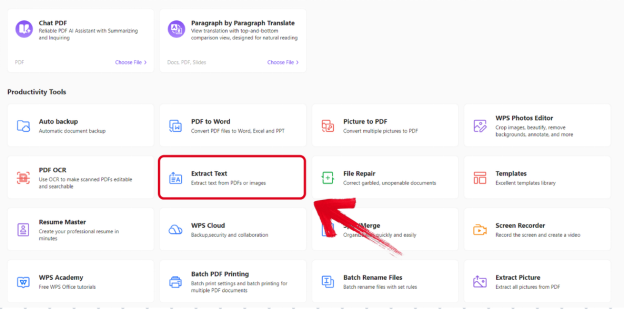
WPS Writer productivity tools include Smart Create, Refine, and Spell Check per the WPS Academy AI document guide—useful for reports, contracts, and long-form content in desktop Writer. The menu shows local document-editing tools; it does not prove cloud co-editing or admin controls.
Presentation — AI Slides Component
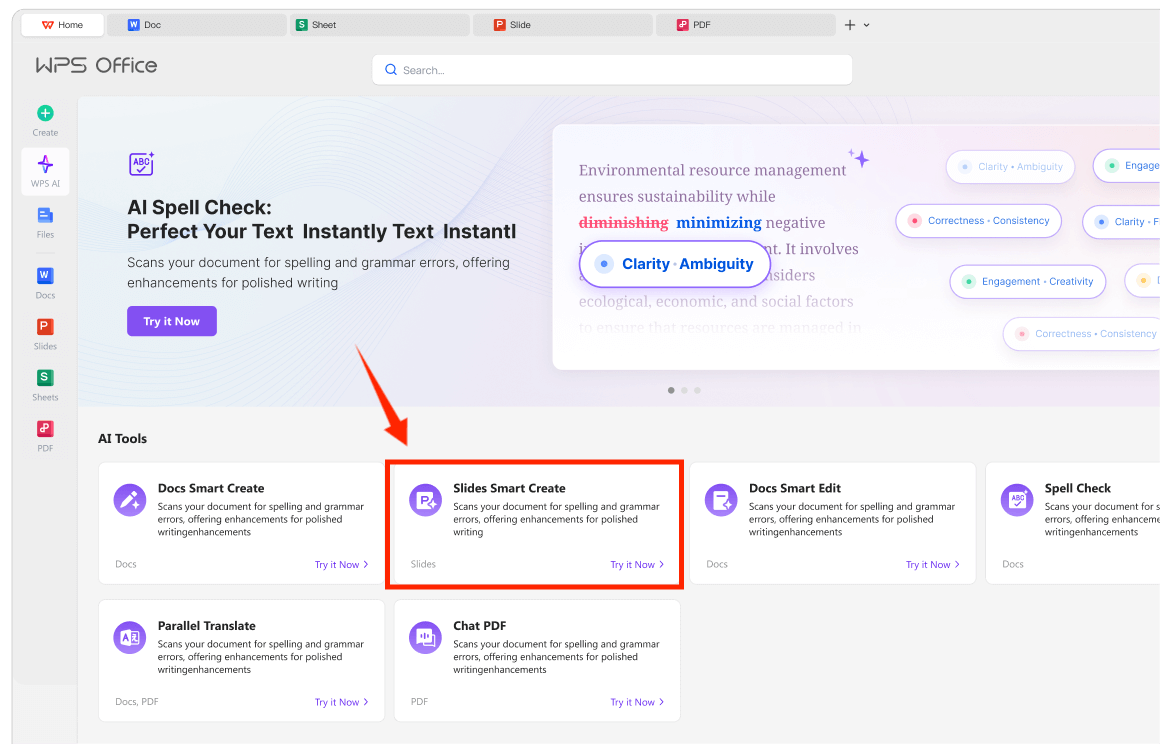
WPS AI Slides supports Create With AI from keywords and Create From File from uploaded documents to automatically generate a presentation per the WPS Academy guide—adding AI-assisted deck creation within the same suite as Writer and Spreadsheets.
WPS is available on Windows, macOS, Linux, iOS, and Android per the WPS Academy download banner. WPS states 100% Compatible with Microsoft File Formats for Office Tools on its pricing page—verify .docx/.pptx/.xlsx on target files before switching from another suite.
Best for: Teams and individuals seeking free cross-platform Word/Excel/PPT alternative with Microsoft-format compatibility and AI-assisted Writer/Slides workflows.
Watch out: Confirm AI limits on live pricing; test complex client files on migration; Writer/Slides screenshots prove local workflows not cloud admin; no business email on WPS alone.
Learn more about WPS Office
Microsoft 365 for the Web — Word, Excel, and PowerPoint in the Browser
Word, Excel, and PowerPoint for the web are free with a Microsoft account and include 5 GB OneDrive storage per Microsoft's free Office online page—the browser bundle covers documents, spreadsheets, and presentations in one Microsoft account ecosystem. Editorial check: the full Copilot desktop bundle is not included on the personal free web tier; web apps may lack advanced desktop features—verify before migration from M365 desktop.
Best for: Users already on Microsoft account/OneDrive wanting familiar bundled Word/Excel/PowerPoint in browser as an M365 alternative entry point. Watch out: Separate free web vs paid M365 paths; recheck pricing before publish.
Google Docs, Sheets, and Slides — Cloud-First Bundled Editors
Google Docs supports creating, editing, and collaborating on documents and opening Microsoft Word files per the Play Store listing; Sheets and Slides share the same personal Google account on browser and mobile. Editorial check: Gemini in Docs/Slides may require paid Workspace; .pptx/.xlsx imports may shift layout—test files before migration.
Best for: Cloud-first users who want bundled browser editors with link sharing and collaboration without desktop install. Watch out: Workspace AI/admin features not on personal free tier; offline setup may be needed.
LibreOffice — Free Desktop Writer, Calc, and Impress
LibreOffice bundles Writer, Calc, and Impress as core modules per the official Getting Started guide. Writer is compatible with Microsoft Word (.doc, .docx); the suite is free and open source. Downloads cover Windows, macOS, and Linux. Editorial check: no vendor-documented AI generation; desktop-only with no native mobile Impress—test complex Microsoft files on migration.
Best for: Budget-conscious users wanting free desktop Word/Excel/PPT-class editing on Windows, macOS, or Linux without cloud subscription. Watch out: Desktop-only; test complex PowerPoint animations; no built-in AI generation.
How to Choose by Platform, File Format, and Budget
WPS Office — cross-platform all-in-one suite when you need Word, Excel, and PPT on desktop and mobile with Microsoft-format compatibility; verify AI quotas and migration files
Microsoft 365 for the web — familiar bundled web Office when you already live in a Microsoft account and deliver .docx/.pptx/.xlsx in browser
Google Docs, Sheets, and Slides — link-based co-editing when your team shares documents and spreadsheets in Drive without desktop install
LibreOffice — zero-subscription desktop editing when cloud collaboration is optional and you work on Windows, macOS, or Linux
Match the alternative to where you edit (desktop, browser, mobile), what file formats you migrate from, and whether you need AI or admin controls—not unqualified "best alternative for every organization" claims.
FAQ
Which all-in-one office suite alternative is best for Microsoft file compatibility?
WPS Office states 100% Compatible with Microsoft File Formats—verify target .docx/.pptx/.xlsx files before migration. Microsoft 365 for the web uses native formats but web may differ on advanced features. Google Docs opens Word files; Slides/Sheets imports may vary. LibreOffice supports Word and PowerPoint formats—test animations on complex files.
Do free tiers include unlimited AI across the suite?
No. WPS Writer and AI Slides have Standard-tier limits per WPS pricing. Copilot and Gemini are plan-dependent. LibreOffice has no documented AI generation. Check live pricing before rollout.
Can I use these alternatives on mobile?
WPS Office lists iOS and Android; Google Docs has mobile apps; Microsoft 365 for the web runs in mobile browsers. LibreOffice is desktop-only. Match platform to your on-the-go editing needs.
Which alternative includes business email and admin?
Google Workspace paid tiers add admin and email separate from personal Docs/Sheets/Slides. Microsoft 365 paid plans add desktop apps and more storage. WPS Office does not document custom-domain business email on pricing alone. LibreOffice has no centralized business admin console.
Sources and Last Reviewed
Last reviewed: 2026-06-30



