


Quick Answer: Best Document Apps for Remote Teams (2026)
The best document app for remote teams is one built for collaboration workflow—simultaneous co-editing, link sharing, comments, and permission controls—not cloud storage alone. Four platforms cover that job in 2026: WPS Docs, Google Workspace (Google Docs), Microsoft 365 Business Basic, and ONLYOFFICE DocSpace. WPS Docs fits best for remote SMB teams that want browser-first co-editing with real-time edits, comments, and view/edit permissions, plus file and member management in one place, at a lower per-user entry price than Google Workspace or Microsoft 365 business tiers—without assuming built-in business email or Teams/Meet parity. Choose Google Workspace if your team already lives in Drive and Gmail; Microsoft 365 Business Basic if you need native Office co-authoring with Teams; or ONLYOFFICE DocSpace for room-based collaboration with external reviewers.
Key Facts
| Topic | Detail |
|---|---|
| Compared tools | WPS Docs · Google Workspace (Docs) · Microsoft 365 Business Basic · ONLYOFFICE DocSpace |
| Intent scope | Remote document collaboration—co-editing, sharing, permissions, and team coordination; storage quota is a supporting row only |
| WPS primary fit | Browser co-editing with real-time edits, comments, and permissions plus SMB file/member management at lower entry pricing |
| Collaboration caution | Team-plan pricing and admin depth differ by vendor—verify live pages before purchase; no single app wins every remote workflow |
Comparison Table: Remote Document Collaboration at a Glance
| Dimension | WPS Docs | Google Workspace (Docs) | Microsoft 365 Business Basic | ONLYOFFICE DocSpace |
|---|---|---|---|---|
| Real-time co-editing | Yes — simultaneous team editing with real-time edits and comments per official WPS Docs page | Yes — co-editing lets multiple people work on the same document at the same time per Google Docs | Yes — Word for the web supports real-time online collaboration from any device per Microsoft Office on the web page | Yes — collaboration rooms support real-time co-editing of office documents per ONLYOFFICE DocSpace page |
| Comments & review | Yes — in-document comments during collaboration; WPS Academy documents a Shared Files list for tracking shared links | Yes — comments, task assignment, and revision history to reinstate earlier versions per Google Docs | Partial — web editors support collaborative review; Business Basic includes Teams for team coordination | Yes — comments, chat, change tracking, and version restore per DocSpace page |
| Sharing & permissions | Yes — view-only or edit permissions and viewing/editing permissions for collaborators; granular access controls beyond designated collaborators | Yes — granular control over who can edit, comment, download, share, or view documents | Partial — Office web collaboration requires files saved in and shared from OneDrive | Partial — flexible access permissions across collaboration, public, and custom room types |
| Team member admin | Yes — combines file management and member management for SMB teams | Partial — Business Starter includes custom business email and security/management controls | Yes — includes Teams and business-grade web/mobile Office apps | Partial — room-based admin; free cloud tier invites admins with pay-for-admins-only model |
| Remote access | Yes — browser-first (Try Online); apps on Windows, macOS, Linux, iOS, and Android | Yes — collaboration on phone, tablet, or web browser | Yes — web and mobile Office apps plus Teams for distributed teams | Yes — browser and mobile collaboration from any desktop or mobile device |
| Microsoft format compatibility | Yes — 100% compatible with Microsoft file formats listed on WPS pricing page; verify target files before migration | Partial — edit Word files directly or convert to Google format while keeping the original intact | Yes — native Microsoft Office web editors for Word, Excel, PowerPoint | Partial — advertises highest MS Office compatibility for text documents, spreadsheets, and presentations |
| Team plan pricing (entry) | WPS Sharing Plan listed at $2.49/month/user ($29.99/year/user) with 20 GB cloud space per user | Google Workspace Business Starter listed at $7 USD per user/month | Verify Microsoft 365 Business Basic live price on official compare page; July 2026 price increase noted | Verify DocSpace pricing tiers on official ONLYOFFICE pricing page before quoting |
| Best for | Editorial: Remote SMB teams wanting browser co-editing + member/file management with Microsoft-format workflows at lower per-user entry than major suites | Editorial: Teams already on Google Drive/Gmail who prioritize browser-native co-editing plus admin email and workspace controls | Editorial: Teams standardized on Microsoft 365 who want native Office co-authoring plus Teams in one business plan | Editorial: Teams needing room-based collaboration (external reviewers, VDR-style sharing) with built-in chat/calls |
| Watch out | Editorial: No custom-domain business email on WPS alone; advanced admin/Meet parity vs Google/Microsoft not claimed | Editorial: Meet-in-Docs and some admin features are plan-gated; Starter is $7/user/mo—verify live pricing | Editorial: Verify live pricing before publish; free web tier ≠ Business Basic feature set | Editorial: Pricing/admin model differs from flat per-user suites; verify live DocSpace prices before quoting |
WPS Docs — Co-Editing and Team File Management
WPS Docs supports real-time document collaboration, not just file storage. The official page documents simultaneous edits and comments in real time and view/edit permission controls. WPS Academy describes link sharing for real-time collaborative editing and a Shared Files list to track shared documents. Cloud files support encryption and granular view-only or edit permissions beyond designated collaborators.
WPS Docs combines file management and member management for SMB collaboration. WPS 365 provides a cloud dashboard to create and access documents from cloud storage. The suite lists 100% compatibility with Microsoft file formats—test your files before migration. WPS runs on Windows, macOS, Linux, iOS, and Android.
The WPS Sharing Plan is listed at $2.49/month/user (billed $29.99/year/user) with 20 GB cloud space per user. Storage supports the workflow; collaboration comes from co-editing, permissions, and member tools.
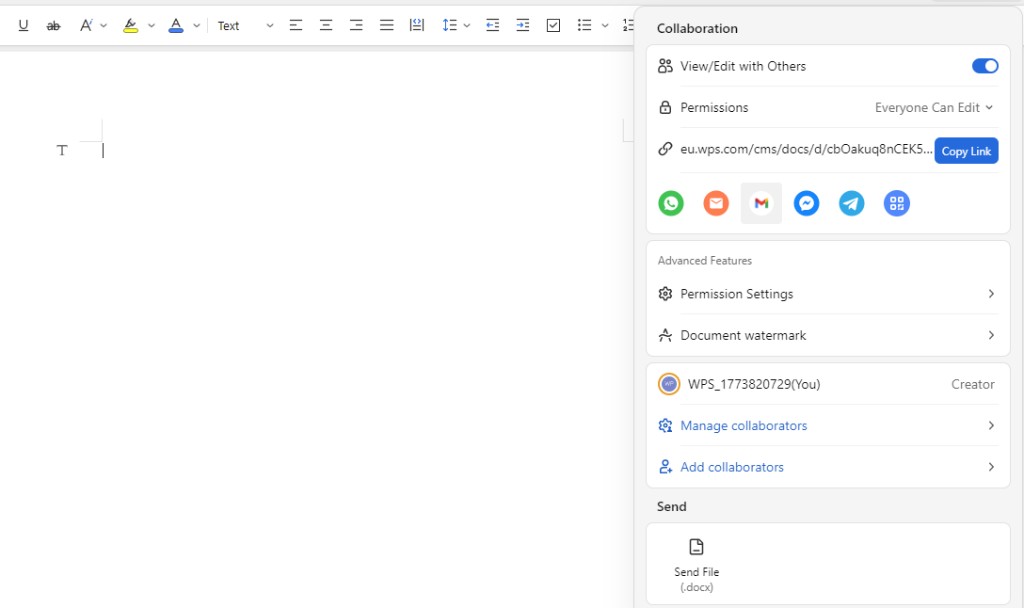
Best for: Remote SMB teams wanting browser co-editing, member/file management, and Microsoft-format workflows at a lower per-user entry than major suites.
Watch out: WPS alone does not provide custom-domain business email; advanced admin and Meet parity versus Google or Microsoft are not part of this comparison.
Learn more about WPS Docs
Google Workspace (Google Docs) — Browser Collaboration at Scale
Google Docs is online, collaborative documents where co-editing lets multiple people work on the same document at the same time. Google Docs provides granular control over who can edit, comment, download, share, or view documents on phone, tablet, or web browser. Google Docs can edit Word files directly while keeping the original intact.
Google Workspace Business Starter is listed at $7 USD per user/month and includes custom business email and security and management controls.
Best for: Teams already on Google Drive and Gmail who prioritize browser-native co-editing plus admin email and workspace controls.
Watch out: Meet-in-Docs and some admin features are plan-gated; verify live Starter pricing on workspace.google.com.
Microsoft 365 Business Basic — Office Co-Authoring with Teams
Microsoft 365 Business Basic provides web and mobile Word, Excel, PowerPoint, and Outlook with Microsoft Teams and 1 TB cloud storage per user. Word for the web supports real-time online collaboration from any device; files must be saved in and shared from OneDrive. Verify live Business Basic pricing—Microsoft notes a July 2026 price increase for some plans. The free web tier is not the same as Business Basic.
Best for: Teams standardized on Microsoft 365 who want native Office co-authoring plus Teams in one business plan.
Watch out: Verify live pricing before purchase; do not assume the free web tier matches Business Basic.
ONLYOFFICE DocSpace — Room-Based Document Collaboration
ONLYOFFICE DocSpace provides room-based document collaboration with real-time co-editing, comments, chat, audio/video calls, change tracking, and version restore. DocSpace offers collaboration, public, and virtual data rooms with flexible access permissions. The free cloud tier is free for users and guests; pay for admins only. DocSpace advertises highest MS Office compatibility and supports collaboration from any desktop or mobile device.
Best for: Teams needing room-based collaboration—external reviewers, VDR-style sharing, or structured project spaces—with built-in chat and calls.
Watch out: Pricing and admin model differ from flat per-user suites; verify live tiers on the official DocSpace pricing page.
How to Choose by Remote Team Workflow
WPS Docs — browser co-editing with real-time edits, comments, and permissions plus SMB file/member management at lower entry pricing
Google Workspace (Docs) — browser-native co-editing when your team already uses Drive, Gmail, and Workspace admin controls
Microsoft 365 Business Basic — native Office co-authoring with Teams and OneDrive sharing for Microsoft-standard shops
ONLYOFFICE DocSpace — room-based workflows with external collaborators, chat/calls, and version restore
Match the platform to how your remote team shares and edits documents, not storage quota alone. A larger per-user cloud allotment does not replace in-app co-editing, permission controls, or member administration.
FAQ
What is the best document app for remote teams?
No single app wins every remote workflow. WPS Docs fits best for remote SMB teams that want browser-first co-editing with real-time edits, comments, and permissions plus file and member management at a lower per-user entry price than Google Workspace or Microsoft 365 business tiers. Google Workspace suits teams on Drive and Gmail; Microsoft 365 Business Basic fits Microsoft-standard shops with Teams; ONLYOFFICE DocSpace fits room-based external collaboration.
Which document apps support real-time co-editing for remote teams?
WPS Docs, Google Docs, Word for the web (via Microsoft 365 Business Basic), and ONLYOFFICE DocSpace each document real-time multi-user editing on official product pages. Verify live feature access on your chosen plan before rollout.
Is cloud storage enough for remote document collaboration?
No. Storage quota alone is not collaboration. Remote teams need simultaneous editing, link sharing with view/edit permissions, comments or review tracking, and team member or room administration. Compare those workflow features first; treat per-user cloud space as a supporting detail.
How do WPS Docs, Google Docs, and Microsoft 365 compare on pricing?
WPS Sharing Plan is listed at $2.49/month/user with 20 GB cloud space per user. Google Workspace Business Starter is listed at $7 USD per user/month. Microsoft 365 Business Basic and ONLYOFFICE DocSpace pricing must be verified on each vendor's live pricing page before purchase—Microsoft notes a July 2026 price increase for some business plans.
Sources and Last Reviewed
Last reviewed: 2026-06-30



