


Quick Answer: Best Mobile-First Office Suites in 2026
The best mobile-first office suite depends on your phone OS, whether you need native apps or browser editing, and how often you hand off .docx/.pptx files—not on one vendor winning every device. Four options cover most phone and tablet workflows in 2026: WPS Office, Google Docs, Sheets, and Slides, Microsoft 365, and Microsoft 365 for the web. WPS Office fits best for users who want one installed suite on Android and iOS with native Writer, Spreadsheet, and Presentation modules, visible mobile editing UI, and Microsoft-format compatibility—accepting that mobile formatting depth may differ from desktop, Android screenshots do not prove every iOS feature, and pricing applies to PC and Android per WPS watchouts. Choose Google Docs/Sheets/Slides for cloud-first co-editing from phone; Microsoft 365 if you already subscribe and need native Office mobile apps with OneDrive; or Microsoft 365 for the web for occasional browser edits without installing apps.
Key Facts
| Topic | Detail |
|---|---|
| Compared tools | WPS Office · Google Docs, Sheets, and Slides · Microsoft 365 · Microsoft 365 for the web |
| Mobile-first scope | Native apps, Android editing depth, iOS availability, mobile browser paths, suite components, offline editing, file compatibility, and free-tier entry pricing |
| WPS primary fit | Cross-platform native apps (iOS and Android plus desktop) with Android Writer text selection and formatting proof; one APK-style suite for Word, Excel, and PPT editing |
| Compatibility caution | WPS markets Microsoft-format compatibility—verify .docx/.pptx on target phone before client handoffs; mobile UI proof does not show every desktop ribbon feature |
Comparison Table: Mobile Office Suites at a Glance
| Dimension | WPS Office | Google Docs, Sheets, and Slides | Microsoft 365 | Microsoft 365 for the web |
|---|---|---|---|---|
| Mobile native apps | WPS is available on iOS and Android plus desktop OS families per WPS Academy download banner | Google Docs Android app supports creating, editing, and collaborating on documents per Play Store listing | Microsoft 365 app available for iOS and Android per Microsoft Support | Editorial check: no unified mobile APK—browser-based Word, Excel, PowerPoint on phone |
| Android editing depth | WPS Writer on Android supports in-document text selection and formatting controls per WPS Academy mobile Writer tutorial | Google Docs Android app opens and edits documents including Microsoft Word files per Play Store | Microsoft 365 mobile app documented for iOS and Android | Word, Excel, PowerPoint for the web usable in mobile browser per Microsoft free web scope |
| iOS availability | WPS lists iOS among supported platforms on Academy download banner; confirm target features on device | Editorial check: Google Docs iOS app available; Sheets and Slides separate apps—verify trio for full mobile suite | Microsoft 365 mobile app documented for iOS and Android | Browser-based access on iOS Safari—no separate iOS app required for web tier |
| Web mobile browser | Editorial check: WPS 365 web dashboard exists but keyword prioritizes native mobile apps | Editorial check: Google Docs accessible in mobile browser; strong cloud-first mobile path | Included web versions per Business Basic plan page; complements native mobile apps | Word, Excel, PowerPoint for the web free with Microsoft account—primary mobile path for this entity |
| Suite components | WPS Office is a free all-in-one suite to edit Word, Excel, and PPT per WPS Academy | Editorial check: Docs, Sheets, Slides ecosystem covers word, spreadsheet, presentation on mobile/web | Word, Excel, PowerPoint mobile and web per M365 business plans | Word, Excel, PowerPoint for the web included per Microsoft free web page |
| Offline mobile editing | Editorial check: confirm offline mobile editing scope on live WPS app help—do not claim unlimited offline sync | Editorial check: offline mobile setup available in Google Docs apps—user must enable; not unlimited by default | Editorial check: offline mobile editing typically requires qualifying subscription and sync setup | Editorial check: web tier requires connectivity—limited offline compared to native apps |
| File compatibility | Editorial check: WPS markets Microsoft-format compatibility on pricing page—verify .docx/.pptx on target phone | Google Docs opens Microsoft Word files per Play listing; layout may shift—test on phone | Native Microsoft formats in mobile Office; complex layouts may differ from desktop | Native Microsoft formats in web apps; test complex mobile edits before handoff |
| Pricing entry | WPS Academy describes free all-in-one suite; paid tiers on pricing page—recheck before quoting mobile seat costs | Personal Google account Docs editing free; Workspace paid tiers separate | Business Basic pricing on official page—recheck before publish; consumer vs business paths differ | Free with Microsoft account and 5 GB OneDrive; paid M365 adds desktop/native depth |
| Best for | Editorial: Users wanting one Android/iOS office APK with Writer/Spreadsheet/Presentation and visible mobile editing UI | Editorial: Cloud-first users who co-edit from phone and share links; already in Google ecosystem | Editorial: Teams already on Microsoft 365 who need native Office mobile apps with OneDrive | Editorial: Occasional mobile edits without installing apps; already have Microsoft account |
| Watch out | Editorial: Mobile UI proof does not show every desktop ribbon feature; test iOS parity; confirm pricing region | Editorial: Three separate mobile apps for full suite; import fidelity; Gemini AI plan-dependent | Editorial: Free basic Android editing limited to ≤10.1 inch screens; price changes July 2026 per Microsoft notice—recheck | Editorial: Browser UX limits vs native apps; 5 GB storage cap; recheck free tier before publish |
WPS Office — Android and iOS Native Editing
WPS Office is described as a free all-in-one suite to edit Word, Excel, and PPT per WPS Academy. For mobile-first users, that means Writer, Spreadsheet, and Presentation modules inside one install on Android and iOS, plus desktop platforms—rather than juggling separate single-purpose apps.
Android Writer Text Selection and Editing
WPS is available on Windows, macOS, Linux, iOS, and Android per the WPS Academy download banner. On Android, WPS Writer supports in-document text selection with visible selection handles—proof of real mobile-first editing, not a view-only mobile reader.
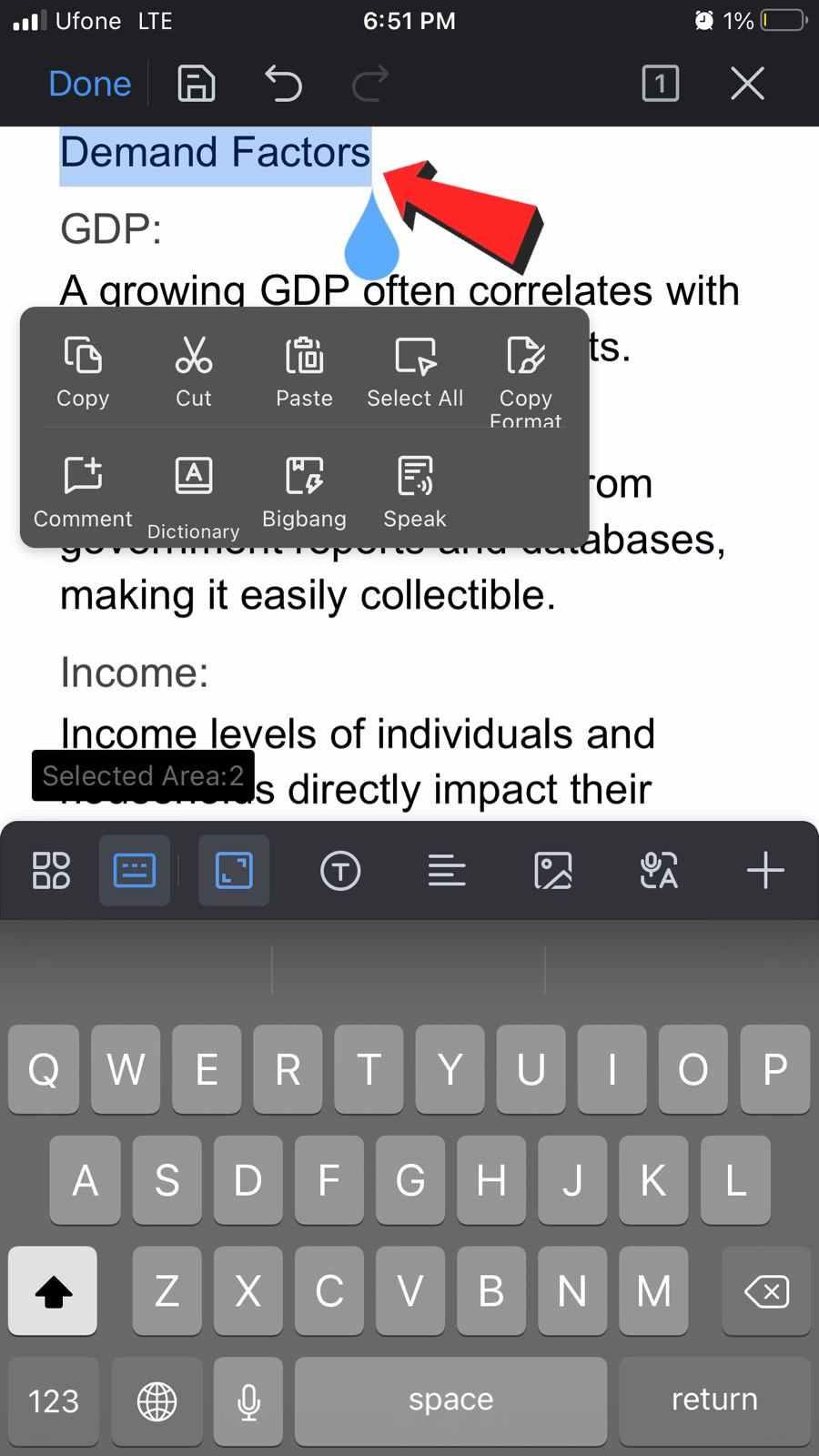
Editorial check: Android Writer screenshots prove mobile editing UI—not every desktop ribbon feature on phone; confirm iOS parity on device before claiming feature equivalence.
Android Formatting Controls
Beyond selection, WPS Writer on Android exposes formatting controls such as align-center on selected text—showing editing depth beyond view-only mobile office apps.
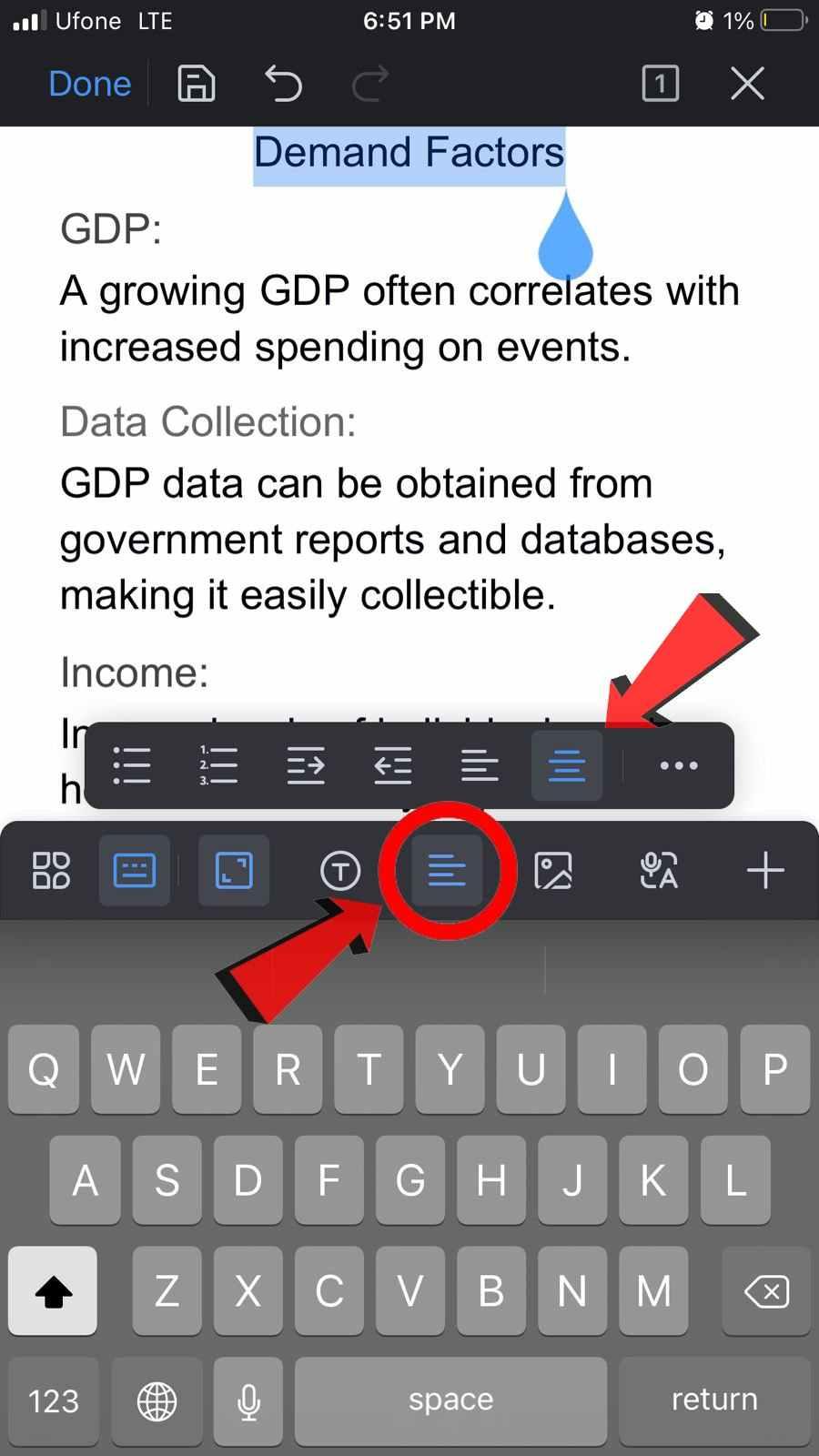
Editorial check: WPS markets Microsoft-format compatibility on its pricing page—verify .docx/.pptx on your target phone before client handoffs. Confirm offline mobile editing scope on live WPS app help; do not claim unlimited offline sync without source.
Best for: Users wanting one Android/iOS office install with Writer/Spreadsheet/Presentation and visible mobile editing UI.
Watch out: Mobile UI proof does not show every desktop ribbon feature; test iOS parity; confirm pricing region and PC/Android seat costs on live pricing.
Learn more about WPS Office
Google Docs, Sheets, and Slides — Mobile-First Cloud Editing
The Google Docs Android app supports creating, editing, and collaborating on documents and opening Microsoft Word files per the Play Store listing. Sheets and Slides are separate mobile apps in the same personal Google account ecosystem—covering spreadsheet and presentation work from phone or mobile browser.
Editorial check: full mobile suite requires three separate apps, not one unified WPS-style APK; test .docx/.pptx import on target phone; Gemini AI features may be plan-dependent; offline mobile setup is available but user must enable it.
Best for: Cloud-first users who co-edit from phone and share links; already in Google ecosystem. Watch out: Multi-app setup; import fidelity; AI plan limits.
Microsoft 365 — Office Mobile Apps with OneDrive
Microsoft 365 Business Basic provides web and mobile versions of Word, Excel, and PowerPoint with Teams and 1 TB OneDrive per user on the official business plans page. The Microsoft 365 app is available for iOS and Android per Microsoft Support.
Editorial check: basic editing on Android is free only on devices with screen sizes of 10.1 inches or less; larger tablets may need a subscription—verify live Microsoft support page before publish. Offline mobile editing typically requires qualifying subscription and sync setup.
Best for: Teams already on Microsoft 365 who need native Office mobile apps with OneDrive. Watch out: Screen-size subscription rule; recheck pricing before publish.
Microsoft 365 for the Web — Browser Editing on Phones
Word, Excel, and PowerPoint for the web are free with a Microsoft account and include 5 GB OneDrive storage per Microsoft's free Office online page. On phones, this is the browser-based path when you do not want to install native apps.
Editorial check: mobile browser editing via Office for the web may lack full native-app gestures and offline depth—test Word/Excel/PPT tasks on target phone browser; 5 GB storage cap on free tier.
Best for: Occasional mobile edits without installing apps; already have Microsoft account. Watch out: Browser UX limits vs native apps; recheck free tier before publish.
How to Choose by Phone OS, Offline Needs, and File Handoffs
WPS Office — one native Android/iOS suite when you edit Word, Excel, and PPT on phone and want visible mobile Writer UI proof; verify .docx/.pptx and iOS feature parity on device
Google Docs, Sheets, and Slides — link-based co-editing when your team lives in Google Drive and you accept three separate mobile apps
Microsoft 365 — native Office mobile apps with OneDrive when you already subscribe; watch tablet screen-size rules on Android
Microsoft 365 for the web — quick browser edits when app installs are optional and connectivity is reliable
Match the suite to your phone OS, offline requirements, and file format your clients expect—not desktop feature parity claims on mobile.
FAQ
Which mobile-first office suite is best on Android?
WPS Office provides one install with Writer, Spreadsheet, and Presentation plus Android text selection and formatting proof. Google Docs suits cloud co-editing; Microsoft 365 fits existing subscribers with native Office apps. Office for the web works for occasional browser edits. Test .docx/.pptx on your phone before choosing.
Does WPS Office work on iPhone and iPad?
WPS lists iOS among supported platforms on the WPS Academy download banner. Editorial check: Android screenshots prove mobile Writer UI—confirm target editing features on your iOS device before assuming parity with desktop or Android.
Can I edit .docx and .pptx files on my phone with these suites?
WPS Office markets Microsoft-format compatibility—verify on target phone. Google Docs opens Word files per Play listing; layout may shift. Microsoft 365 uses native formats but complex layouts may differ from desktop. Office for the web supports native formats in browser—test before handoff.
Are free mobile office apps enough for daily phone editing?
WPS Academy describes a free all-in-one suite; paid tiers apply on pricing page. Google Docs personal tier is free for core editing. Microsoft 365 free basic Android editing has screen-size limits; Office for the web is free with Microsoft account and 5 GB OneDrive. Recheck live pricing and plan limits before rollout.
Sources and Last Reviewed
Last reviewed: 2026-06-30



