


Quick Answer: Best Office Software for AI-Assisted Resumes in 2026
The best office software for creating resumes with AI assistance depends on how much AI drafting and refinement you need, whether you export .docx for ATS uploads, and your budget for AI quotas—not on one tool writing a perfect resume without human review. Four document suites cover most AI-assisted resume workflows in 2026: WPS Office, Microsoft 365 for the web, Google Docs, and LibreOffice Writer. WPS Office fits best for job seekers and career switchers who want prompt-based resume drafts via Smart Create and AI Refine for professional tone inside WPS Writer, with .docx compatibility watchouts and optional Android section editing—accepting Standard-tier AI limits, mandatory human fact-checking of AI output, and knowing the Smart Create menu screenshot does not show a finished resume layout. Choose Microsoft 365 for the web if you already use Word in browser; Google Docs for cloud co-editing with mentors; or LibreOffice Writer for free local editing without built-in AI.
Key Facts
| Topic | Detail |
|---|---|
| Compared tools | WPS Office · Microsoft 365 for the web · Google Docs · LibreOffice Writer |
| Resume + AI scope | AI resume drafting, writing refinement, spell check, template support, mobile editing, .docx compatibility, and free-tier entry pricing |
| WPS primary fit | Smart Create prompt-to-draft and AI Refine for structure and professional tone in WPS Writer; .docx compatibility per WPS pricing page; Android section editing for on-phone review |
| Human review required | AI resume drafts require human fact-checking on all tools; no vendor guarantees job placement or ATS optimization scores |
Comparison Table: Resume + AI Writing Tools at a Glance
| Dimension | WPS Office | Microsoft 365 for the web | Google Docs | LibreOffice Writer |
|---|---|---|---|---|
| AI resume drafting | WPS AI Writer Smart Create generates structured document drafts from prompts with headings and sections users can edit—applicable to resume-style prompts per Academy guide | Editorial check: Word for the web supports document editing; full Copilot resume drafting typically needs paid plan—not on free web alone | Editorial check: Gemini-assisted drafting in Docs may require eligible plans—do not claim unlimited AI resume generation on personal free account | Editorial check: no vendor-documented AI resume generator—manual writing or paste external AI output only |
| AI writing refinement | WPS AI Refine reviews and enhances document content for improved structure and professional tone per Academy guide | Editorial check: advanced AI writing refinement via Copilot requires qualifying Microsoft 365 subscription | Editorial check: AI writing help in Docs tied to Google AI product availability and plan | Editorial check: no built-in AI Refine equivalent—external tools required |
| Spell check / grammar | WPS Academy documents AI Spell Check integrated in WPS AI Writer suite | Word for the web includes spelling and grammar checking per Microsoft Office web scope | Google Docs includes spelling and grammar suggestions in browser/mobile editors per Docs product scope | LibreOffice Writer includes spell check per official documentation scope |
| Template / resume support | Editorial check: users may start from blank doc or Smart Create prompt; no vendor resume-template gallery cited—do not claim dedicated resume template store | Editorial check: Microsoft offers resume templates in Word ecosystem—verify live template gallery; not all on free web | Editorial check: Google Docs template gallery includes resume options—verify live gallery; layout may need manual tuning | Editorial check: community and built-in templates exist—verify locally; no AI template generator |
| Mobile editing | WPS Writer Android supports text selection and formatting for on-phone resume section edits per WPS Academy mobile Writer tutorial | Word for the web accessible in mobile browser per Microsoft free web positioning | Google Docs Android app supports creating and editing documents per Play Store | Editorial check: LibreOffice desktop-first—no official full mobile Writer app for resume editing on phone |
| File compatibility | WPS states 100% Compatible with Microsoft File Formats—verify resume .docx export before ATS upload | Native Word formats in web app; test resume layout before export | Google Docs opens Microsoft Word files per Play listing; resume .docx import may shift formatting | LibreOffice Writer compatible with Microsoft Word .doc and .docx per official guide |
| Pricing entry | WPS Academy describes free suite; AI tools limited on Standard per pricing—recheck AI resume quotas | Word for the web free with Microsoft account and 5 GB OneDrive; Copilot AI separate paid path | Personal Google account Docs free; Workspace and AI features on separate paid tiers | LibreOffice free and open source per official documentation |
| Best for | Editorial: Job seekers wanting prompt-based resume drafts plus Refine inside free/low-cost WPS Writer with .docx path | Editorial: Users already on Microsoft account who want familiar Word in browser for manual + optional Copilot resume work | Editorial: Cloud-first applicants who co-edit resume with mentors via share link and use Google ecosystem | Editorial: Budget users who manually format resumes offline without AI subscription |
| Watch out | Editorial: human review required; AI quotas on pricing; productivity menu screenshot shows entry point not finished resume layout; verify .docx | Editorial: do not imply Copilot on free tier; recheck pricing; web layout limits vs desktop Word | Editorial: Gemini AI plan limits; .docx fidelity; export to PDF before some ATS uploads | Editorial: no AI resume assist; desktop-only; verify complex resume layout in .docx export |
WPS Office — Smart Create and Refine for Resume Drafts
WPS Office is described as a free all-in-one suite to edit Word, Excel, and PPT per WPS Academy. For resume builders, WPS Writer is the relevant module—where AI-assisted drafting and refinement happen before you export a .docx for job applications.
Smart Create and AI Refine for Resume Sections
WPS AI Writer Smart Create generates structured document drafts from prompts—including headings and sections users can edit—per the WPS Academy AI document generator guide. For resumes, that means describing your target role, skills, and experience in a prompt, then editing the generated sections. WPS AI Refine reviews and enhances document content for improved structure and professional tone per the same guide.
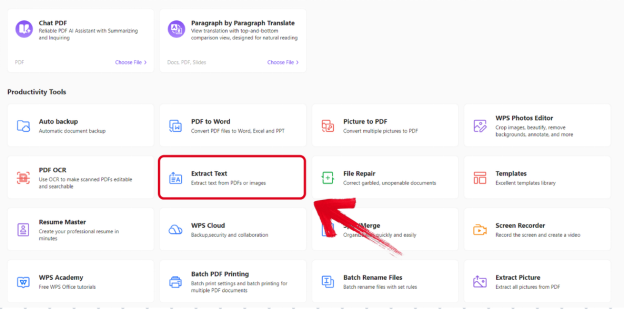
Editorial check: the screenshot shows the Writer productivity menu entry, not a finished resume layout. Human fact-checking is mandatory—verify dates, employers, and skills before sending any AI draft. Confirm AI limits on live pricing; Standard tier marks AI tools as limited.
WPS states 100% Compatible with Microsoft File Formats for Office Tools on its pricing page—verify resume .docx export before ATS upload.
Mobile Resume Section Editing on Android
After drafting on desktop, you can select and edit resume bullets and summary sections on Android using WPS Writer mobile text selection—useful for quick review before an interview, not for AI generation on phone.
Best for: Job seekers wanting prompt-based resume drafts plus Refine inside free/low-cost WPS Writer with .docx path.
Watch out: Human review required; AI quotas on pricing; menu screenshot ≠ finished resume; verify .docx on target ATS.
Learn more about WPS Office
Microsoft 365 for the Web — Word in Browser with Copilot Caveats
Word for the web is free with a Microsoft account and includes 5 GB OneDrive storage per Microsoft's free Office online page—enough to draft and store a resume in the browser. Spelling and grammar checking is included in Word for the web per Microsoft Office web scope.
Editorial check: full Copilot resume assistance typically requires paid Microsoft 365/Copilot plans—not implied on the personal free web tier. Microsoft offers resume templates in the Word ecosystem—verify the live template gallery; not all may be on free web. Test resume layout before export.
Best for: Users already on a Microsoft account who want familiar Word in browser for manual + optional Copilot resume work. Watch out: Do not imply Copilot on free tier; recheck pricing; web layout limits vs desktop Word.
Google Docs — AI-Assisted Editing with Plan Limits
Google Docs supports creating, editing, and collaborating on documents and opening Microsoft Word files per the Play Store listing. Spelling and grammar suggestions are included in Docs editors per Google Docs product scope. Google Docs template gallery may include resume options—verify live gallery; layout may need manual tuning.
Editorial check: Gemini in Docs may require eligible Google Workspace or consumer AI plans—do not claim unlimited AI resume writing on a personal free account. Test .docx resume import on target device; export to PDF before some ATS uploads.
Best for: Cloud-first applicants who co-edit resume with mentors via share link. Watch out: Gemini AI plan limits; .docx fidelity; export paths.
LibreOffice Writer — Free Local Editing Without Built-In AI
LibreOffice Writer is compatible with Microsoft Word (.doc, .docx) per the official Getting Started guide; the suite is free and open source. Spell check is included in Writer per official documentation scope. Community and built-in templates may exist—verify locally.
Editorial check: LibreOffice has no vendor-documented AI resume generator—manual formatting or paste external AI output only. Desktop-first—no official full mobile Writer app for resume editing on phone.
Best for: Budget users who manually format resumes offline without AI subscription. Watch out: No AI resume assist; desktop-only; verify complex resume layout in .docx export.
How to Choose by AI Depth, .docx Handoffs, and Budget
WPS Office — prompt-based Smart Create plus Refine when you want AI drafting inside a free/low-cost Writer with .docx export; mandatory human review and AI quota checks
Microsoft 365 for the web — familiar Word in browser when you already have a Microsoft account; Copilot AI requires paid path
Google Docs — share-link co-editing with mentors when cloud collaboration matters more than native .docx fidelity
LibreOffice Writer — zero-subscription local editing when AI assistance is optional and you work on desktop
Match the tool to how much AI you need, what format recruiters expect (.docx vs PDF), and your budget for AI quotas—not job-placement guarantees.
FAQ
Which office software has the best AI for writing resumes?
WPS Writer Smart Create generates structured drafts from prompts and AI Refine improves tone per WPS Academy. Copilot in Word and Gemini in Docs require paid or eligible plans—not unlimited on free tiers. LibreOffice has no built-in AI resume generator. Always human-review AI output before applying.
Can WPS Smart Create write my entire resume automatically?
Smart Create produces a formatted draft with headings and sections you edit—not a guaranteed job-winning resume. Editorial check: confirm AI limits on live pricing; verify employers, dates, and skills manually; the productivity menu screenshot shows entry point, not finished layout.
Will my resume .docx work with ATS systems from these tools?
WPS states Microsoft file format compatibility—verify resume .docx export before upload. Word for the web uses native formats; test layout. Google Docs opens Word files but import may shift formatting—export carefully. LibreOffice supports .doc/.docx—test complex layouts locally.
Can I edit my resume on my phone after AI drafting?
WPS Writer Android supports text selection for section edits after desktop AI draft. Google Docs has mobile apps for editing. Word for the web runs in mobile browser. LibreOffice is desktop-only for full resume formatting.
Sources and Last Reviewed
Last reviewed: 2026-06-30



