


Quick Answer: What Is an AI Document Cleanup Tool?
An AI document cleanup tool helps you fix spelling and grammar errors, polish inconsistent tone and structure, and batch-replace repeated placeholders inside your document editor—before you share a draft.
Document cleanup commonly means fixing spelling and grammar errors, inconsistent tone or structure, and repeated placeholders or formatting drift before sharing a draft. An AI document cleanup tool is most useful when spell check, refine/polish, and batch find-replace live inside the same document editor—avoiding copy-paste from external chat tools that can break formatting and skip in-place review.
WPS Office is a free all-in-one suite to edit Word, Excel, and PPT on Windows, macOS, Linux, iOS, and Android. For AI document cleanup, open a draft in WPS Writer, use Productivity Tools to run AI Spell Check (spelling/grammar) and AI Refine (tone/structure on selected text), batch-clean placeholders with Find & Replace (Ctrl + H), then save as .docx and verify file compatibility on target recipients before sharing.
Editorial check: AI cleanup output requires human fact-checking; an internet connection is required for AI processing; confirm AI limits on live WPS pricing before heavy use; results may still require manual editing. This guide covers in-editor WPS Writer cleanup—not enterprise redaction, DLP, or multi-vendor tool roundups.
Open messy draft — report, memo, or pasted content in WPS Writer
AI Spell Check — review spelling and grammar suggestions
AI Refine — polish tone and structure on selected sentences
Find & Replace — batch-update repeated placeholders
Human review — verify facts, figures, and technical terms
Save
.docx— verify compatibility on target files
Key Facts
| Topic | Detail |
|---|---|
| Document cleanup scope | Fixing spelling and grammar errors, inconsistent tone or structure, and repeated placeholders or formatting drift before sharing |
| AI cleanup tool definition | Spell check, refine/polish, and batch find-replace inside the same document editor—not external chat copy-paste |
| Integrated vs external chat | Chat tools may rewrite text but require manual paste-back, increasing risk of lost styles, tables, and headers in Word-class documents |
| Common cleanup steps | Automated spell/grammar review, AI refinement of selected sentences for tone and structure, and batch replacement of repeated placeholders per WPS Academy |
| WPS AI Writer role | WPS AI Writer includes Productivity Tools with Smart Create, Refine, and Spell Check as built-in AI writing enhancements for common document cleanup and drafting tasks |
| Productivity Tools access | Open a document in WPS Writer and open the Productivity Tools menu (or WPS AI Tab) to reach Spell Check and Refine |
| AI Spell Check | Catches spelling and grammar issues; presents suggestions users can review and accept—human review of facts, figures, and technical terms still required |
| AI Refine | Reviews and enhances selected content for improved structure and professional tone; select specific sentences rather than entire documents |
| Find & Replace batch tip | Ctrl + H to replace repeated placeholders (e.g., "Company Name") across a draft instead of editing manually |
| File compatibility | WPS states 100% Compatible with Microsoft File Formats—verify .docx on target files before sharing |
| Platforms & review | Windows, macOS, Linux, iOS, and Android (desktop steps sourced); fact-check output; internet required; confirm AI limits on live pricing |
What Document Cleanup Means (Typos, Tone, Placeholders, Formatting)
Before you run any AI tool, it helps to name what "cleanup" actually covers in a Word-class document:
| Cleanup type | What it fixes | Typical AI assist |
|---|---|---|
| Spelling & grammar | Typos, subject-verb agreement, punctuation | AI Spell Check |
| Tone & structure | Awkward phrasing, inconsistent voice, weak transitions | AI Refine on selected sentences |
| Placeholders & drift | Repeated "[Company Name]" tokens, stale dates, copy-paste artifacts | Find & Replace batch pass |
| Formatting continuity | Headings, bullets, and styles that break after heavy edits | In-editor review before export |
Document cleanup is a pre-share editorial pass—not a substitute for legal review, compliance redaction, or professional copyediting on high-stakes documents.
Integrated Editor Cleanup vs External Chat Copy-Paste
Integrated editor cleanup differs from external chat cleanup: chat tools may rewrite text but require manual paste-back, increasing risk of lost styles, tables, and headers in Word-class documents.
| Approach | How cleanup works | Risk |
|---|---|---|
| Integrated (WPS Writer) | Spell Check, Refine, and Find & Replace run inside the open file | Lower formatting loss; in-place review of each suggestion |
| External chat copy-paste | Paste draft into chat, copy cleaned text back | Higher risk of broken styles, tables, headers, and section numbering |
| Standalone grammar SaaS | Browser extension or upload workflow | May not preserve complex Word layout; separate from your editor |
For most office drafts—reports, memos, proposals—in-editor AI cleanup keeps structure intact while you fix language and tone.
WPS Writer: AI Document Cleanup Built In
WPS Office is described as a free all-in-one suite to edit Word, Excel, and PPT per WPS Academy. For users seeking an AI document cleanup tool, WPS AI Writer is integrated into WPS Writer—designed to handle repetitive formatting, editing, and drafting tasks inside the editor without switching tools per WPS Academy.
WPS is available on Windows, macOS, Linux, iOS, and Android per WPS Academy download banner. The cleanup steps below follow the desktop Writer path documented on WPS Academy.
Best for: Anyone who needs AI Spell Check, AI Refine, and Find & Replace cleanup inside the same Word-class editor—without external chat tab switching or standalone grammar-app uploads.
Watch out: Do not claim the suite overview alone proves cleanup steps; confirm AI limits on live WPS pricing; cleanup does not replace enterprise redaction or compliance tools.
WPS Writer: AI Cleanup Tools in Productivity Tools
WPS AI Writer includes Productivity Tools with Smart Create, Refine, and Spell Check as built-in AI writing enhancements for common document cleanup and drafting tasks per WPS Academy. To access cleanup tools: open a document in WPS Writer and open the Productivity Tools menu (or WPS AI Tab) to reach Spell Check and Refine per WPS Academy.
For document cleanup specifically, focus on these two tools:
Spell Check — catch spelling and grammar issues across the draft.
Refine — polish selected sentences for improved structure and professional tone.
Smart Create can generate drafts that may need Spell Check and Refine cleanup afterward—useful when your starting point is a messy AI-generated or pasted document.
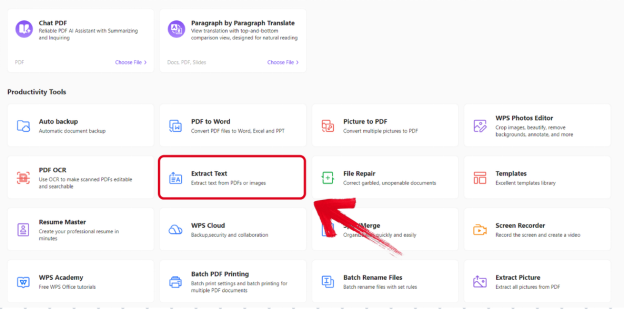
Editorial check: The Productivity Tools menu shows where cleanup tools live in Writer—it does not prove a cleaned document body alone. Always review content before sharing.
Clean Up Spelling and Grammar With AI Spell Check
WPS Academy documents AI Spell Check as part of WPS AI Writer productivity tools for catching spelling and grammar issues. AI Spell Check presents suggestions users can review and accept; WPS Academy notes AI-assisted editing may still require manual editing and an internet connection for AI processing.
To run AI Spell Check cleanup:
Open your draft in WPS Writer.
Open Productivity Tools (or the WPS AI Tab).
Select Spell Check.
Review each suggestion—accept fixes that are correct; skip or edit suggestions for technical terms, product names, and proper nouns.
Re-read the full paragraph after bulk accepts to catch context errors Spell Check may miss.
Run Spell Check after major drafting or Refine passes and before you export or share. Spell Check catches language errors—it does not verify facts, figures, dates, or names.
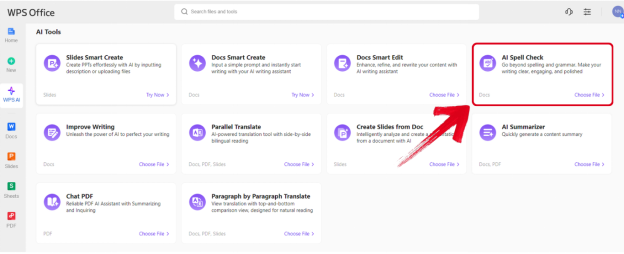
Editorial check: Spell Check may flag technical terms incorrectly. Human review of facts and figures remains mandatory.
Clean Up Tone and Structure With AI Refine
AI Refine reviews and enhances selected content for improved structure and professional tone per WPS Academy. WPS Academy recommends selecting specific sentences rather than entire documents, and warns Refine may change original tone on context-sensitive text such as quotes, legal disclaimers, or brand voice passages.
To run AI Refine cleanup:
Select the sentences you want to clean up—not the whole document.
Open Refine (or Improve Writing) from Productivity Tools.
Review tone/style suggestions in the Refine window.
Choose Accept, Redo, or Discard per WPS Academy.
Re-read accepted text against your source materials before moving to the next section.
Use Refine after Spell Check on sections that read awkwardly but are factually correct, or when tone shifts between sections after multiple authors or paste operations.
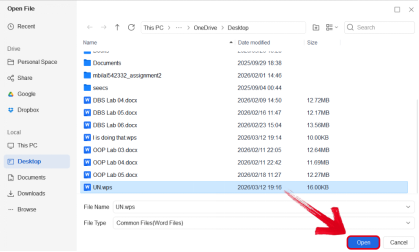
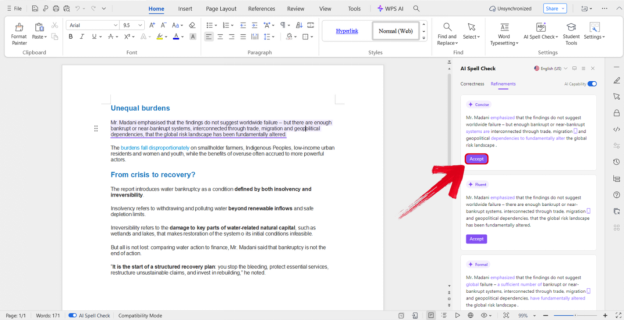
Editorial check: Refine may change original tone or subtle meaning. Re-read every accepted suggestion—especially on context-sensitive passages.
Batch Cleanup: Find & Replace for Repeated Placeholders
After AI generation, messy paste, or template reuse, drafts often contain repeated placeholders—"Company Name," "[Date]," "[Client]," or "TBD"—that need updating before sharing. WPS Academy documents a Find and Replace batch tip (Ctrl + H) to replace repeated placeholders across a generated draft instead of editing manually.
To batch-clean placeholders:
Press Ctrl + H to open Find and Replace.
Enter the placeholder in Find (e.g.,
[Company Name]).Enter the real value in Replace.
Use Replace All to update every instance at once.
Scan the document for variants (different bracket styles, extra spaces) and repeat if needed.
This semi-automated pass complements AI Spell Check and Refine—especially on proposals and reports built from reusable templates.
When Manual Cleanup Still Matters
AI document cleanup accelerates common fixes, but some tasks still require human judgment:
| Situation | Why manual cleanup wins |
|---|---|
| Facts, figures, and dates | AI does not verify accuracy—only language |
| Technical terminology | Spell Check may flag valid domain terms |
| Legal, medical, or compliance text | Tone changes from Refine can alter meaning |
| Complex tables and styles | External paste or chat rewrite often breaks layout |
| Brand voice and quotes | Refine may flatten distinctive tone |
| Enterprise redaction | DLP and compliance tools are out of scope for Writer AI cleanup |
Treat AI cleanup as a first pass—not a publication-ready guarantee.
Tips: Human Review, Technical Terms, and AI Limits
Built-in AI cleanup saves time—but output still requires your judgment:
Fact-check every claim — AI may invent statistics, dates, or names.
Review Spell Check suggestions one section at a time — skip false positives on technical terms.
Scope AI Refine to selected sentences — protect context-sensitive tone.
Confirm AI limits — check live WPS pricing for current AI usage limits before heavy cleanup sessions.
Internet required — AI processing requires an internet connection per WPS Academy guidance.
Verify file compatibility — after cleanup, test
.docxand PDF on target files.Manual editing expected — AI results may still require manual editing even after Refine and Spell Check.
Do not over-scope cleanup — AI does not replace professional editing, enterprise redaction, or flawless error-free output.
Brief Note: AI Cleanup in Microsoft Word (Plan-Gated Context)
Word, Excel, and PowerPoint for the web are free with a Microsoft account and include 5 GB OneDrive storage per Microsoft's free web page. That tier is useful context—but full Copilot cleanup/drafting assistance in Word typically requires paid or eligible Microsoft 365/Copilot plans, not the personal free web tier alone.
Document cleanup without Copilot access remains manual for AI-assisted spelling and tone polish unless users adopt an integrated cleanup path elsewhere—such as WPS AI Writer inside WPS Office.
Editorial check: This guide focuses on the WPS integrated document cleanup workflow. Do not publish a Copilot vs WPS feature matrix or imply Copilot is unlimited on the free web tier.
FAQ
What is an AI document cleanup tool?
An AI document cleanup tool helps fix spelling and grammar errors, inconsistent tone or structure, and repeated placeholders inside your document editor—using integrated Spell Check, Refine, and Find & Replace rather than external chat copy-paste.
How do I clean up a document with AI in WPS Office?
Open your draft in WPS Writer → Productivity Tools → run AI Spell Check for spelling/grammar → select sentences and run AI Refine for tone/structure → batch-replace placeholders with Find & Replace (Ctrl + H) → human review → save .docx and verify compatibility.
Does AI Spell Check fix every error?
No. AI Spell Check presents suggestions you review and accept; it may flag technical terms incorrectly and does not verify facts or figures. Human review remains mandatory.
Can AI Refine change my document's meaning?
Yes. AI Refine may change original tone on context-sensitive text. Select specific sentences, review every suggestion, and use Accept, Redo, or Discard carefully.
Do I need the internet for WPS AI document cleanup?
Yes. An internet connection is required for AI processing per WPS Academy guidance.
Can I use this cleanup workflow on mobile?
WPS is listed for Windows, macOS, Linux, iOS, and Android, but step-by-step cleanup in this guide is sourced for desktop Writer. Do not claim an identical mobile suite-AI cleanup workflow without Academy proof.
Are there AI limits on the free tier?
Confirm AI limits on live WPS pricing before relying on unlimited cleanup. Do not claim unlimited AI on any free tier without a current pricing recheck.
Does WPS support DOC and DOCX after cleanup?
WPS AI Writer supports common formats like DOC and DOCX per WPS Academy FAQ. Verify layout on target files after cleanup before sharing.
Sources and Last Reviewed
| Source | Role |
|---|---|
| WPS Academy — AI Document Generator Guide | Spell Check, Refine, Find & Replace, Productivity Tools |
| WPS Academy — What Is WPS Office | Suite positioning |
| WPS Pricing | Microsoft file format compatibility; AI limit recheck |
| Microsoft 365 Free for the Web | Web tier and Copilot plan context |
Last reviewed: 2026-07-01