


Quick Answer
If you need spreadsheet templates—budgets, calendars, trackers, or invoices—without buying desktop Excel, four credible options cover most workflows: WPS Spreadsheets + WPS Template (free templates with an in-app picker and downloadable .xlsx files), Google Sheets (Template Gallery in the browser), Microsoft Excel for the web (Microsoft Create templates plus free Excel online), and LibreOffice Calc (built-in and community templates via import). WPS fits best when you want free downloadable spreadsheet templates in .xlsx format plus an in-app template picker, with official WPS pages describing Microsoft Office file format compatibility—verify each workbook before migration. Choose Google Sheets for cloud-first sharing, Excel for the web if you already use a Microsoft account, or LibreOffice Calc for a free desktop editor with offline local files.
Key Facts
| Topic | Detail |
|---|---|
| Compared tools | WPS Spreadsheets · Google Sheets · Microsoft Excel for the web · LibreOffice Calc |
| WPS primary fit | Free downloadable .xlsx spreadsheet templates plus in-app template picker; Microsoft-format compatibility language on official WPS pages—verify target files |
| Google Sheets primary fit | Template Gallery copies in Google Drive with real-time sharing in the browser |
| Excel for the web primary fit | Official Excel templates from Microsoft Create with familiar Excel UI in the browser |
| LibreOffice Calc primary fit | Budget-conscious desktop users who accept community template import and offline local files |
| Compatibility caution | No tool guarantees full Excel macro, VBA, or pivot-table parity—test complex workbooks before switching |
| Pricing caution | Free tiers differ by vendor and platform—confirm current official pricing before relying on a paid feature |
Comparison Table: Spreadsheet Templates at a Glance
| Dimension | WPS Spreadsheets | Google Sheets | Microsoft Excel for the web | LibreOffice Calc |
|---|---|---|---|---|
| Template library | WPS Template via Apps > Templates; in-app Spreadsheet launcher shows ready-to-use templates; template.wps.com lists Spreadsheet downloads | Google Template Gallery in Sheets (top right); selecting a template creates an editable copy | Microsoft Create offers thousands of customizable templates including Excel budgets, invoices, schedules, and planners | Built-in Calc templates via Template Manager; community templates at extensions.libreoffice.org imported via File → New → Templates |
| Open & edit .xlsx | WPS states Microsoft Office file format compatibility; budget templates downloadable as .xlsx/.xls—verify each workbook before migration | Opens and edits spreadsheets in browser; Excel (.xlsx) import/export supported with possible formatting differences—test before relying on layout | Excel for the web edits native .xlsx in browser; verify complex workbooks on web vs desktop | Opens Microsoft Office formats including Excel files; verify complex workbooks before migration |
| Spreadsheet editing | WPS Academy documents creating workbooks, entering data in cells, and basic formulas in WPS Spreadsheets | Native Google Sheets editor with formulas and collaboration in browser; templates may include pre-built formulas | Excel for the web supports organizing data and collaborating online | Full desktop spreadsheet editing as part of free open-source LibreOffice suite |
| Cross-platform | Windows, macOS, Linux, iOS, and Android per WPS Academy; templates accessible via desktop Apps > Templates flow | Browser-based Sheets on any OS with supported browser; mobile Sheets apps available separately | Excel for the web runs in browser on any OS; includes 5 GB OneDrive with free Microsoft account | Desktop Calc on Windows, macOS, and Linux; no official mobile/web Calc editor from TDF |
| Price (entry) | WPS Academy describes WPS Office as free to download with spreadsheet editing; paid tiers exist—confirm platform/region on live pricing | Personal Google account Sheets + Template Gallery free; Google Workspace paid tiers separate | Excel for the web free with Microsoft account (5 GB OneDrive); premium Microsoft 365 adds desktop apps and more storage | LibreOffice is free and open source; no subscription required for Calc or Template Manager |
| Best for | Users who want free downloadable .xlsx spreadsheet templates plus an in-app template picker with Microsoft-format compatibility language on official WPS pages | Cloud-first users who want instant Template Gallery copies in Google Drive with real-time sharing | Microsoft-account users who want official Excel templates from Microsoft Create with familiar Excel UI in the browser | Budget-conscious desktop users who accept community template import workflow and offline local files |
| Watch out | Editorial check: Verify complex Excel files (macros/pivots) in WPS before switching; WPS listed prices apply to PC and Android per pricing footnote | Editorial check: Offline editing requires setup; Excel template fidelity may need adjustment after import | Editorial check: Web Excel may lack macros/VBA and some advanced features—test templates before production use | Editorial check: No unified branded template store—templates require download/import; no official iPad/mobile Calc app |
WPS Spreadsheets + WPS Template — Free .xlsx Templates and In-App Picker
WPS Office is described as a free all-in-one suite to edit Word, Excel, and PPT per WPS Academy. For spreadsheet work, WPS Spreadsheets is the dedicated module—you can create workbooks, enter data in cells, and use basic formulas such as 2+2 per the official spreadsheet guide.
How to access WPS spreadsheet templates
When opening WPS Spreadsheets, users see blank workbook options and ready-to-use templates to select per WPS Academy. For the broader template library, WPS Template provides free templates: on Windows, open the WPS Office homepage → Apps → Templates, choose a template, and click Use Now or Free Use to download and open it.

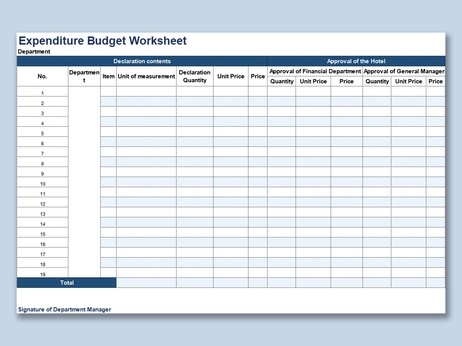
WPS budget sheet templates are listed as compatible with WPS Spreadsheet, Microsoft Excel, and Google Sheets in .xlsx or .xls format on the official template page—verify each file before relying on formulas or layout. WPS pricing page states 100% Compatible with Microsoft File Formats for Office Tools; treat this as a starting point and test your actual workbooks before migration.
WPS is available on Windows, macOS, Linux, iOS, and Android per WPS Academy download banner.
Best for: Users who want free downloadable .xlsx spreadsheet templates plus an in-app template picker with Microsoft-format compatibility language on official WPS pages.
Watch out: Editorial check: Verify complex Excel files (macros/pivots) in WPS before switching; WPS listed prices apply to PC and Android per pricing footnote.
Learn more about WPS Spreadsheets
Spreadsheet guide: How to use WPS Office Spreadsheet
Template help: How do I use a WPS template?
Budget templates: WPS budget sheet templates
Google Sheets — Template Gallery in the Browser
Google Sheets is a browser-first spreadsheet editor. Per Google Docs Editors Help, open Sheets (or Docs, Slides, or Forms), click Template Gallery at the top right, select a template, and a copy of the template opens for editing.
Google-created templates include budgets and order forms among other categories. The Template Gallery flow is web-based—offline use requires separate Google offline setup; do not assume desktop Excel parity.
Google Sheets opens and edits spreadsheets in the browser with Excel (.xlsx) import/export supported, though formatting may differ after import. Personal Google account access to Sheets and the Template Gallery is free; Google Workspace paid tiers are separate.
Best for: Cloud-first users who want instant Template Gallery copies in Google Drive with real-time sharing.
Watch out: Editorial check: Offline editing requires setup; Excel template fidelity may need adjustment after import.
Microsoft Excel for the Web — Microsoft Create Templates + Free Excel Online
Word, Excel, and PowerPoint for the web are free with a Microsoft account and include 5 GB OneDrive storage per Microsoft's free Office online page. Excel for the web supports organizing data and collaborating online.
For templates, Microsoft Create (create.microsoft.com) offers thousands of customizable templates including Excel categories such as budgets, Gantt charts, invoices, schedules, and planners. This pairs well with Excel for the web when you want official Excel templates and a familiar Excel interface in the browser.
Best for: Microsoft-account users who want official Excel templates from Microsoft Create with familiar Excel UI in the browser.
Watch out: Editorial check: Advanced Excel desktop features (macros/VBA, some pivots) may not be available in Excel for the web—test template workbooks before relying on them.
LibreOffice Calc — Community Templates via extensions.libreoffice.org
LibreOffice Calc is the spreadsheet module in the free, open-source LibreOffice suite. LibreOffice downloads are available for Windows, macOS, and Linux at libreoffice.org/download.
The Template Manager includes built-in spreadsheet templates. Users can browse online templates at extensions.libreoffice.org and import downloaded templates via File → New → Templates. This workflow is download/import/community-driven—not a single branded gallery like WPS Template or Google Template Gallery.
LibreOffice opens Microsoft Office formats including Excel files; verify complex workbooks before migration. There is no official mobile or web Calc editor from The Document Foundation.
Best for: Budget-conscious desktop users who accept community template import workflow and offline local files.
Watch out: Editorial check: No unified branded template store—templates require download/import; no official iPad/mobile Calc app.
How to Choose by Template Workflow
| If your priority is… | Start with… | Why |
|---|---|---|
| Free .xlsx downloads plus in-app template picker on desktop and mobile | WPS Spreadsheets | WPS Template library and Spreadsheet launcher offer ready-to-use templates with .xlsx compatibility language on official pages |
| Instant cloud copies you can share in Google Drive | Google Sheets | Template Gallery creates an editable copy in one click |
| Official Microsoft Excel templates with browser Excel editing | Excel for the web | Microsoft Create catalog plus free Excel online with a Microsoft account |
| Offline desktop editing with no subscription | LibreOffice Calc | Free open-source Calc with Template Manager and community extensions |
| Budget or invoice templates specifically | WPS Spreadsheets or Excel for the web | Both list budget and invoice categories on official template pages—compare layouts side by side |
| iPad or phone spreadsheet editing | WPS Spreadsheets or Google Sheets | WPS lists iOS and Android; Google Sheets has mobile apps—LibreOffice Calc has no official mobile editor |
FAQ
Can these tools open my existing Excel (.xlsx) files?
All four tools support opening and editing spreadsheet files, but compatibility varies by workbook complexity. WPS and LibreOffice describe Microsoft-format support; Google Sheets and Excel for the web handle .xlsx with possible formatting or feature gaps. Test macros, pivot tables, and advanced formulas in your target tool before switching—none of the options above guarantee full Excel desktop parity.
Which option works best offline?
LibreOffice Calc is built for offline desktop use. WPS Spreadsheets runs locally on Windows, macOS, Linux, iOS, and Android once installed. Google Sheets and Excel for the web are browser-first; offline editing requires separate setup (Google offline mode or Microsoft account sync). Plan accordingly if you need templates without an internet connection.
Are these good choices for students on iPad?
Google Sheets and WPS Spreadsheets both offer mobile access—Sheets via browser or mobile app, WPS via iOS and Android apps per WPS Academy. Excel for the web runs in a supported browser on iPad with a Microsoft account. LibreOffice Calc has no official iPad app. For template workflows on iPad, start with Google Sheets or WPS and verify that your chosen template layout works on a smaller screen.
Sources and Last Reviewed
| Claim area | Source | URL |
|---|---|---|
| WPS suite & platforms | WPS Academy | wps.com/academy/what-is-wps-office |
| WPS Spreadsheets & templates | WPS Academy | wps.com/academy/spreadsheet guide |
| WPS Template usage | WPS Help | help.wps.com/template article |
| WPS budget templates & .xlsx compatibility | WPS Template | wps.com/template/budget-sheet-templates |
| WPS file format compatibility | WPS Pricing | wps.com/pricing |
| Google Sheets Template Gallery | Google Docs Editors Help | support.google.com/docs/answer/148833 |
| Excel for the web & OneDrive | Microsoft | microsoft.com/free-office-online |
| Microsoft Create templates | Microsoft Create | create.microsoft.com/templates |
| LibreOffice suite & Calc | LibreOffice | libreoffice.org/discover |
| LibreOffice downloads | LibreOffice | libreoffice.org/download |
| LibreOffice Template Manager | LibreOffice Help | help.libreoffice.org/template manager |
Last reviewed: 2026-06-30



