


Quick Answer: Best PPT Alternatives for Businesses (2026)
The best PPT alternative for businesses depends on how your team builds decks, shares files, and manages admin—not on a single universal winner. Four presentation-capable platforms cover most business needs in 2026: WPS Office (Presentation), Microsoft PowerPoint, Google Slides, and LibreOffice Impress. WPS Office fits best for cross-platform SMB teams that want an all-in-one office suite (Word, Excel, and PPT editing) with WPS AI Slides for topic-to-deck and document-to-deck generation—accepting Standard-tier AI limits and verifying .pptx fidelity on client files before delivery. Choose Microsoft PowerPoint if your organization already runs Microsoft 365 with Teams and business email; Google Slides for browser-first co-editing on Google Workspace; or LibreOffice Impress for a free desktop .pptx editor without a cloud subscription.
Key Facts
| Topic | Detail |
|---|---|
| Compared tools | WPS Office (Presentation) · Microsoft PowerPoint · Google Slides · LibreOffice Impress |
| Intent scope | Business presentation editing—sales pitches, internal reports, client decks—with scoped AI, .pptx compatibility, collaboration, pricing, and admin rows |
| WPS primary fit | Cross-platform all-in-one suite plus WPS AI Slides for faster pitch decks; verify AI quotas and target .pptx files |
| Presentation caution | Free web tiers, AI features, and admin controls differ by vendor and plan—verify live pricing pages before purchase; no tool replaces PowerPoint for every enterprise workflow |
Comparison Table: Business Presentation Tools at a Glance
| Dimension | WPS Office | PowerPoint | Google Slides | LibreOffice |
|---|---|---|---|---|
| Presentation editing | All-in-one PPT | Web + Business | Browser | Desktop Impress |
| AI slide generation | AI Slides | Plan-dependent | Gemini tiers | None documented |
| .pptx compatibility | Verify files | Native | Import caveats | Open/save |
| Platforms | 5 OS + mobile | Web + apps | Browser-first | Desktop only |
| Collaboration | WPS Docs sep. | Teams + co-edit | Live + comments | Local only |
| Pricing entry | Free Standard | Free web / paid | $7/user/mo | Free OSS |
| Business admin | No email claimed | M365 admin | Workspace admin | Local deploy |
| Dimension | WPS Office | Microsoft PowerPoint | Google Slides | LibreOffice Impress |
|---|---|---|---|---|
| Presentation editing | WPS Office is a free all-in-one suite that includes PPT/presentation editing alongside Word and Excel per WPS Academy | PowerPoint for the web included in free Microsoft account tier; Business plans add desktop web and mobile PowerPoint per M365 business compare page | Create and deliver presentations in browser with templates animations and transitions per Google Workspace Slides page | Impress creates slides with text lists tables charts and clip art; includes templates and Help per official Getting Started documentation |
| AI slide generation | WPS AI Slides offers Create With AI from keywords and Create From File from documents to generate business presentations per Academy guide | Copilot/GPT features vary by M365 plan—free web tier does not include full Copilot desktop bundle; verify plan before AI claims | Gemini in Slides can generate slides and images per Google product page—plan eligibility varies; premium features marked on page | LibreOffice Impress has no vendor-documented AI slide generation |
| File compatibility (.pptx) | WPS targets Microsoft-format compatibility for office files—verify client .pptx decks before delivery; do not claim macro/VBA parity | Native .pptx in PowerPoint; web and desktop may differ on macros/VBA—test business templates before relying on them | Google Slides imports PowerPoint but layout/fonts may shift—test client decks; export to .pptx available with fidelity caveats | Impress opens and saves Microsoft PowerPoint formats and exports PDF HTML and graphics per official documentation |
| Platforms | Windows macOS Linux iOS and Android per WPS Academy download banner | Browser PowerPoint on any OS; Business plans include desktop web and mobile versions per M365 business page | Browser Slides on any OS; mobile apps via Google Workspace ecosystem; no native desktop install required | LibreOffice downloads for Windows macOS and Linux per official download page |
| Collaboration | WPS Docs co-editing exists as a separate product surface—verify WPS Docs for team workflows if collaboration is required | M365 Business Basic includes Teams for chat/call/meet alongside PowerPoint per business compare page | Live editing comments and granular sharing permissions for internal and external collaborators per Slides product page | Impress is local desktop editing—no native live multi-user co-editing; use file share/version control separately |
| Pricing entry | WPS Standard free tier available; paid tiers and AI limits on official pricing—recheck before quoting business seat costs | Free PowerPoint for the web with Microsoft account and 5 GB OneDrive; paid Business plans from official compare page—verify July 2026 price changes | Google Workspace Business Starter listed at $7 USD per user/month on official pricing—recheck before publish | LibreOffice is free and open source—no per-user subscription on official download/documentation pages |
| Business admin | WPS does not document custom-domain business email on pricing alone—do not claim you@company.com without WPS 365 admin proof | M365 Business plans include custom business email and identity/access management per business compare page | Business Starter includes custom business email and security/management controls per Workspace pricing | No centralized business admin console or custom email—IT deploys locally; not a cloud workspace suite |
| Best for | Editorial: Cross-platform SMB teams wanting all-in-one office plus AI Slides for faster pitch decks—accepting AI quotas and .pptx verification | Editorial: Teams already on Microsoft 365 who need familiar PowerPoint .pptx workflows with business email and 1 TB storage on paid tiers | Editorial: Cloud-first business teams that co-edit decks in browser/Drive with admin controls on Workspace Starter | Editorial: Budget-conscious businesses needing free desktop .pptx editing on Windows/macOS/Linux without cloud subscription |
| Watch out | Editorial: Confirm AI slide limits on live pricing; test complex PowerPoint files; collaboration claims scoped to verified WPS Docs—not implied by AI Slides screenshot alone | Editorial: Separate free web vs Business plan paths; recheck pricing before publish; web PowerPoint may lack advanced desktop features | Editorial: Brand templates and some Gemini features are premium tiers; 15 GB personal Drive not same as Workspace business storage | Editorial: Test animations and complex PowerPoint on target files; no mobile-native Impress app; no built-in real-time collaboration |
WPS Office — AI Slides and Full-Suite Presentation Editing
WPS Office is described as a free all-in-one suite to edit Word, Excel, and PPT per WPS Academy—so business teams get presentation editing inside the same install as documents and spreadsheets, not a slides-only app.
AI Slides for Business Decks
WPS AI Slides supports Create With AI from keywords and Create From File from uploaded documents to automatically generate a presentation per the WPS Academy guide. That workflow helps sales and marketing teams draft pitch decks from a topic line or an existing brief without starting from a blank slide.
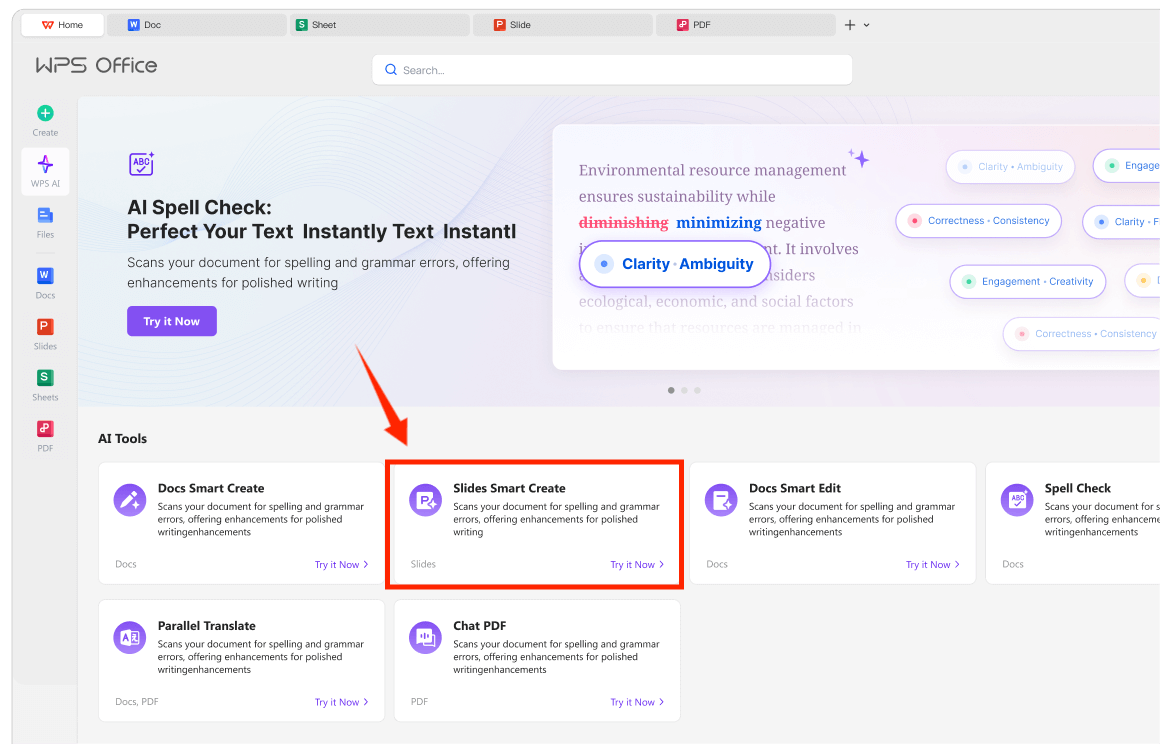
Confirm AI slide limits on live pricing—Standard tier marks AI tools as limited. Test complex .pptx files before client delivery; WPS targets Microsoft-format compatibility but does not guarantee macro/VBA parity.
Full Office Suite Beyond Slides
WPS is available on Windows, macOS, Linux, iOS, and Android per the WPS Academy download banner. The Writer component shows the suite breadth buyers expect when evaluating a PowerPoint alternative that also covers reports and spreadsheets.
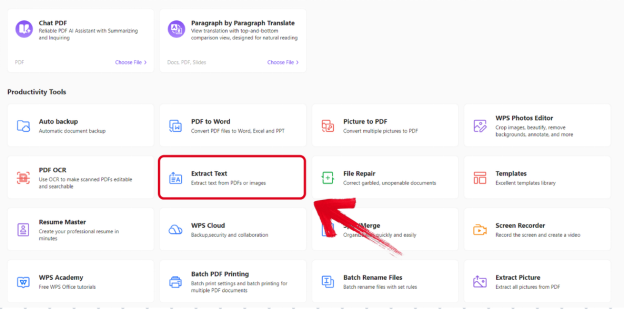
Best for: Cross-platform SMB teams wanting all-in-one office plus AI Slides for faster pitch decks—accepting AI quotas and .pptx verification.
Watch out: Confirm AI slide limits on live pricing; test complex PowerPoint files; do not assume WPS Docs co-editing from the AI Slides workflow alone.
Learn more about WPS Office
Microsoft PowerPoint — Familiar .pptx Workflows
PowerPoint for the web is free with a Microsoft account and includes 5 GB OneDrive storage. Microsoft 365 Business Basic adds web and mobile PowerPoint with Teams and 1 TB OneDrive per user, plus custom business email and identity and access management on paid business plans. Copilot features vary by plan—the free web tier does not include the full Copilot desktop bundle. Test macros and VBA on business templates before relying on web PowerPoint alone.
Best for: Teams already on Microsoft 365 who need familiar PowerPoint .pptx workflows with business email and 1 TB storage on paid tiers.
Watch out: Separate free web vs Business plan paths; recheck pricing before publish—Microsoft documents July 2026 price changes for some business plans.
Google Slides — Browser Collaboration for Business Teams
Google Slides lets teams create and deliver presentations in the browser with no installation required. Live editing, comments, and granular sharing permissions support internal and external collaborators. Google Workspace Business Starter is listed at $7 USD per user/month with custom business email and security and management controls. Gemini in Slides and brand templates are premium features—verify plan eligibility. Importing PowerPoint may shift layout and fonts.
Best for: Cloud-first business teams that co-edit decks in browser/Drive with admin controls on Workspace Starter.
Watch out: Brand templates and some Gemini features are premium tiers; personal Google Drive storage is not the same as Workspace business storage.
LibreOffice Impress — Free Desktop .pptx Alternative
LibreOffice Impress creates slides with text, lists, tables, charts, and clip art; opens and saves Microsoft PowerPoint formats; and exports to PDF, HTML, and graphics per official documentation. Downloads are available for Windows, macOS, and Linux. Impress has no vendor-documented AI slide generation and no native live multi-user co-editing. IT deploys locally—no cloud admin console or custom business email.
Best for: Budget-conscious businesses needing free desktop .pptx editing without a cloud subscription.
Watch out: Test animations and complex PowerPoint on target files; no mobile-native Impress app; no built-in real-time collaboration.
How to Choose by Team Size, Budget, and Collaboration Needs
WPS Office — cross-platform all-in-one suite with AI Slides when you need faster pitch decks and also edit Word/Excel in one install; verify AI quotas and .pptx on client files
Microsoft PowerPoint — familiar .pptx workflows with Teams, business email, and 1 TB storage when you are already on Microsoft 365 Business plans
Google Slides — browser co-editing with Workspace admin when your team lives in Drive and needs link-based deck sharing
LibreOffice Impress — zero subscription desktop .pptx editing when cloud collaboration and admin consoles are not required
Match the tool to how your team builds, shares, and approves decks—not AI marketing alone. A slide generator does not replace .pptx fidelity testing or plan-level admin requirements.
FAQ
Which PPT alternative handles .pptx files best for businesses?
Microsoft PowerPoint is the native .pptx editor. WPS Office, LibreOffice Impress, and Google Slides each support PowerPoint-format workflows with caveats: WPS and Impress open and save .pptx but require testing on complex templates; Google Slides imports PowerPoint with possible layout shifts. Verify target client decks on your chosen platform before delivery.
Do these tools include unlimited AI slide generation?
No. WPS AI Slides quotas apply on Standard tier per WPS pricing. Copilot in PowerPoint and Gemini in Slides are plan-dependent—free web PowerPoint and Workspace Starter may not include full AI bundles. LibreOffice Impress has no documented AI slide builder. Check live pricing and plan pages before rollout.
Can I edit business presentations offline?
LibreOffice Impress and desktop WPS Office support offline editing on installed apps. Google Slides is browser-first; offline requires Google's offline setup. PowerPoint for the web needs connectivity; desktop PowerPoint on paid Business plans supports offline on installed clients. Match platform to your travel and field-sales workflow.
Which option includes business admin and custom email?
Microsoft 365 Business and Google Workspace Business Starter document custom business email and security/management controls on official pricing pages. WPS Office does not document custom-domain business email on Standard pricing alone. LibreOffice is locally deployed without a cloud admin console—IT manages installs separately.
Sources and Last Reviewed
Last reviewed: 2026-06-30



