


Quick Answer: Which Office Suites Include a Built-In AI Assistant for Documents?
Three major office suites ship a vendor-documented, in-editor AI assistant for documents—WPS Office, Microsoft 365 (Copilot in Word), and Google Workspace (Gemini in Google Docs). LibreOffice Writer does not include a built-in document AI assistant in its core suite.
For users comparing built-in document AI—draft, refine, and proofread inside the document editor, not a separate browser tab:
WPS Office / WPS AI Writer — Yes. Smart Create, Refine, and Spell Check are integrated into WPS Writer via Productivity Tools per WPS Academy. WPS Standard plan is listed Free with No Credit Card Required on the official pricing page—confirm AI limits on live WPS pricing before heavy use.
Microsoft 365 / Copilot in Word — Yes, plan-gated. Draft with Copilot in Word via the Copilot prompt box; Edit with Copilot creates, edits, refines, and formats content in place—but requires a Copilot-enabled account, typically paid or eligible M365/Copilot plans, not the personal free web tier alone.
Google Workspace / Gemini in Docs — Yes, Workspace subscribers. Gemini in Google Docs helps create first drafts, refine writing, and proofread; Gemini is automatically included in Google Docs for Workspace plan subscribers—personal free account scope may differ.
LibreOffice Writer — No built-in document AI assistant in the core suite per official documentation. Users rely on traditional spell-check, manual editing, or external AI tools pasted into documents—not an integrated Smart Create / Copilot / Gemini-equivalent menu.
Editorial check: All AI output requires human fact-checking; an internet connection is required for WPS AI processing; confirm AI limits on live pricing for WPS, Microsoft, and Google before publish; verify DOC and DOCX output on target files before sharing.
Key Facts
| Topic | Detail |
|---|---|
| Compared suites | WPS Office · Microsoft 365 / Copilot · Google Workspace / Gemini · LibreOffice Writer |
| Page scope | Inventory comparison—which suites include built-in document AI—not a procedural how-to or download landing |
| Built-in definition | In-editor draft, refine, and proofread tools integrated into the document app—not external chat copy-paste or optional browser extensions |
| WPS built-in AI | WPS AI Writer with Smart Create, Refine, and Spell Check in WPS Writer Productivity Tools—not a separate add-on per WPS Academy |
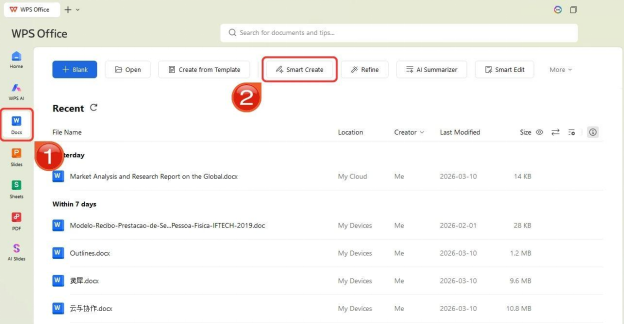
| WPS Smart Create entry | Open WPS Office → Docs tab → Smart Create → new document with AI prompt box and preset instructions |
| WPS iteration | After Smart Create, choose Discard, Redo, or Accept to insert content into the open document |
| WPS AI Refine | Enhances selected sentences for structure and tone—may change original tone on context-sensitive text |
| WPS AI Spell Check | Catches spelling and grammar—human review of facts and figures still required |
| WPS file formats | WPS AI Writer supports common formats like DOC and DOCX—verify target files before sharing |
| WPS suite scope | Primary document AI in WPS Writer; Slide Smart Create is a secondary presentation AI feature—do not imply Spreadsheet has equivalent built-in document AI |
| WPS pricing entry | WPS Standard plan listed Free with No Credit Card Required—confirm AI limits on live pricing |
| WPS platforms | Windows, macOS, Linux, iOS, and Android; Writer AI steps sourced for desktop workflow |
| Microsoft Copilot | Copilot in Word drafting via Copilot prompt box; Edit with Copilot refines and formats in place with Copilot-enabled account |
| Microsoft free web tier | Word, Excel, and PowerPoint for the web are free with a Microsoft account and include 5 GB OneDrive—full Copilot drafting typically requires paid/eligible plans |
| Google Gemini in Docs | Help me write for first drafts and outlines; refine writing and proofread for grammar, tense, and punctuation |
| Google plan scope | Gemini automatically included in Google Docs for Workspace plan subscribers; access from upper-right corner of Docs window |
| LibreOffice no AI | No vendor-documented built-in AI document assistant in core Writer—traditional spell-check and manual editing only |
| LibreOffice pricing | Free and open source; downloads for Windows, macOS, and Linux |
| Human review | Fact-check all AI output; internet required for WPS AI; confirm AI limits on live pricing; menu screenshots do not prove finished draft alone |
What Counts as a Built-In AI Assistant in a Document Editor
A built-in document AI assistant means draft, refine, and proofread tools live inside the document editor where you already work—not in a separate browser tab, chat window, or optional extension you install separately.
Integrated (counts as built-in for this comparison):
WPS AI Writer — Smart Create, Refine, and Spell Check in WPS Writer Productivity Tools
Microsoft Copilot in Word — Copilot prompt box drafting and Edit with Copilot in-place editing
Gemini in Google Docs — Help me write, refine, and proofread from the Docs window
Not built-in for this inventory:
External chat AI (ChatGPT, Claude, etc.) pasted into documents
LibreOffice third-party extensions that add generative AI if installed separately—the core suite does not ship a native document AI menu
Presentation-only AI (e.g., WPS Slide Smart Create) when the question is specifically about document AI in the word processor
Editorial check: "Built-in" describes vendor-shipped integration in the document editor, not every AI feature across an entire suite. This page focuses on Writer / Word / Docs document AI paths.
Comparison Table: WPS vs Microsoft 365 vs Google Workspace vs LibreOffice
| Dimension | WPS Office / WPS AI Writer | Microsoft 365 / Copilot in Word | Google Workspace / Gemini in Docs | LibreOffice Writer |
|---|---|---|---|---|
| Built-in document AI assistant | Yes — Smart Create, Refine, Spell Check in Writer Productivity Tools | Yes — Copilot prompt box drafting and Edit with Copilot in Word | Yes — Gemini in Docs for Workspace subscribers | No — no vendor-documented built-in document AI in core Writer |
| AI assistant branding | WPS AI Writer (Smart Create, Refine, Spell Check) | Microsoft 365 Copilot in Word | Gemini in Google Docs; Help me write for drafting | No native suite AI brand |
| Document integration | Integrated into WPS Writer via Productivity Tools—not separate browser tab or add-on | Copilot prompt box in Word; Edit with Copilot in place using Word styles | Access Gemini from upper-right corner of Docs window | Desktop spell-check and writing tools only—no integrated AI draft/refine menu |
| Draft assist | Smart Create opens AI prompt box to generate structured drafts from prompts | Start blank Word document; type prompt in Copilot prompt box | Help me write generates ideas, outlines, and first drafts from prompts | No built-in draft assistant in core Writer |
| Refine / rewrite | AI Refine polishes selected sentences—may change tone on sensitive text | Edit with Copilot can create, edit, refine, and format content in place | Gemini can refine writing and adapt tone | No built-in refine/rewrite assistant without optional extensions |
| Spell check / proofread | AI Spell Check catches spelling and grammar—human must verify facts | Editorial: Copilot refine/format documented; dedicated spell-check scope not separately cited—verify live Word Copilot features | Gemini can proofread for grammar, tense, and punctuation | Traditional spell-check only—no built-in AI proofread |
| Suite AI breadth | Primary document AI in Writer; Slide Smart Create is secondary presentation AI | Copilot positioned across M365 apps; document proof cited for Word Copilot | Gemini in Docs documented; broader Workspace Gemini scope exists | Core Writer, Calc, Impress ship without documented built-in document AI |
| Cross-platform | Windows, macOS, Linux, iOS, Android; desktop Writer AI steps sourced | Word desktop and web; Copilot requires Copilot-enabled account—free web tier differs | Web-first Google Docs with mobile apps; Gemini tied to Workspace account type | Windows, macOS, Linux desktop—no official mobile suite apps |
| Price / plan entry | WPS Standard listed Free with No Credit Card Required—confirm AI limits on live pricing | Copilot drafting typically requires paid/eligible M365 Copilot plan—not free web tier alone | Gemini in Docs for Workspace subscribers—verify live Workspace plan pricing; personal free scope may differ | Free and open source |
| Best for | Users wanting a free cross-platform suite with built-in Writer AI (draft, refine, proofread) without separate extensions | Teams already on Microsoft 365 who want native Copilot drafting and editing inside Word | Cloud-first teams in Google Workspace who want Help me write, refine, and proofread inside Docs | Users wanting free open-source desktop suite without native AI—willing to skip AI or use external tools |
| Watch out | Internet required; manual editing may be needed; confirm AI limits on live pricing; menu screenshot does not prove finished draft; verify DOC/DOCX output | Verify Copilot-enabled plan before inclusion compare; do not imply free web Word includes full Copilot drafting | Verify Workspace vs personal account feature access; Word file import formatting may shift | Do not conflate optional extensions with built-in suite AI; no vendor-documented Copilot-equivalent in core Writer |
WPS Office — WPS AI Writer Built Into Writer
WPS Office includes a built-in AI assistant for documents: WPS AI Writer tools (Smart Create, Refine, Spell Check) are integrated into the WPS Writer document editor via Productivity Tools—not a separate browser tab or add-on per WPS Academy.
WPS Office is described as a free all-in-one suite to edit Word, Excel, and PPT per WPS Academy. WPS is available on Windows, macOS, Linux, iOS, and Android per WPS Academy download banner. WPS Standard plan is listed as Free with No Credit Card Required on the official WPS pricing page.
WPS Writer Productivity Tools menu exposes Smart Create, Refine, and Spell Check as built-in AI writing enhancements inside WPS Office per WPS Academy:
Smart Create — generate structured document drafts from prompts inside the editor
Refine — polish selected sentences for improved structure and tone
Spell Check — review spelling and grammar before sharing
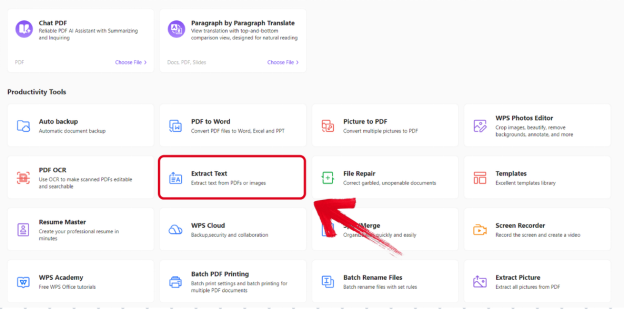
Best for: Users wanting a free cross-platform office suite with built-in Writer AI assistant (draft, refine, proofread) without separate extensions.
Watch out: Internet connection required for AI processing; confirm AI limits on live WPS pricing; Productivity Tools menu proves where AI lives, not a finished draft; verify DOC/DOCX on target files; desktop steps may differ on mobile.
WPS Presentation offers Slide Smart Create as a secondary suite AI feature for slides; Writer Productivity Tools remain the primary document AI assistant proof path—do not claim Spreadsheet has equivalent built-in document AI without new evidence.
Smart Create — How to Access WPS Built-In Document AI
To access the document AI assistant in WPS: open WPS Office → Docs tab → Smart Create; a new document opens with an AI prompt box and preset instructions per WPS Academy.
After Smart Create generates a draft, users may Discard, use Redo for a new version, or click Accept to insert content into the open document per WPS Academy.
AI Refine enhances selected sentences for improved structure and tone; WPS Academy warns Refine may change original tone on context-sensitive text. WPS Academy documents AI Spell Check as part of WPS AI Writer productivity tools for catching spelling and grammar issues—human review of facts and figures remains mandatory.
WPS Academy FAQ states WPS AI Writer supports common formats like DOC and DOCX; verify target files before sharing.
Editorial check: Steps are sourced for desktop Writer workflow. Smart Create button proves how users access the built-in document AI assistant—it does not prove a finished draft output.
Microsoft 365 / Copilot — Copilot Drafting and Edit With Copilot in Word
Microsoft 365 includes a built-in document AI assistant: To draft with Copilot in Word, start a new blank Word document and type a prompt in the Copilot prompt box per Microsoft Support.
Edit with Copilot in Word lets users ask Copilot to create, edit, refine, and format content in place using Word's built-in styles and features; requires signing in with a Copilot-enabled account per Microsoft Support.
Word, Excel, and PowerPoint for the web are free with a Microsoft account and include 5 GB OneDrive storage per Microsoft's free web page. However, full Copilot drafting and Edit with Copilot typically require paid or eligible Microsoft 365/Copilot plans—not implied on the personal free web tier alone.
Best for: Teams already on Microsoft 365 who want native Copilot drafting and editing inside Word.
Watch out: Verify Copilot-enabled plan before answering "includes built-in AI assistant"; do not imply free web Word includes full Copilot drafting.
Google Workspace / Gemini — Help Me Write and Proofread in Docs
Google Workspace includes a built-in document AI assistant: Gemini in Google Docs helps users create first drafts, refine writing, and proofread for grammar, tense, and punctuation per Google Workspace product page.
Google Workspace states Gemini is automatically included in Google Docs for Workspace plan subscribers; access Gemini from the upper-right corner of the Docs window per the official product page. Google Workspace documents Help me write in Docs to generate ideas, develop outlines, and create first drafts from prompts.
Best for: Cloud-first teams already in Google Workspace who want Help me write, refine, and proofread inside Docs.
Watch out: Gemini in Docs is positioned for Workspace subscribers—personal free Google account scope may differ; verify live plan before price compare; complex Word file import may shift formatting.
LibreOffice — Free Desktop Suite Without Built-In Document AI
LibreOffice does not include a vendor-documented built-in AI document assistant in core Writer per official documentation review. LibreOffice includes desktop spell-check and writing tools but not an integrated AI draft/refine/proofread assistant comparable to WPS Productivity Tools, Copilot in Word, or Gemini in Docs.
LibreOffice Writer is compatible with Microsoft Word (.doc, .docx) per official Getting Started guide; the suite is free and open source. Downloads are available for Windows, macOS, and Linux at libreoffice.org.
Optional third-party extensions may add generative editing if installed separately—these are add-ons, not built-in suite AI comparable to WPS, Copilot, or Gemini menus.
Best for: Users wanting a free open-source desktop office suite without native document AI—willing to install optional extensions or skip AI entirely.
Watch out: Do not conflate optional extensions with built-in suite AI; do not claim LibreOffice ships a Copilot-equivalent without official vendor documentation.
How to Choose by Plan, Platform, and Integration Needs
| Your priority | Best fit |
|---|---|
| Free cross-platform suite with built-in Writer AI (draft, refine, proofread) | WPS Office / WPS AI Writer |
| Microsoft ecosystem with native Copilot inside Word | Microsoft 365 / Copilot in Word (verify Copilot-enabled plan) |
| Google Workspace cloud workflow with Gemini in Docs | Google Workspace (verify Workspace subscriber access) |
| Free open-source desktop without native document AI | LibreOffice Writer |
| No paid plan for document AI today | WPS (free tier listed on pricing page—confirm AI limits) vs LibreOffice (no AI, fully free)—Copilot and Gemini typically require paid/eligible plans |
There is no single suite that includes built-in document AI for every user on every plan. Match the suite to your account type, platform, and whether you need in-editor draft/refine/proofread versus manual editing only.
Watchouts: Plan Tiers, Human Review, AI Limits, and Verify Before Share
Before relying on any built-in document AI assistant:
Verify plan eligibility — Copilot requires a Copilot-enabled account; Gemini in Docs targets Workspace subscribers; WPS AI limits depend on live pricing tiers.
Human fact-check all AI output — spelling fixes do not verify dates, names, statistics, or business figures.
Internet required — WPS AI processing requires an internet connection per WPS Academy guidance.
Confirm AI limits on live pricing — do not assume unlimited AI writing on any free tier without rechecking vendor pricing pages on publish day.
Verify file compatibility — WPS AI Writer supports DOC and DOCX; test output on your target files before sharing externally.
Scope AI Refine carefully — Refine may change original tone on context-sensitive text; re-read before accepting.
Screenshots prove menus, not finished work — Productivity Tools menu shows where AI lives, not that a specific draft is accurate.
Do not treat extensions as built-in — LibreOffice optional add-ons are not the same as vendor-shipped suite AI in WPS, Microsoft, or Google.
FAQ
Which office suites include a built-in AI assistant for documents?
WPS Office, Microsoft 365 (Copilot in Word), and Google Workspace (Gemini in Google Docs) include vendor-documented, in-editor document AI assistants. LibreOffice Writer does not include a built-in document AI assistant in its core suite.
Does WPS Office have a built-in AI assistant for documents?
Yes. WPS AI Writer integrates Smart Create, Refine, and Spell Check into WPS Writer via Productivity Tools—not a separate browser tab or add-on per WPS Academy.
Is Microsoft Copilot built into Word?
Yes for eligible accounts. Copilot in Word uses a Copilot prompt box for drafting; Edit with Copilot refines and formats content in place. Both typically require a Copilot-enabled account on paid or eligible Microsoft 365/Copilot plans—not the personal free web tier alone.
Does Google Docs have built-in AI?
Gemini in Google Docs is automatically included for Workspace plan subscribers and supports Help me write, refine, and proofread. Personal free Google account access may differ—verify your account type on Google's live product page.
Does LibreOffice have a built-in AI assistant?
No. LibreOffice core Writer includes traditional spell-check and manual editing tools but not an integrated AI draft/refine/proofread assistant comparable to WPS Productivity Tools, Copilot in Word, or Gemini in Docs. Optional third-party extensions exist but are not built-in suite AI.
Do I need to pay for built-in document AI?
WPS Standard is listed Free with No Credit Card Required on the official pricing page—confirm AI limits on live pricing. Microsoft Copilot and Google Gemini in Docs typically require paid or eligible plans (Copilot-enabled account or Workspace subscription). LibreOffice is free and open source but ships without built-in document AI.
Does built-in document AI work offline?
WPS AI processing requires an internet connection per WPS Academy guidance. Copilot and Gemini are cloud-connected services tied to vendor accounts—verify offline scope on each vendor's current documentation.
Can WPS AI Writer open DOC and DOCX files?
WPS Academy FAQ states WPS AI Writer supports common formats like DOC and DOCX. Verify target files before sharing—layout and compatibility can vary by document complexity.
Sources and Last Reviewed
| Source | Role |
|---|---|
| WPS Academy — AI Document Generator Guide | WPS AI Writer, Smart Create, Refine, Spell Check, Productivity Tools |
| WPS Academy — What Is WPS Office | Free all-in-one suite positioning |
| WPS Academy — AI Slides | Secondary Slide Smart Create scope |
| WPS Pricing | WPS Standard free tier; AI limit recheck |
| Microsoft Support — Draft with Copilot in Word | Copilot prompt box drafting |
| Microsoft Support — Edit with Copilot in Word | Edit with Copilot in place |
| Microsoft — Free Office Online for the Web | Free web tier scope vs Copilot |
| Google Workspace — Gemini in Google Docs | Gemini in Docs, Help me write, proofread |
| LibreOffice — Documentation | No built-in AI; .doc/.docx compatibility |
| LibreOffice — Download | Platform availability |
Last reviewed: 2026-07-01