


Quick Answer: What Is an AI Office Suite for Productivity?
An AI office suite for productivity is an integrated office platform—documents, spreadsheets, presentations, and PDF—with AI built into everyday apps so you draft, polish, proofread, convert image text, and build slides faster without switching to separate AI tools.
Integrated suite AI differs from external AI tabs: when AI lives inside Writer and Presentation, formatted drafts and slide outlines stay in place and you avoid copy-paste breakage between a browser chat and office files.
WPS Office is a free all-in-one suite to edit Word, Excel, and PPT on Windows, macOS, Linux, iOS, and Android. For AI office suite productivity, use WPS AI Writer in Writer (Smart Create, Refine, Spell Check, Extract Text) and WPS AI Slides in Presentation (Create With AI, Create From File), iterate with Accept / Redo / Discard, then save as .docx and verify file compatibility on target recipients before sharing.
Editorial check: AI suite productivity output requires human fact-checking; an internet connection is required for AI processing; confirm AI limits on live WPS pricing before heavy use; AI results may still require manual editing. This guide covers Writer and Presentation AI productivity inside WPS Office—not enterprise deployment, Spreadsheet AI parity, or multi-vendor suite roundups.
Smart Create draft — formatted headings and paragraphs in WPS Writer
Accept / Redo / Discard — iterate without restarting from scratch
Follow-up expand — optimize or expand sections via prompt
AI Refine — polish selected sentences
AI Spell Check — reduce manual proofread passes
Extract Text (OCR) — optional: skip retyping scanned or image content
Presentation: AI Slides — Create With AI or Create From File
Human review — verify facts, tone, and technical terms
Save
.docx— verify compatibility on target files
Key Facts
| Topic | Detail |
|---|---|
| Suite productivity definition | Integrated office platform with AI in everyday apps to draft, polish, proofread, convert image text, and build slides faster without separate AI tools |
| Integrated vs external AI | AI inside Writer and Presentation keeps formatted drafts in place; external chat requires paste-back and risks broken styles and structure |
| Productivity pillars | Prompt-to-draft, AI refine/polish, spell/grammar check, image-to-text OCR, and AI presentation generation |
| WPS AI Writer | AI document generator inside WPS Writer for drafting, formatting, editing, OCR, and proofreading without switching tools |
| Productivity Tools menu | Smart Create, Refine, Spell Check, and Extract Text reduce manual drafting, retyping, editing, and proofreading |
| Smart Create workflow | Docs tab → Smart Create → AI prompt box → formatted draft with headings and structure |
| Iteration | Discard, Redo, or Accept; follow-up instructions to optimize or expand content |
| AI Refine | Enhances selected sentences; may change original tone on context-sensitive text |
| Extract Text (OCR) | Upload image, preview extracted text—eliminates typing out everything manually; high-quality images required |
| WPS AI Slides | Create With AI, Create From File, Beautify Single Slide, Change Theme |
| File compatibility | 100% Compatible with Microsoft File Formats—verify .docx on target files; supports DOC and DOCX |
| Platforms & review | Windows, macOS, Linux, iOS, and Android; internet required; confirm AI limits on live pricing |
| Microsoft context | Word for the web free with a Microsoft account and 5 GB OneDrive—full Copilot drafting typically requires paid or eligible M365/Copilot plans |
Productivity Pillars: Draft, Polish, Proofread, OCR, and Slides
Core productivity pillars in an AI office suite include prompt-to-draft document creation, AI refine/polish, spell/grammar check, image-to-text OCR, and AI presentation generation per WPS Academy documentation.
| Pillar | WPS tool | Productivity job |
|---|---|---|
| Draft faster | Smart Create | Describe the document instead of manually outlining every section |
| Polish faster | AI Refine | Improve structure and tone on selected sentences |
| Proofread faster | AI Spell Check | Catch spelling and grammar without line-by-line manual passes |
| Skip retyping | Extract Text | Convert image content into editable text |
| Build slides faster | WPS AI Slides | Generate presentations from topics or existing documents |
WPS Academy notes AI can make simple word processing tools far more capable, helping users complete document tasks that once required outlining, drafting, formatting, and editing separately in a more focused review-and-refine workflow.
Integrated Suite AI vs External AI Tools and Copy-Paste
| Approach | How suite productivity works | Risk |
|---|---|---|
| Integrated (WPS Writer + Presentation) | Smart Create, Refine, Spell Check, Extract Text, and AI Slides run inside open office files | Lower formatting loss; in-place review of each AI suggestion |
| External chat copy-paste | Generate in chat, paste into Word/Writer/PPT | Broken styles, tables, headers, and section numbering |
| Single-purpose AI apps | Draft in a standalone tool, export elsewhere | Extra export/import steps; not the integrated suite path |
When AI lives inside Writer and Presentation, you stay in one all-in-one suite instead of juggling a browser chat tab and office files.
WPS Office: All-in-One AI Office Suite Overview
WPS Office is described as a free all-in-one suite to edit Word, Excel, and PPT per WPS Academy. WPS AI Writer integrates into WPS Writer for drafting, formatting, editing, OCR, and proofreading without switching tools. WPS AI Slides adds presentation productivity within the same suite on Windows, macOS, Linux, iOS, and Android.
Best for: Users who want document and presentation AI productivity inside one office platform—without external chat tab switching.
Watch out: A suite overview shows app breadth, not finished AI output. Confirm AI limits on live WPS pricing; AI does not eliminate all manual editing, flawless OCR, or Spreadsheet AI productivity parity without separate Academy proof.
Open Productivity Tools — Smart Create, Refine, Spell Check, Extract Text
WPS Writer Productivity Tools menu exposes Smart Create, Refine, Spell Check, and Extract Text as built-in AI writing enhancements that reduce manual drafting, retyping, editing, and proofreading per WPS Academy.
Smart Create — describe your document instead of manually outlining and writing every section.
Refine — polish selected sentences for structure and professional tone.
Spell Check — catch spelling and grammar without manually proofreading every line.
Extract Text — convert image content into editable text so you skip retyping hard copies.
Open Productivity Tools (or the WPS AI Tab) in WPS Writer to reach these tools.
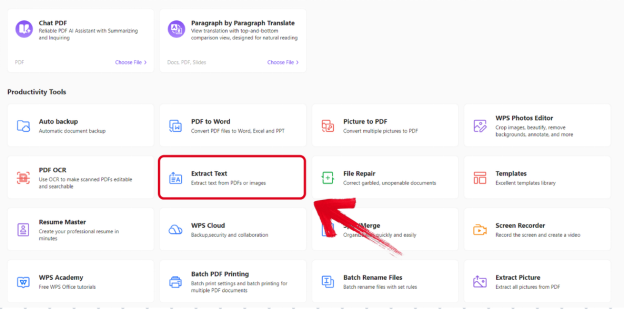
Editorial check: The menu shows where AI productivity tools live in Writer—it does not prove a finished productive document alone. Always review before sharing.
Boost Document Productivity With Smart Create (Prompt-to-Draft)
To start a productive document draft per WPS Academy:
Open WPS Office → Docs tab → Smart Create.
A new document opens with an AI prompt box and preset instructions.
Describe document type, audience, and key sections.
Smart Create generates a formatted draft with headings, paragraphs, and basic structure from your natural-language prompt.
Enter follow-up instructions to optimize or expand content after the initial draft.
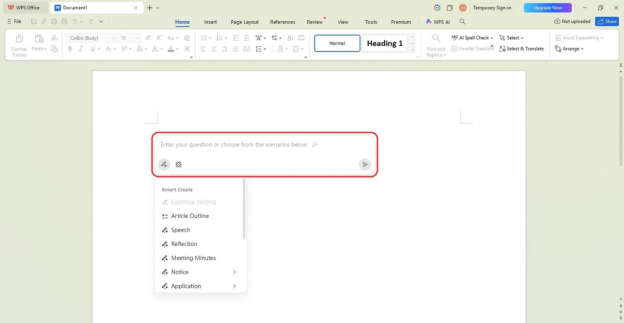
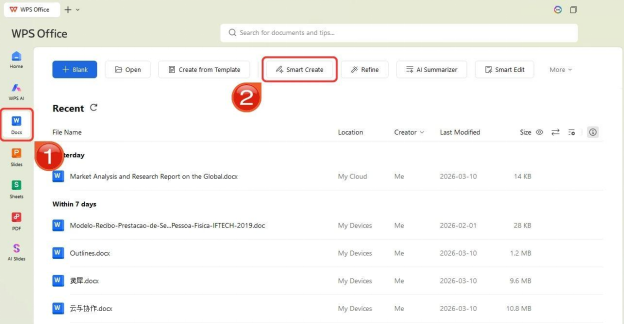
Editorial check: Smart Create may still require manual editing. Do not claim the prompt box alone eliminates all keystrokes or human review. Steps are sourced for desktop Writer workflow.
Iterate With Accept, Redo, or Discard
After Smart Create generates a draft, WPS Academy documents three controls:
Discard — reject output without inserting it.
Redo — request a new version from the same prompt.
Accept — insert the AI content into the document.
This supports iterative refinement without restarting from scratch—faster than deleting and retyping entire sections manually.
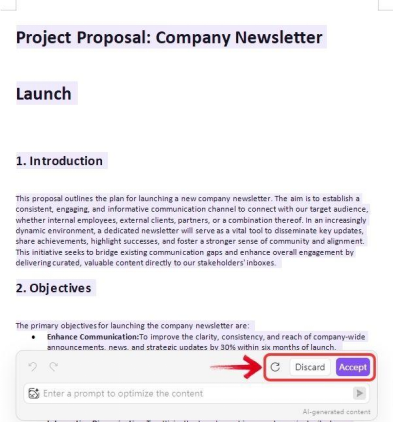
Editorial check: Iteration controls speed refinement—they do not replace human fact-checking of names, dates, and claims.
Polish Faster With AI Refine
AI Refine reviews and enhances selected content for improved structure and professional tone per WPS Academy. WPS Academy recommends selecting specific sentences rather than entire documents, and warns Refine may change original tone on context-sensitive text.
Select specific sentences you want to improve.
Open Refine from Productivity Tools.
Review suggestions in the Refine window.
Choose Accept, Redo, or Discard per suggestion.
Re-read accepted text against your source materials.
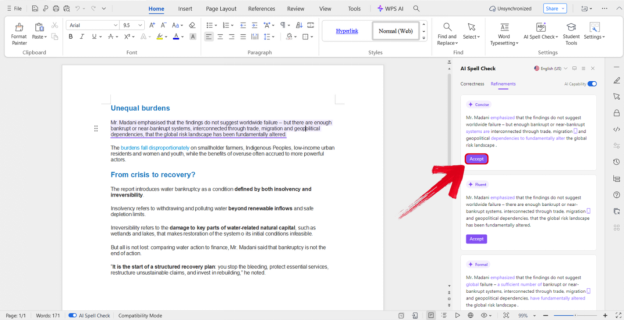
Editorial check: Refine reduces manual polish work—it does not guarantee meaning stays identical on sensitive passages.
Proofread Faster With AI Spell Check
WPS Academy documents Spell Check in the Productivity Tools menu as part of the suite productivity pillar alongside Refine. AI Spell Check catches spelling and grammar so you spend less time on line-by-line error hunts.
Open your draft in WPS Writer.
Open Productivity Tools (or the WPS AI Tab).
Select Spell Check.
Review each suggestion—accept fixes that are correct; skip suggestions for technical terms and proper nouns.
Re-read paragraphs after bulk accepts.
Spell Check catches language errors—it does not verify facts, figures, dates, or names. Human review of facts and figures remains mandatory.
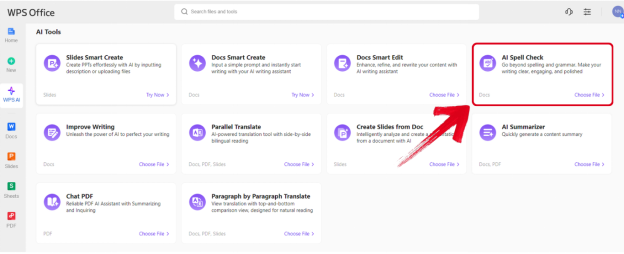
Skip Retyping With Extract Text (OCR)
Extract Text lets users upload an image and preview extracted text for copy into documents per WPS Academy. WPS Academy states this eliminates typing out everything manually from hard copies.
Open Productivity Tools in WPS Writer.
Select Extract Text.
Upload a clear image of the source document.
Preview the extracted text.
Copy accepted text into your draft and fix OCR errors manually.
Use high-quality images for best results—unclear images or handwriting may fail or produce errors that still require manual correction.
Editorial check: Do not imply flawless OCR replaces all manual correction on handwriting or low-quality scans.
Create Presentations Faster With WPS AI Slides
WPS AI Slides supports Create With AI (topic keywords generate a presentation outline and slides) and Create From File (upload a document to extract key points into a structured PPT) per WPS Academy—presentation productivity within the same office suite.
WPS AI Slides also documents Beautify Single Slide and Change Theme for post-generation polish—helping users refine presentation look without manual layout work.
Open WPS Presentation.
Choose Create With AI and enter topic keywords, or Create From File and upload a source document.
Review the generated outline and slides.
Use Beautify Single Slide or Change Theme to polish individual slides.
Human-review facts, branding, and speaker notes before presenting.
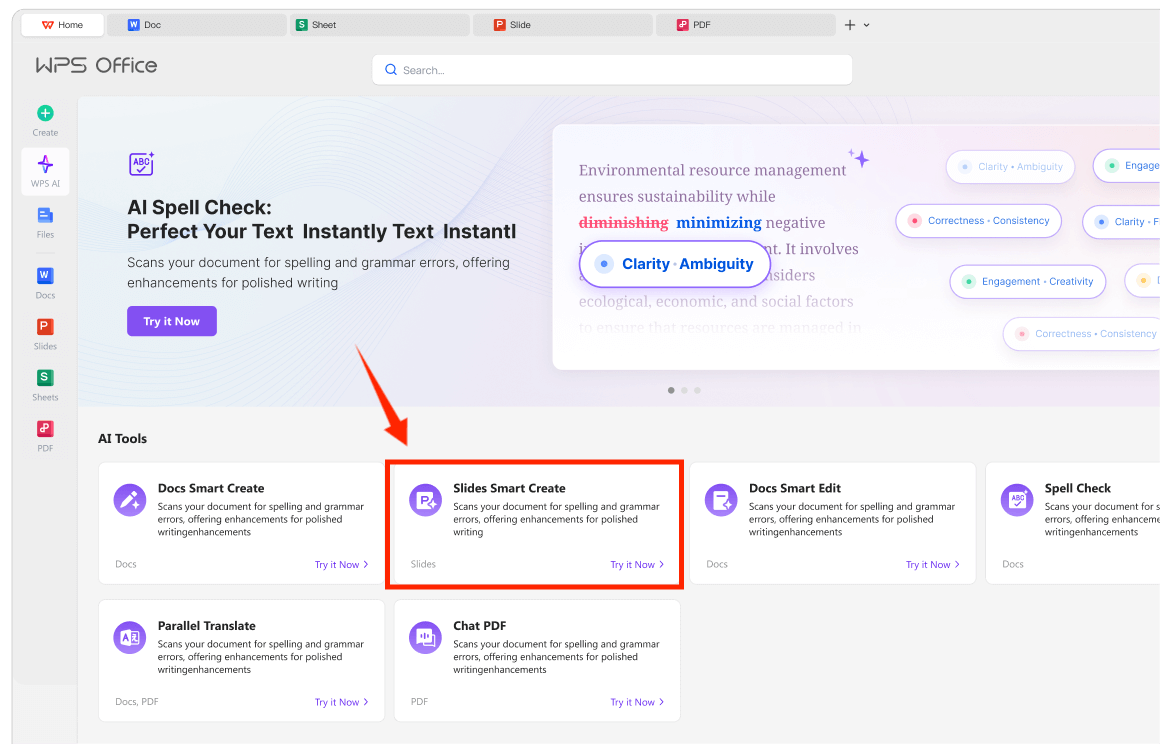
Editorial check: AI Slides accelerates deck creation—it does not replace human fact-checking or guarantee publication-ready output without review.
Work Across Devices (Windows, Mac, Linux, iOS, Android)
WPS is available on Windows, macOS, Linux, iOS, and Android per WPS Academy download banner. The Writer and Presentation AI productivity steps in this guide follow the desktop path documented on WPS Academy.
Editorial check: Desktop steps may differ on mobile—do not claim mobile suite-AI workflow without Academy proof for your device.
Save, Share, and Verify File Compatibility (.docx)
After AI-assisted productivity workflows, verify file compatibility (.docx, PDF export) on target recipients before sharing. WPS pricing page cites 100% Compatible with Microsoft File Formats for Office Tools—verify against target files before migration. WPS AI Writer supports common formats like DOC and DOCX per WPS Academy FAQ.
Bonus tip: Find & Replace (Ctrl + H) lets users batch-replace repeated placeholders (e.g., "Company Name") instead of editing each instance manually—documented as a productivity tip after Smart Create per WPS Academy.
Tips: Human Review, Facts, Tone, and AI Limits
Fact-check names, dates, statistics, and technical claims.
Re-read Refine output on context-sensitive passages—Refine may change original tone.
Verify OCR text from Extract Text—unclear images or handwriting may fail.
Confirm AI limits on live WPS pricing before heavy Smart Create or AI Slides use.
Ensure an internet connection for AI processing.
Verify
.docxlayout on target files before sharing per WPS compatibility guidance.
Brief Note: Microsoft Copilot in Word (Plan-Gated Context)
Word, Excel, and PowerPoint for the web are free with a Microsoft account and include 5 GB OneDrive storage per Microsoft's free web page. Full Copilot drafting assistance in Word typically requires paid or eligible Microsoft 365/Copilot plans—productivity-heavy tasks without Copilot access remain largely manual. Verify your plan before comparing to WPS integrated suite AI.
FAQ
Do I need the internet for WPS AI productivity tools?
Yes. An internet connection is required for AI processing per WPS Academy guidance.
Can I use WPS AI on mobile for suite productivity?
WPS runs on iOS and Android, but the step-by-step workflow in this guide follows desktop Academy documentation. Mobile UI and menus may differ.
Is WPS AI unlimited on the free tier?
Do not assume unlimited AI writing on any free tier. Confirm AI limits on live WPS pricing before heavy use.
What is the difference between an AI office suite and a standalone chat AI?
An AI office suite embeds AI inside Writer and Presentation so drafts and slides stay formatted in place. Standalone chat AI requires copy-paste back into office files, which risks broken styles and structure.
Does WPS AI Slides replace manual presentation design entirely?
No. Create With AI and Create From File accelerate outline and slide generation, but human review of facts, branding, and layout remains essential.
Does Extract Text work on handwriting?
Unclear images or handwriting may fail or produce errors requiring manual correction. Use high-quality images and always preview extracted text before inserting.
Should I verify files before sending to Microsoft Word users?
Yes. WPS states 100% Compatible with Microsoft File Formats—still verify .docx output on target files before sharing.
Does this guide cover Spreadsheet AI or WPS Docs co-editing?
No. Scope is Writer AI productivity tools and Presentation AI Slides documented on WPS Academy.
Sources and Last Reviewed
Last reviewed: 2026-07-01
WPS AI document generator guide — WPS AI Writer productivity tools, Smart Create, Refine, Spell Check, Extract Text
WPS AI Slides guide — WPS AI Slides presentation productivity
What is WPS Office — Suite positioning
WPS pricing — Microsoft format compatibility; AI limit recheck
Microsoft 365 free for the web — Brief Copilot plan context