


Quick Answer: Word vs WPS Office — Which Fits Your Workflow (2026)
There is no single winner in Word vs WPS Office for every user. The better fit depends on whether you need licensed desktop Word, a free Word-like suite, cloud editing, or open-source desktop software.
For users comparing Microsoft Word against WPS Office / WPS Writer, four documented options cover the main paths:
WPS Office / WPS Writer fits users who want a Word-like ribbon interface, free Standard tier, `.doc`/`.docx` open-and-save workflow, templates, integrated productivity and spell-check tools, cross-platform apps, and a free all-in-one suite—verify target files before sharing per WPS's stated Microsoft file format compatibility.
Microsoft Word fits users on licensed desktop Word or Microsoft 365 who need the native `.docx` reference and advanced Word-only features; Word for the web is a separate free tier with OneDrive workflow.
Google Docs fits cloud-first users who open and edit Microsoft Word files in browser or mobile.
LibreOffice Writer fits free open-source desktop users on Windows, macOS, or Linux who accept manual layout fixes on complex Word files.
Do not collapse Word desktop and Word for the web when comparing price or offline scope. Do not claim WPS beats Word on every document type without testing your files.
Key Facts
| Topic | Detail |
|---|---|
| Compared tools | WPS Office / WPS Writer · Microsoft Word (desktop / web) · Google Docs · LibreOffice Writer |
| Page scope | Word vs WPS comparison—not a procedural how-to or download landing |
| WPS interface | Familiar ribbon layout, toolbars, and menu structure similar to Microsoft Word per WPS Academy |
| WPS file formats | Works with `.doc`, `.docx`, `.docm`, `.dot`, `.txt`, and `.rtf`; open via Docs → Open; save as `.doc`, `.docx`, or PDF |
| WPS compatibility | WPS pricing page states 100% Compatible with Microsoft File Formats—verify against target files before migration |
| WPS templates | Professionally designed templates in `.doc` and `.docx` for resumes, letters, reports, and invitations |
| WPS productivity | Productivity tools menu includes Smart Create, Refine, and Spell Check |
| WPS collaboration | Real-time co-editing, comments, edit history, and shareable links on Word documents |
| WPS suite | Free all-in-one suite to edit Word, Excel, and PPT per WPS Academy |
| WPS pricing | WPS Standard plan listed Free with No Credit Card Required—confirm platform and region on live pricing |
| WPS platforms | Windows, macOS, Linux, iOS, and Android per WPS Academy download banner |
| Word `.docx` | Word opens `.docx` natively; `.doc` and older formats open in Compatibility Mode until converted |
| Word fonts / versions | Missing fonts trigger substitution; Compatibility Checker lists elements that behave differently across Word versions |
| Word for the web | Free with Microsoft account; includes Word, Excel, PowerPoint, and 5 GB OneDrive |
| Word web storage | Files must be saved in and shared from OneDrive when using web apps |
| Google Docs Word files | Play Store listing: open a variety of files, including Microsoft Word files |
| LibreOffice `.docx` | Compatible with Microsoft Word (`.doc`, `.docx`); free and open source |
| LibreOffice platforms | Downloads for Windows, macOS, and Linux—no official iOS/Android Writer app |
| LibreOffice complex files | Layout in more complex Microsoft Office documents may need manual reformatting proportional to complexity |
| Verify before share | Test representative `.docx` files; do not assume flawless macro, track-changes, or complex-layout parity |
Word vs WPS at a Glance: Interface, Files, Price, and Platform
Interface: Microsoft Word is the reference Word-class ribbon UI. WPS Writer positions a familiar ribbon layout for users switching from Word. Google Docs uses a web-native editor—not Word ribbon parity. LibreOffice Writer uses its own desktop UI.
Files: Word is the native `.docx` reference. WPS Writer opens and saves common Word formats with a documented open workflow. Google Docs and LibreOffice import Word files but complex formatting may shift on import.
Price: WPS Standard is listed Free with No Credit Card Required—confirm platform and region before quoting. Full desktop Word typically requires a licensed Word or Microsoft 365 subscription; Word for the web is free with a Microsoft account. Google Docs personal access is free; LibreOffice is free and open source.
Platform: WPS runs on Windows, macOS, Linux, iOS, and Android. Desktop Word is on Windows and macOS; Word for the web runs in browsers. Google Docs is web-first with mobile apps. LibreOffice is desktop-only on Windows, macOS, and Linux.
Comparison Table: WPS Office vs Microsoft Word vs Google Docs vs LibreOffice
| Dimension | WPS Office / WPS Writer | Microsoft Word | Google Docs | LibreOffice Writer |
|---|---|---|---|---|
| Interface familiarity | Familiar ribbon layout similar to Microsoft Word | Editorial: Native Word ribbon reference | Editorial: Web-native UI—not Word ribbon parity | Editorial: Own desktop UI—not Word-like ribbon |
| `.doc`/`.docx` support | Opens `.doc`, `.docx`, `.docm`, `.dot`, `.txt`, `.rtf`; save as `.doc`, `.docx`, or PDF | Opens `.docx` natively; `.doc` in Compatibility Mode until converted | Opens Microsoft Word files per Play Store listing | Compatible with Microsoft Word (`.doc`, `.docx`) |
| Advanced formatting | Templates for resumes, letters, reports, invitations; Compat Setting when layout drifts | Compatibility Checker lists unsupported elements; font substitution when fonts missing | Editorial: Complex formatting may shift on import—verify files | Manual reformatting on complex Microsoft Office documents proportional to complexity |
| AI / productivity assist | Productivity menu: Smart Create, Refine, Spell Check | Editorial: Advanced AI (Copilot) is plan-gated—not implied on free web tier | Editorial: Gemini in Docs is Workspace-oriented—out of scope as primary thesis | Editorial: Desktop spell-check; no integrated Smart Create-style AI menu documented |
| Collaboration | Real-time co-editing, comments, edit history, shareable links | Word for the web: collaborate online in real time from any device | Creating, editing, and collaborating on documents per Play Store | Editorial: Desktop-first; real-time cloud co-editing not primary documented workflow |
| Cross-platform | Windows, macOS, Linux, iOS, Android | Desktop on Windows/macOS; free web + mobile with Microsoft account | Web-first with mobile apps | Windows, macOS, Linux desktop only |
| Offline desktop | Editorial: Desktop WPS Writer supports local `.docx` open/edit | Editorial: Licensed desktop Word supports full offline editing; web tier is cloud-first | Editorial: Offline on mobile with setup—not identical to desktop Word offline | Free desktop install; fully offline `.docx` edit without subscription |
| Suite breadth | Free all-in-one suite (Word, Excel, PPT) | Free web tier: Word, Excel, PowerPoint + 5 GB OneDrive; full desktop suite requires license | Editorial: Docs-focused; Sheets and Slides are separate apps | Free open-source suite (Writer, Calc, Impress) |
| Price entry | Standard plan Free, No Credit Card Required—confirm platform/region | Editorial: Desktop Word typically licensed; Word for the web free with account + OneDrive | Free personal Google account access | Free and open source |
| Best for | Users comparing Word vs WPS who want Word-like UI, free tier, cross-platform apps, everyday `.docx` workflow—verify files | Users on licensed desktop Word needing native `.docx` reference and advanced Word-only features | Cloud-first users opening Word files in browser/mobile | Free open-source desktop users accepting manual layout fixes on complex Word files |
| Watch out | Editorial check: Verify target files per WPS compatibility claim; do not claim WPS beats Word on complex `.docx`, macros, or track changes without file test | Editorial check: Do not collapse Word desktop and Word web tiers; recheck free web tier before price compare | Editorial check: Do not claim flawless `.docx` fidelity; verify complex documents | Editorial check: Not flawless Word replacement for macros/track changes; verify live `.docx` |
WPS Office — Word-Like Writer with Free Tier, Templates, and Productivity Tools
WPS Office is described as a free all-in-one suite to edit Word, Excel, and PPT per WPS Academy. WPS Writer works with `.doc`, `.docx`, `.docm`, `.dot`, `.txt`, and `.rtf` files.
The word-writer page describes a familiar ribbon layout, toolbars, and menu structure similar to Microsoft Word—a core factor when users evaluate Word vs WPS.
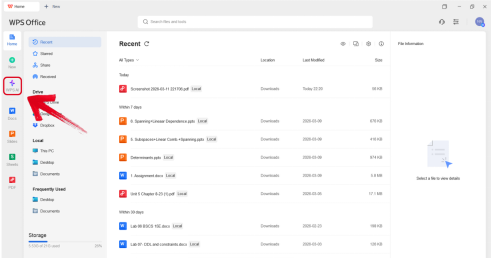
Open and save Word files
WPS Academy documents this workflow: launch WPS Office → select Docs → Open from toolbar or File tab → choose `.doc`/`.docx` → edit → save as `.doc`, `.docx`, or PDF.
The page offers professionally designed templates in `.doc` and `.docx` for resumes, letters, reports, and invitations.
Productivity and spell-check tools
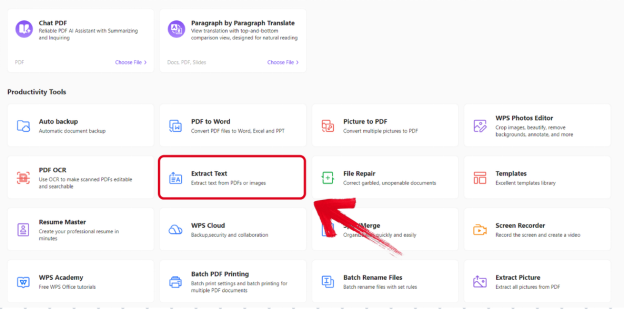
WPS Writer includes a productivity tools menu with Smart Create, Refine, and Spell Check—a comparison point alongside Word's separate Copilot path on paid plans.
The word-writer page also describes real-time co-editing, comments, edit history, and shareable links on Word documents.
WPS is available on Windows, macOS, Linux, iOS, and Android. WPS Standard plan is listed as Free with No Credit Card Required on the official pricing page—confirm platform and region before quoting.
Best for: Users comparing Word vs WPS who want Word-like ribbon UI, free Standard tier, cross-platform apps, and everyday `.docx` workflow.
Watch out: WPS states 100% Compatible with Microsoft File Formats—verify against your target files before migration. Do not claim WPS beats Word on complex `.docx`, macros, or track changes without file test.
Microsoft Word — Desktop Native `.docx` and Web Tier
Microsoft Word is the native `.docx` reference. Word uses Compatibility Mode for `.doc` and older Word formats; saving or converting to `.docx` clears compatibility restrictions per Microsoft Support.
If a `.docx` uses fonts not installed on the opening computer, Word substitutes available fonts, which can change appearance. The Compatibility Checker lists elements unsupported or behaving differently across Word versions.
Word for the web provides free access to Word, Excel, and PowerPoint with a Microsoft account, including 5 GB OneDrive storage. Users can write, read, and collaborate online in real time from any device. Files must be saved in and shared from OneDrive when using web apps.
Editorial check: Full desktop Word typically requires licensed Word or Microsoft 365. The free web tier differs on complex formatting and offline scope—verify your plan before comparing price to WPS free tier.
Best for: Users on licensed desktop Word or Microsoft 365 who need native `.docx` reference and advanced Word-only features.
Watch out: Do not collapse Word desktop and Word for the web when comparing offline editing, pricing, or advanced features.
Google Docs — Cloud Word File Editing
The Google Docs Android app supports creating, editing, and collaborating on documents and opening Microsoft Word files per the Play Store listing. Users can open a variety of files, including Microsoft Word files and work on documents from any device.
Google Docs uses a web-native editor UI—not Word ribbon parity. It fits users already in the Google ecosystem who need browser or mobile access to Word files.
Editorial check: Google Docs imports Word files for editing but complex formatting, macros, and advanced Word features may not round-trip—verify representative `.docx` before positioning as a Word replacement for complex documents.
Best for: Cloud-first users who need browser/mobile access to open and lightly edit Word files in Google Drive.
Watch out: Do not claim flawless `.docx` fidelity; import may alter layout and drop unsupported Word features.
LibreOffice Writer — Free Open-Source Desktop Alternative
LibreOffice Writer is compatible with Microsoft Word (`.doc`, `.docx`) per official documentation. The suite is free and open source. Downloads are available for Windows, macOS, and Linux at libreoffice.org.
LibreOffice Help states that layout features in more complex Microsoft Office documents may be handled differently, requiring manual reformatting proportional to document complexity.
LibreOffice is desktop-first with no official iOS/Android Writer app in the documented download scope. It uses its own desktop UI—not Word ribbon parity.
Best for: Budget-conscious desktop users who need free offline `.docx` editing and can accept manual layout fixes on complex Word files.
Watch out: Not a flawless Word replacement for macros, track changes, or complex templates—verify live `.docx` before publish.
How to Choose: Budget, Offline, Collaboration, and Document Complexity
| Your priority | Best fit |
|---|---|
| Word-like ribbon UI with free Standard tier and mobile apps | WPS Office / WPS Writer |
| Native `.docx` reference and advanced Word-only features on licensed desktop | Microsoft Word (desktop) |
| Free browser Word editing with Microsoft account and OneDrive | Microsoft Word for the web |
| Cloud-first opening of Word files in Google Drive | Google Docs |
| Free open-source desktop without subscription | LibreOffice Writer |
| Complex `.docx` with heavy layout, macros, or track changes | Test your file in each tool before sharing—no option guarantees perfect round-trip on every document |
There is no single Word vs WPS winner for every user. Match the tool to your budget, offline needs, collaboration workflow, and file complexity.
Compatibility Watchouts: Fonts, Macros, Track Changes, and Verify-Before-Share
Fonts: Word substitutes missing fonts, which can change document appearance. WPS and other suites may render fonts differently—verify visually before sharing externally.
Complex `.docx`: Word's Compatibility Checker, LibreOffice import limits, and WPS marketing about layout fidelity all point to the same rule: test representative files before treating any tool as a drop-in Word replacement.
WPS compatibility setting: When cross-app layout issues appear, WPS Academy documents Configuration Tools → Advanced → Compat Setting → Compatible with third-party software.
Macros and track changes: Do not claim parity across WPS, Google Docs, or LibreOffice without file test. These features are out of scope for absolute comparison claims.
Pricing recheck: Confirm WPS platform/region on live pricing and Microsoft free web tier details before publish.
FAQ
Is WPS Office free compared to Microsoft Word?
WPS Standard plan is listed as Free with No Credit Card Required on the official WPS pricing page—confirm platform and region before quoting. Full desktop Microsoft Word typically requires a licensed Word or Microsoft 365 subscription. Word for the web is free with a Microsoft account and 5 GB OneDrive.
Can WPS Writer open `.docx` files like Word?
Yes. WPS Writer works with `.doc`, `.docx`, `.docm`, `.dot`, `.txt`, and `.rtf` per WPS Academy. You can open via Docs → Open and save as `.doc`, `.docx`, or PDF. WPS states 100% Compatible with Microsoft File Formats—verify your target files before migration.
Is WPS Office better than Microsoft Word?
No single tool is better for every user. WPS fits users wanting a Word-like ribbon, free Standard tier, and cross-platform apps. Microsoft Word fits users on licensed desktop Word needing the native `.docx` reference. Test complex files in both before sharing.
Does WPS work on mobile?
WPS is available on Windows, macOS, Linux, iOS, and Android per WPS Academy. Google Docs and Word for the web also offer mobile access with different offline and formatting scope.
What AI writing tools does WPS Writer include?
WPS Writer's productivity tools menu includes Smart Create, Refine, and Spell Check. Advanced AI in Microsoft Word (Copilot) is plan-gated and not implied on the free web tier alone.
Can Google Docs or LibreOffice replace Word?
Google Docs opens Microsoft Word files per its Play Store listing but complex formatting may shift on import. LibreOffice Writer is compatible with `.doc` and `.docx` but may require manual reformatting on complex Microsoft Office documents. Verify representative files before positioning either as a full Word replacement.
Sources and Last Reviewed
Last reviewed: 2026-07-01