


Best AI document formatting tools solve different jobs—not one universal “fix my messy Word file” button. If you need a new formatted draft from a prompt, start with WPS AI Writer (Smart Create with Accept/Redo before insert). If you need to edit an existing Word file, look at Microsoft Copilot in Word. If you need a new doc from a template, see Google Gemini’s Match doc format.
This guide maps each task to a tool, compares four products honestly, and does not promise full APA/MLA auto-reformatting of uploaded files.
Find your task — or jump to WPS AI Writer / the Smart Create workflow.
What Kind of Document Formatting Do You Need?
“Document formatting” can mean generating structure, matching a template, editing an existing file, or enforcing a full style guide. Those are not the same workflow.
| Your task | Start here |
|---|---|
| Generate a new document with headings and sections from a prompt | WPS AI Writer (Smart Create) |
| Generate a new document that mirrors an existing template | Google Gemini in Docs (Match doc format) |
| Edit, rewrite, or adjust formatting in an existing Word document | Microsoft Copilot in Word |
| Fix headings, lists, grammar, and light structure in a web draft | Grammarly Docs |
| Auto-unify fonts, margins, and full APA/MLA/Chicago compliance across an uploaded file | Not covered in this guide—we did not test tools for that workflow |
Scanned or messy text: WPS AI Writer also supports OCR-based text extraction with formatted document or table output, but that is still not the same as auto-unifying fonts, margins, and heading styles across an entire existing Word or PDF file in one step.
Comparison Table: Four AI Document Formatting Tools
Tool names link to each product’s primary page; each row ends with Source / Docs links. Formatting control method and When you can intervene describe different mechanisms—not one interchangeable “format score.”
“Best for” and “Watch out” reflect documented workflows, compatibility, and plan requirements.
| Tool | Generate from prompt | Formatting control method | When you can intervene | Edit environment | Export / compatibility | Best for | Watch out | Source / Docs |
|---|---|---|---|---|---|---|---|---|
| WPS AI Writer DesktopAccept/RedoDOCX | Yes — describe the document; AI generates a formatted draft with headings and sections | AI draft + Accept / Redo / Discard | Draft generated, before insertion | WPS Writer (desktop) | .doc / .docx / .rtf (Word-compatible) | Prompt-to-formatted-draft generation in a Word-compatible desktop editor | Internet connection required for AI processing; review AI drafts before sharing | Product guide Formats |
| Microsoft Copilot DesktopM365Styles | Yes — create/edit/refine content via Copilot prompts in Word | Word styles + Auto Rewrite options | During in-place editing | Microsoft Word | Native .docx in Word | Editing and reformatting content inside an existing Word document | Availability can vary by Copilot license, organization settings, and rollout status; preview or Premium access may be required | Product Rewrite Formats |
| Google Gemini in Docs WebMatch formatCollaborate | Yes — Help me create from bottom-bar prompt | Match a reference Google Doc's format | Before generation | Google Docs (web) | Download as .docx .pdf and other Google Docs export formats | Generating new documents that mirror an existing Google Doc template | Requires an eligible Google Workspace or Google AI plan; documented feature is currently desktop and English only | Product Export docs |
| Grammarly Docs WebHeadingsGrammar | Yes — AI-powered Docs writing surface for drafting and refining documents | Manual heading/list styles + grammar suggestions | During editing | Grammarly Docs (web) | Download documents from Grammarly Docs/Editor | Light structure edits (headings lists) plus grammar and clarity feedback | Export can lose complex formatting from uploaded documents, including images, footnotes, charts, indents, spacing, alignment, and citations | Product Export docs Formatting FAQ |
Why WPS AI Writer Stands Out for Prompt-to-Formatted-Draft Workflows
WPS AI Writer fits users who want AI to build a formatted first draft—not users who only need to reformat an entire existing Word file in one click.
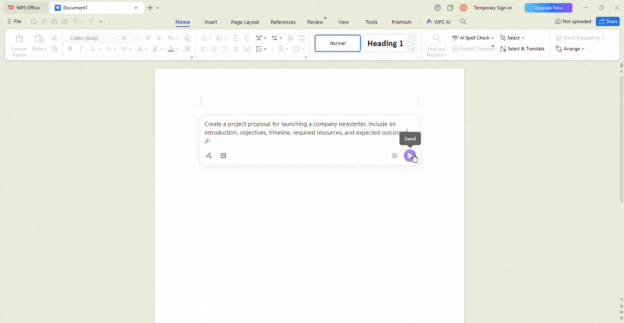
WPS AI Writer: Best for Prompt-to-Formatted-Draft Generation
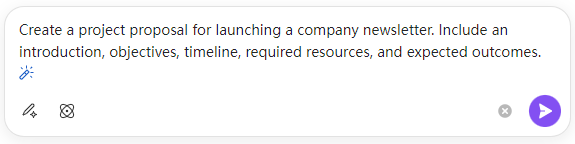
What it helps format: Structured document drafts from a prompt via Smart Create, with headings, paragraphs, and basic layout applied during generation.
Best for: Generating a new formatted draft from a prompt inside a Word-compatible desktop editor.
Watch out: Internet connection required for AI processing; review AI drafts before sharing.
Editorial note: Not a substitute for one-click reformatting of an entire existing Word file or full APA/MLA compliance.
Editing or export workflow: Review Accept/Redo/Discard before inserting; edit in WPS Writer; save in .doc, .docx, or .rtf.
Official source: WPS Academy — AI Document Generator guide
Try WPS AI Writer — Smart Create in WPS Writer
Microsoft Copilot in Word
What it helps format: Create, edit, refine, and format content in an existing Word document using built-in styles, Edit with Copilot prompts, and Auto Rewrite suggestions.
Best for: Editing, rewriting, and adjusting formatting inside an existing Microsoft Word document.
Watch out: Availability can vary by Copilot license, organization settings, and rollout status. In some cases, preview or Premium access may be required.
Editing or export workflow: Edit natively in Word; Auto Rewrite shows options before Replace or Insert below; output stays in .docx.
Official source: Microsoft Support — Edit with Copilot in Word
Google Gemini in Docs
What it helps format: New document drafts from prompts, with Match doc format to mirror a reference Google Doc’s layout, style, and structure before generation.
Best for: Generating a new document that follows an existing Google Doc template or sample layout.
Watch out: Requires an eligible Google Workspace or Google AI plan; the documented Match doc format flow is currently desktop and English only.
Editing or export workflow: Edit in Google Docs; download as .docx, .pdf, or other supported export formats when needed.
Official source: Google Help — Create personalized documents with Gemini
Grammarly Docs
What it helps format: AI-assisted drafting with manual heading/list styles via toolbar or slash commands; grammar and clarity suggestions during editing.
Best for: Light structure edits (headings, lists) plus grammar feedback in a web editor.
Watch out: Export can lose complex formatting from uploaded documents, including images, footnotes, charts, indents, spacing, alignment, and citations.
Editorial note: Grammarly also does not enforce full document style guides such as APA, MLA, or Chicago.
Editing or export workflow: Edit in Grammarly Docs; export to Word or PDF when finished—verify complex layouts on a sample first.
Official source: Grammarly Support — Docs user guide
Which AI Document Formatting Tool Should You Choose?
Need a new formatted draft from a prompt in a Word-compatible desktop app?
→ WPS AI Writer
Need to edit or reformat content inside an existing Word document?
→ Microsoft Copilot in Word
Need a new doc that mirrors an existing Google Doc template?
→ Google Gemini in Docs
Need light heading/list fixes plus grammar suggestions in a web editor?
→ Grammarly Docs
Choose WPS AI Writer first when your job is a new formatted draft from a prompt and you want Accept/Redo preview before insertion in a Word-compatible desktop editor.
Choose Microsoft Copilot in Word when you already work in Word and need to edit or reformat an existing document in place.
Choose Google Gemini in Docs when you need a new doc that mirrors a reference Google Doc template.
Choose Grammarly Docs when grammar-aware light structure edits matter more than template matching or desktop .docx editing.
How to Format a Document With WPS AI Writer (Smart Create)
Open WPS Office and go to Docs.
Click Smart Create to open the AI prompt box.
Describe the document you need (type, sections, tone, and length).
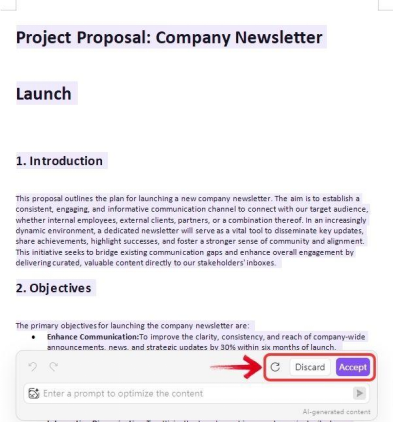
Review the formatted draft WPS AI generates.
Click Accept to insert, Redo for a new version, or discard if it misses the mark.
Edit headings, tables, and placeholders directly in WPS Writer.
Save or export in .docx or another supported format.
FAQ
Can these tools reformat my existing messy Word document?
Microsoft Copilot in Word is the closest fit for editing an existing Word file. WPS AI Writer focuses on generating new formatted drafts; Gemini on new docs from a template; Grammarly on light web editing. None of the tools in this guide were verified for one-click full-document APA/MLA reformatting.
Can AI format an entire document automatically?
They can apply headings, lists, and basic structure from a prompt or reference doc, but you should still review accuracy, tone, and compliance before sharing.
Which tool is best if I need .docx on desktop?
WPS AI Writer and Microsoft Copilot in Word target Word-compatible desktop workflows. Google Gemini and Grammarly Docs are web-first—export or download when you need offline files.
Can Grammarly preserve complex formatting on export?
Grammarly Docs states that export may not preserve images, footnotes, charts, indents, spacing, alignment, citations, and other complex elements from uploaded documents.
Sources and Last Reviewed
WPS
Third-party tools
Last reviewed: 2026-06-30.



